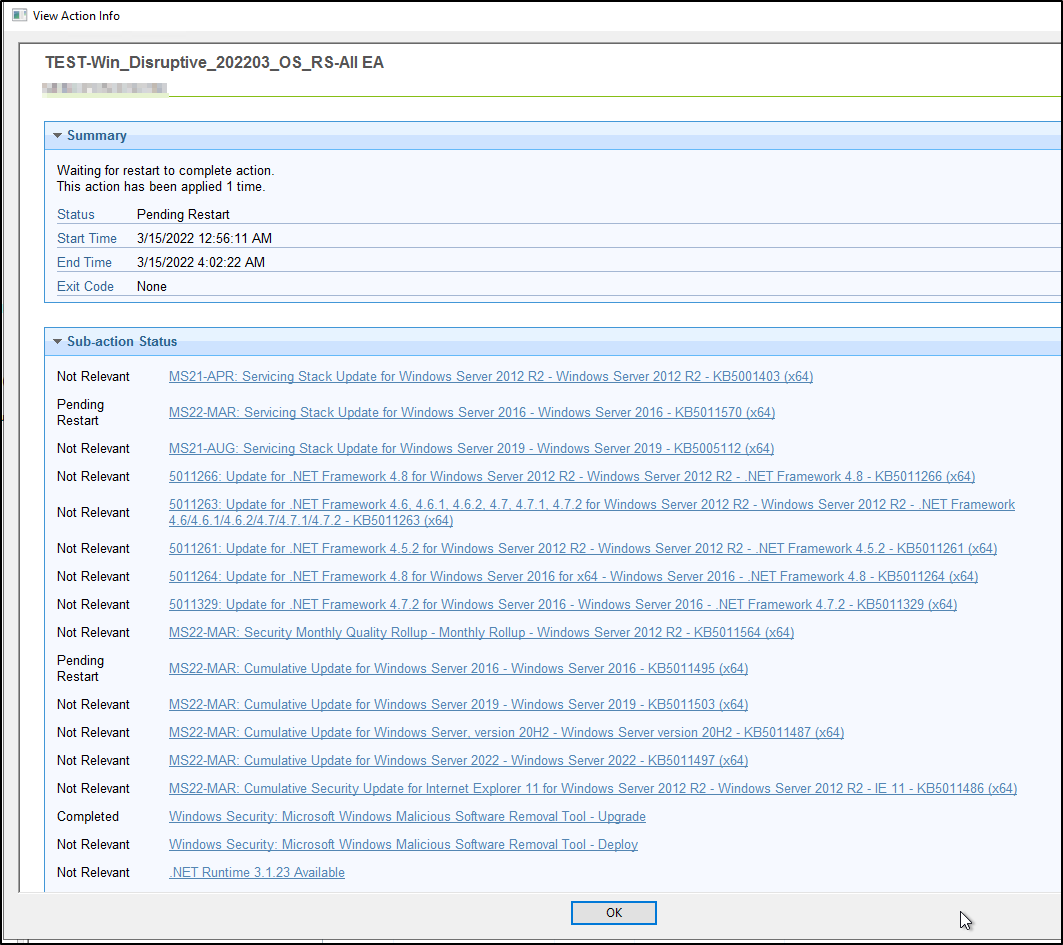
My deployments are only for Windows Servers. I have a baseline, setup as best practice. Latest Stack, then .NET, OS Cumulative, and then apps/features like IE, Edge, .NET Core. We select the option force a restart within 5min in the Post-Action.
We normally have around 1-5% pending restart/reboot state. And within those, a large percentage are unrelated to application of the patches (ex: file move, etc)…
This month were seeing as high as 53% in this state, and worse yet is most patches are showing “Pending Restart” in the Action status. It is not restricted to just one operating system version, but we are primarily seeing it on Win2012R2 and Win2016, followed by Win2019.
I haven’t heard other reports on this month in particular, but I don’t think this is a rare case. I find that generally 2-4 times each year MS puts out a patch set that requires more than one restart.
If you perform a second reboot on these machines, is the ‘Pending Restart’ status cleared?
Most of my test servers have been fixed unfortunately (with a reboot), so I don’t have much data to look at right now.
Here is an interesting example. Notice how the action shows a “Pending Restart” on the stack & cumulative, but using the “Pending Restart” C3 analysis, points more towards file moves then actual issue of application.
Be aware that running that many patches is going to complicate the pending operations that patching usually does. Each patch could be touching the same file and thus pending the operation until the next restart and it can only do one at a time so this could cause multiple reboots needed depending on the overlaps of some of these patch pieces
Thanks everyone for the feedback here and our HCL account contacts.
I am in process to implement one and/or two solutions.
Regarding the _BESClient_ActionManager_PendingRestartExclusions=:; property/value.
It appears we have been quite lucky that we have not had more issues in the past. It was also good to get a deeper understanding of this setting. I like how the computer is still relevant for a “Pending Restart” however, it allows an action to move to “Completed”. I also didn’t realize that having pending file operations, causes the patches to show “Pending Restart”… until now, my assumption was they would still complete.
In my case, I applied this property to a couple of test servers where I know the patches are actually complete, and the actions instantly flipped from “Pending Restart” to complete.
Adding Additional restarts
I do not want to add a “Pending Restart” fixlet to my OS monthly baseline, as it would mean that computers become relevant over the coming day(s) post action as a system change prompts for file changes & changing the computer state to relevant for “Pending Restart”. As an example, about 25% of my fleet are in a pending restart state right now and vast majority of those are not from my OS monthly deployments.
My fix was to create a second baseline in addition to our monthly OS baseline. In this bseline, I added a Fixlet with a Relevance of “Pending Restart” and an action script of “restart 10”. Now, uou could also just do a fixlet, but we have RESTAPI automation for patching and this allows the existing automation code base to call multiple baselines.
Please note it is also important here to limit the reapplication to say 2-5 times, so computers do not get in a reboot loop. For us, this existed in our RESTAPI automation already, so we had 0% modification to our existing code to execute this fix. We’ll be trying this in production this weekend.
Just a couple ideas and hopefully others can gain something from this to.