We have a baseline we apply to our workstations, all Windows 10 and 11.
When we apply this baseline to the Windows 11 machines, the status will remain in Pending Download for hours, “Waiting for downloads to be mirrored,” unless I restart the BESClient service and force refresh from the console. Sometimes this works, usually it doesn’t. If I leave it alone, eventually the service stops reporting to the console and the workstations start graying out.
Looking at the action details, I can see the .MSU file is cached on the server. I’m guessing this has something to do with the size of the patch. We updated the PreCacheStageDiskLimit setting to accommodate the patch size, so that shouldn’t still be an issue.
I feel like I’m missing something obvious here, but for the life of me I can’t figure it out. Any help is appreciated.
I am not sure there is necessarily an issue here yet. Waiting for downloads to be mirrored means the Client is waiting for the action download to become available through the Relay-client download chain. Windows CUs can be quite large, so this may take some time depending on your network conditions.
Also, once the download completes, CU installation itself can take considerable time, during which the endpoint may appear stale/offline in the Console even though the installer/action is still working in the background.
Rather than restarting the BESClient service, I would first check the BESClient log on one affected endpoint to see whether it is waiting for the download, downloading, executing the patch.
The client logs showed a download request for the cumulative patch and .NET, and then the external URL’s from which it downloads them. The log didn’t update for quite some time after that, so I hit the panic button and restarted the service.
We patched another group of workstations today and I just left them alone, and after about 90 minutes they went from Pending Download to Running. I just needed to quit messing with them and let them run. When I restarted the service thinking I was helping it along, I was actually making it take longer.
So what I think I need to do is cache that patch at the local site so the endpoints can pull the patch over the LAN instead of the WAN, or just set expectations that Windows 11 patching will take a lot longer than other Windows versions have.
I appreciate your help Vijay, thank you very much.
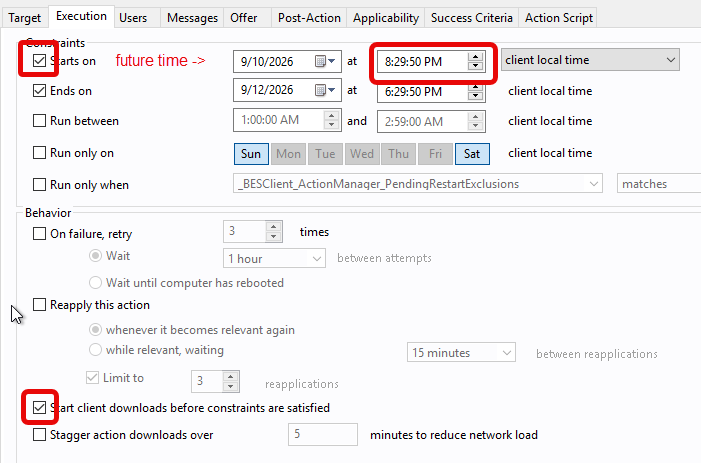
You may also want to consider issuing the patch action several hours beforehand and using the Execution behavior option Start client downloads before constraints are satisfied, while setting the Starts on constraint to match when your patch or change window opens. This will give your endpoints time to download the binaries so they are staged locally on the endpoint before the action actually starts.