Despite having BFI, we are audited from time to time by companies that want to use VBS scripts that they provide, to be run on many endpoints. The VBS scripts often include addition TXT files which are referenced by the script, creating a CSV export file.
Running the script to generate the file is easily enough, but uploading the CSV file is my challenge. I wanted to know if here was a way similar to the process that uploads scan results to the BES server. And if possible, to a single location vs the endpoint ID directory.
An important element, which the documentation covers in their example, is generating a custom meta-attribute file that contains an pertinent data such as computer name, location, subnet, or whatever other criteria you would use to break-out the results once they reach the root server.
I’ve found a helpful cadence is to have policy actions daily for the following tasks:
generate meta-data file on endpoints
archive and upload to root
execute script on the root to sort out and transfer different types of data (based on relevance of the meta-data file contents) into destination shares.
script on root to clear upload manager folder structure in preparation for the following day’s data
Using this methodology, I’ve successfully uploaded GB of several disparate data types per night and automatically sorted them into shares and even ftped some data off to vendors.
Maybe this isn’t going to work with what I’m trying to do. I’m looking to deploy a VBS that may be different depending on the audit vendor. The commonality is that I want the CSV file that is generated to be copied up to the BES server; in a single directory if possible. Currently, the files are left in \BigFix Enterprise\BES Client__BESData\opsite10__Download, which I suspect clears itself out after a reboot. I rather have the file upload itself to the BES for manual collection.
This can work with a bit of careful planning. I’ve done it before. I suggest creating a data collection set per vendor. When you execute the VBS they provide, add your own metadata text file with any applicable info. For example: Computername, location, role, app name, Vendor name, audit info, etc.
Net result on client side:
DataSetA
VendorA.csv
VendorAmetadata.txt
Execute the Archive function on the client to initiate upload to the root server. There you will wind update with a compilation of results in a hash-based folder structure. This is a bit difficult to deal with honestly. That is where you run a script on the root (step 3 above) to dynamically build a script using relevance substitution to parse out the data that you want into the destination you desire. For example, build a batch script substituting in files to copy based on something in the VendorXmetadata.txt file that you uploaded along with the data. Your destination can be a share or folder such that all the resulting csv files for VendorA end up in a VendorA folder or VendorA share.
That all sounds very complex for what I was hoping to do. I was really looking to simply move the files somewhere where they get picked up by the Archive Manager and it uploads them. For example, the code below was taken from the BES Client Diag fixlet.
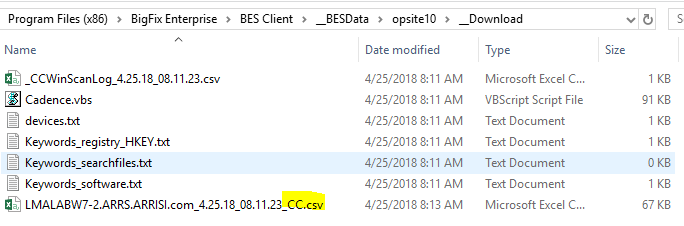
The file I am interested is the one highlighted below; the other files are just part of the script.
The name will be different all the time but will always end in *CC.csv.
Should I move the file before trying to archive it?
This code seems to upload files located in __BESData\actionsite__Download and not my (or whoever runs it) ops site. So I think I need to move the file somewhere first?
setting "_BESClient_ArchiveManager_OperatingMode"="2" on "{parameter "action issue date" of action}" for client
setting "_BESClient_ArchiveManager_FileSet-client"="{pathname of client folder of current site & "\__Download\*CC.csv"}" on "{parameter "action issue date" of action}" for client

// send results
archive now
Hi, have you managed to get this to work? We tried to retrieve files from a client script using the upload/archive manager and there was sociability issues with the standard retrievals. Perhaps this is an alternative method.
I never got it to work and gave up on it. The whole process should be easier considering its a native and frequently used process in the infrastructure.
The process is more cumbersome than it should be, I agree. However it does work when following the steps I outlined.
In particular, the transformation from hash-based folder structure into something usable is challenging. This would make an excellent enhancement request.
Scheduled grooming of the Upload Manager repository would be another great RFE. Today it requires custom scripts to maintain it.