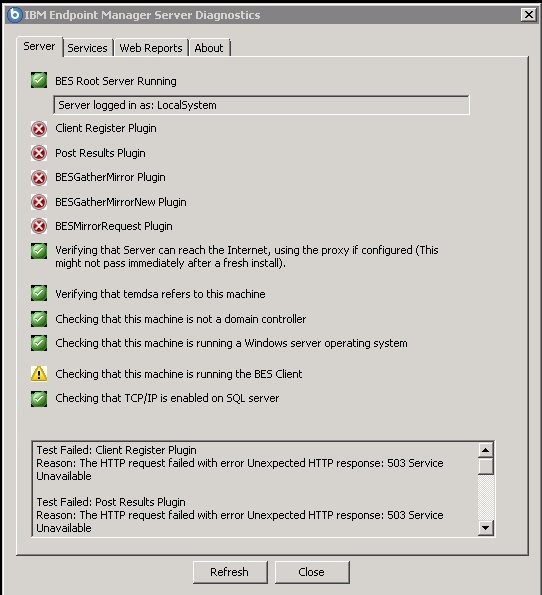
It looks like this might be due to incorrect replication settings.
It looks like this error occurs when the BigFix Primary server tries to pull from a replica server that hasn’t replicated yet. The Replica gets to the first step, finds out one of the tables that it is expecting data in is empty and just disconnects. It then seems to report to the primary the error, “The action site has not been created”. Maybe it is expecting row 0 of LOCAL_OBJECT_DEFS to be the creation of the action site?
Here is the error on the primary:
Thu, 10 Sep 2015 21:02:03 -0700 – 8660 – Replicating from BigFixReplica using sqlreplicationuser to log on BFEnterprise
Thu, 10 Sep 2015 21:02:03 -0700 – 8660 – select Version from DBINFO
Thu, 10 Sep 2015 21:02:03 -0700 – 8660 – select CreationTime from LOCAL_OBJECT_DEFS where ID = 0
Thu, 10 Sep 2015 21:02:03 -0700 – 8660 – Replication failed for server ‘BigFixReplica’: Database Error: The action site has not been created.
Here is the error on the replica:
Thu, 10 Sep 2015 21:02:06 -0700 – 4884 – FillDB version 9.2.5.130 starting…
Thu, 10 Sep 2015 21:02:06 -0700 – 4884 – Connecting to local database with DSN:BES_bfenterprise Username:
Thu, 10 Sep 2015 21:02:06 -0700 – 4884 – Successful ODBC call returned:
[Microsoft][SQL Server Native Client 11.0][SQL Server]Changed database context to ‘BFEnterprise’. (01000:5701)
[Microsoft][SQL Server Native Client 11.0][SQL Server]Changed language setting to us_english. (01000:5703)
Thu, 10 Sep 2015 21:02:06 -0700 – 4884 – Successful ODBC call returned:
[Microsoft][SQL Server Native Client 11.0][SQL Server]Changed database context to ‘BFEnterprise’. (01000:5701)
[Microsoft][SQL Server Native Client 11.0][SQL Server]Changed language setting to us_english. (01000:5703)
Thu, 10 Sep 2015 21:02:06 -0700 – 4884 – select DatabasePropertyEx( db_name(), ‘collation’ )
Thu, 10 Sep 2015 21:02:06 -0700 – 4884 – select Version from DBINFO
Thu, 10 Sep 2015 21:02:06 -0700 – 4884 – Connected to local database.
Thu, 10 Sep 2015 21:02:06 -0700 – 4884 – select FieldContents from ADMINFIELDS where FieldName = ? and IsDeleted = 0
Thu, 10 Sep 2015 21:02:07 -0700 – 4884 – OpenSSL Initialized (Non-FIPS Mode)
Thu, 10 Sep 2015 21:02:07 -0700 – 4884 – Using OpenSSL crypto library libBEScrypto64 - OpenSSL 1.0.1m-fips 19 Mar 2015
Thu, 10 Sep 2015 21:02:07 -0700 – 4884 – select FieldContents from ADMINFIELDS where FieldName = ? and IsDeleted = 0
Thu, 10 Sep 2015 21:02:07 -0700 – 4884 – Signature Algorithms: sha256, sha1
Thu, 10 Sep 2015 21:02:07 -0700 – 4884 – Download Algorithms: sha256, sha1
Thu, 10 Sep 2015 21:02:07 -0700 – 4884 – select ServerID from DBINFO
Thu, 10 Sep 2015 21:02:07 -0700 – 4884 – select FieldContents from ADMINFIELDS where FieldName = ? and IsDeleted = 0
Thu, 10 Sep 2015 21:02:07 -0700 – 4884 – select Certificate
from CERTIFICATES
where Subject = ?
Thu, 10 Sep 2015 21:02:07 -0700 – 4884 – select FieldContents from ADMINFIELDS where FieldName = ? and IsDeleted = 0
Thu, 10 Sep 2015 21:02:07 -0700 – 4884 – select ServerID from DBINFO
Thu, 10 Sep 2015 21:02:07 -0700 – 4884 – select Weights.SrcServerID,
Weights.DstServerID,
Weights.EdgeWeight,
Connectivity.IsConnected,
Connectivity.LastReplicationTime,
Connectivity.LastError
from REPLICATION_EDGE_WEIGHTS Weights LEFT OUTER JOIN
REPLICATION_EDGE_CONNECTIVITY Connectivity
on ( Weights.SrcServerID = Connectivity.SrcServerID
and Weights.DstServerID = Connectivity.DstServerID )
where Weights.EdgeWeight != 0
and Weights.DstServerID in ( select ServerID from REPLICATION_SERVERS where IsDeleted = 0 )
and Weights.SrcServerID in ( select ServerID from REPLICATION_SERVERS where IsDeleted = 0 )
Thu, 10 Sep 2015 21:02:07 -0700 – 4884 – select ServerID, DNS, URL, IntervalSeconds from REPLICATION_SERVERS where IsDeleted = 0
Thu, 10 Sep 2015 21:02:07 -0700 – 4884 – {call get_LastUsedSequence( ? )}
Thu, 10 Sep 2015 21:02:07 -0700 – 4884 – {call getComputerSequences( ?, ? )}
Thu, 10 Sep 2015 21:02:07 -0700 – 4884 – select top 0 * from EXTERNAL_OBJECT_DEFS
Thu, 10 Sep 2015 21:02:07 -0700 – 4884 – {? = CALL sp_getapplock( ?, ? )}
Thu, 10 Sep 2015 21:02:07 -0700 – 4884 – select P.Name, S.SiteID, P.ID, P.Fields from LOCAL_OBJECT_DEFS P, VERSIONS V, SITENAMEMAP S where P.ID = V.ID and S.Sitename = V.Sitename and P.Version = V.LatestVersion and P.ContentType = 5 and S.Sitename = ‘ActionSite’ and P.ParentID = 0 and dbo.fn_ExtractField( ‘IsReserved’, 0, P.Fields ) = ‘Yes’
Thu, 10 Sep 2015 21:02:07 -0700 – 4884 – select CreationTime from LOCAL_OBJECT_DEFS where ID = 0
Thu, 10 Sep 2015 21:02:07 -0700 – 4884 – Unable to connect to database: Database Error: The action site has not been created.
It looks like it’s trying to search inside of LOCAL_OBJECT_DEFS but because this is a new DSA and replication hasn’t occurred yet, the LOCAL_OBJECT_DEFS table is empty and this part of it fails.
In my lab environment this error goes away if I go through and double check all the replication registry keys are correctly set (for SQL authentication). Hopefully that will work in production!
More to come…