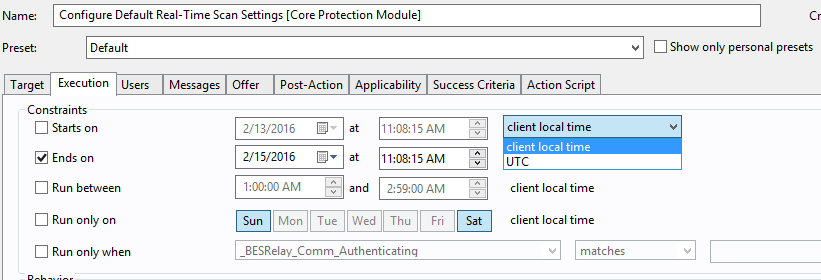
I had a request from a team to patch using absolute time and not client time. the options are for the constraints are client time or UTC time. Has anyone used some other method for creating absolute time without using UTC? Using UTC option , what time zone is that using as the source , the BigFix Server?
Use Case
So there is a case we have a set of servers have a same patching windows but some machines
in this group are in PST , some are in CST, We would like to set the time to have them all start at the same time regardless to their local times……, in the instruction below, it only gives us 2 option as you
mentioned, Client local time and UTC….(We don’t want to use UTC for our servers
in any case at least at this point….)
Do want to use some other kind of fixed time ? Most other time zones vary but UTC is fixed. If you want something that is also fixed then it will have a defined offset from UTC in any case.
If you want a specific time then you could take UTC and add whatever off set you need ?
What the customer wants to happen is endpoints in PST and
CST take action at the same time regardless what time zone the endpoint is in. How would you approach that
All computers keep time relative to UTC, but display it differently based upon a time zone offset. The display of the time is just for the user’s presentation and ease.
If you want something to happen all at the same time, then you need to determine what that time is relative to UTC, and then set that as the start time.
I have endpoints in PST, CST, and MT. I would like to schedule one action that runs at the same exact time for all endpoints as if I used take action now. I cannot figure out away to use scheduling in the execution tab to do this. Has anyone tried this as this is being compared to VMWare CM which provides this feature.
UTC depends on clients having the correct time zone configured. Usually not an issue, but we’ve seen cases where it’s configured incorrectly.
It would be nice to have an option to start an action based on the server time so all clients get the action at the same actual time regardless of what time the client believes it is. I believe the only way to really do this is to postpone taking the action until you want it deployed.
You could initiate the action with an api and have a script set to kick it off at a certain time.
UTC is time without a timezone (or a timezone of -0:00) – the UTC should be identical across every single computer in your organization regardless of what timezone they are in and the user-visible time is just UTC±TimeZone.
That makes sense. I thought I remembered having issues with it before, but maybe I was thinking of problems using local time and assuming all clients at the same location were on the same time zone.
It looks like there is relevance to get the server’s time:
now of registration server
Shorthand for ‘now of registration server’. When the client registers with the server, the server passes its current time back to the client. The client starts a stop watch at that time. The apparent registration server time is the time the server passed back to the client, plus the elapsed time on the stop watch.
This could be used in a relevance statement as part of the action to control the exact start time of the action and utilize specifically server time instead of relying on the client to know what time it is on the server.
Don’t know what drawbacks there are to this but thought it might be useful!