Session Relevance return DNS Name only returns blank

I’ve got session relevance to retrieve device data from our environment and all is working, but only property that does not return anything is “DNS Name”. When I check webreports field is correctly populated. Checking the console this is global property same as ID, RAM, etc.
Session Relevance statement

(id of it as string | “not found”, names of it as string,
value of results from (BES Property “RAM”) of it | “not found”,
value of results from (BES Property “Device Type”) of it | “not found”,
value of results from (BES Property “dns name”) of it | “not found”
) of bes computers whose (last report time of it > now - 1 * hour)
it will return “not found” for every entry.

Output from session relevance
image
Item highlighted in yellow should be the DNS name

Output webreports

Any ideas/suggestions to resolve this? THx!

If you happen to have more than one property named ‘DNS Name’, you’ll have to be more specific in your session relevance query (for instance, by ID, or specifying the reserved property).

Also, if you’re extracting multiple properties for computers, consider leveraging the following format/structure: Efficient Session Relevance Query for Computer Properties

1 Like

Another thing that it may also cause this is MultiCloud - it seems based on the name that this machine is Azure, is that right? If so, do you have MultiCloud feature enabled and proxy records?

If the answers to those questions are all “Yes”, what you have to memorize is that with the same exact name there will be a “Native” & “Proxy” record and some of the fields will exist on one but not on another, so you would need to filter out whatever you don’t need… For example, in this case you may need - try something like:

(id of it as string | “not found”, names of it as string,
value of results from (BES Property “RAM”) of it | “not found”,
value of results from (BES Property “Device Type”) of it | “not found”,
value of results from (BES Property “dns name”) of it | “not found”
) of bes computers whose (agent type of it = "Native" and last report time of it > now - 1 * hour)
it will return “not found” for every entry.
2 Likes

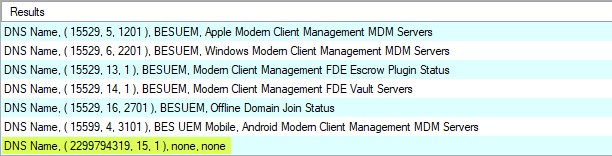
If this is due to the scenario @Aram describes, you can find out the property id by using this expression

(name of it, id of it, name of site of source analysis of it | "none", name of source analysis of it | "none") of bes properties whose (name of it = "DNS Name")

As DNS Name is a built in global property, its id should start with a long number which is the database id for your deployment, in my case thats 2299794319, and it will not have an analysis or site name.
image

Then, using this expression of the type mentioned by @Aram , you can call the exact property id which should prevent the empty data…unless the scenario @ageorgiev refers to is your root cause. Aside from a few minor edits, I used the Excel Connector to create this relevance.

(	item 0 of it as string  & "," & 
	item 1 of it as string  & "," & 
	item 2 of it as string  & "," & 
	item 3 of it as string ) 
of (
	(if (exists result (item 0 of it, item 1 of it) and 
		 exists values of result (item 0 of it, item 1 of it) ) 
		then (concatenation "%0A" of values of result (item 0 of it, item 1 of it)) 
		else ("<none>")), 
	(if (exists result (item 0 of it, item 2 of it) and 
		 exists values of result (item 0 of it, item 2 of it) ) 
		then (concatenation "%0A" of values of result (item 0 of it, item 2 of it)) 
		else ("<none>")), 
	(if (exists result (item 0 of it, item 3 of it) and 
		 exists values of result (item 0 of it, item 3 of it) ) 
		then (concatenation "%0A" of values of result (item 0 of it, item 3 of it)) 
		else ("<none>")), 
	(if (exists result (item 0 of it, item 4 of it) and 
		 exists values of result (item 0 of it, item 4 of it) ) 
		then (concatenation "%0A" of values of result (item 0 of it, item 4 of it)) 
		else ("<none>")))  
of (
	elements of intersection of (
		(sets of items 0 
			of (computers of it, values whose (it as time > (now - 1 * hour)) of it) 
				of results of bes property "Last Report Time")),
	bes property whose (name of it = "Computer Name" and 
		(item 0 of it = 2299794319 and item 1 of it = 4 and item 2 of it = 1) of id of it),
	bes property whose (name of it = "RAM" and 
		(item 0 of it = 2299794319 and item 1 of it = 34 and item 2 of it = 1) of id of it),
	bes property "Device Type",
	bes property whose (name of it = "DNS Name" and 
		(item 0 of it = 2299794319 and item 1 of it = 15 and item 2 of it = 1) of id of it))

3 Likes

This looks good, now I do have question my session relevance looks something like the below

(id of it as string | “not found”, names of it as string,
value of results from (BES Property “RAM”) of it | “not found”,
value of results from (BES Property “Device Type”) of it | “not found”,
value of results from (BES Property “dns name”) of it | “not found”
) of bes computers whose (last report time of it > now - 1 * hour)
it will return “not found” for every entry.

how could I rewrite this so it would use the ID
bes property whose (name of it = “DNS Name” and
(item 0 of it = 2299794319 and item 1 of it = 15 and item 2 of it = 1) of id of it)

I’ve got some experience with session relevance but this a bit over my head to be honest. I’m only interested in the property “DNS Name”. As Aram mentioned before I do have multiple properties called DNS Name so that explain why it would not return any data.

Any help would be appreciated

Below are a 2 potential examples…either of them should hopefully work (let us know!). The first directly answers your question, but the subsequent one takes a different approach for this special case :slight_smile:

To add a filter for the property ID for your original session relevance:

(id of it as string | "not found", names of it as string,
value of results from (BES Property "RAM") of it | "not found",
value of results from (BES Property "Device Type") of it | "not found",
value of results from (BES Property whose (name of it as lowercase = "dns name" AND id of it = (2299794319, 15, 1))) of it | "not found"
) of bes computers whose (last report time of it > now - 1 * hour)

Another approach in this particular case to referencing the Property’s ID (in order to uniquely specify the property data you want to return), is to specify that you want the data from the ‘reserved’ property (vs. say a property with the same name from an analysis):

(id of it as string | "not found", names of it as string,
value of results from (BES Property "RAM") of it | "not found",
value of results from (BES Property "Device Type") of it | "not found",
value of results from (BES Property whose (name of it as lowercase = "dns name" AND reserved flag of it)) of it | "not found"
) of bes computers whose (last report time of it > now - 1 * hour)
1 Like

Thx for this, exactly what I was looking for and it’s working fine. Appreciate all the help.
