Hi,
Server_audit logs size is more than 3GB, I want to check something in this log file but due to too big in size unable to open it with notepad, notepad++ & wordpad, Is there any option -
- to read it.
- split it into multiple size to read in that way.
- how to decrease the size of it.
- where to check default settings either on console or server, as I have read it should be by default 100MB.
OK got baretail for it, its able to show all logs with no problem.
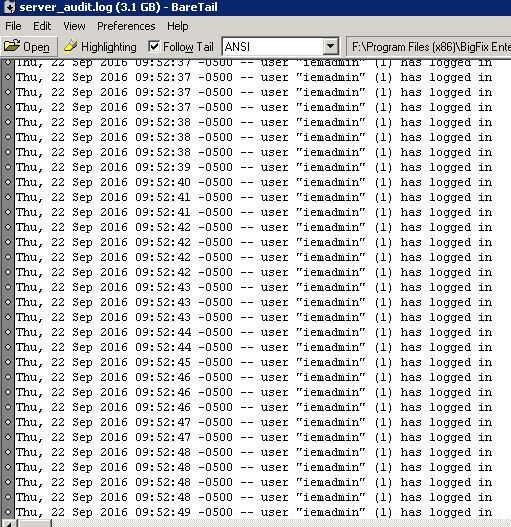
While reading server_audit logs file there are thousands(almost per second) of entry related to bigfix main admin user logged in & continuing, why is it so?
I have checked the same thing in another root server & file size of server_audit is just 100KB where bigfix main admin user ID logged in a day & logged out after many days but no repeated entries like earlier having for each & every seconds.
That could be the reason of that much of size. please needed expert suggestion.
1 Like
Starting from 9.2 patch 7 and in 9.5 can use the _Audit_Logging_LogMaxSize client settings works as described at this link ->
https://www.ibm.com/developerworks/community/wikis/home?lang=en#!/wiki/Tivoli%20Endpoint%20Manager/page/BigFix%20Logging%20Guide
such as: “[…] the maximum size can be set with option “_Audit_Logging_LogMaxSize” expressed in bytes. The default value is 100MB. When the size limit is reached, the file is renamed with the format ‘server_audit.YYYYMMDDHHMM.log’. To enable the new setting, the user must restart the server. Important: The renamed log files are never deleted; to free space, the user must delete manually the unnecessary files.”
2 Likes
we having 9.1 so will these changes or settings work here ?
Yes @vk.khurava
Setting should works well into earlier version as well. 
1 Like
The log rotation I mention is available starting from the last patches of 9.2
Is there any option we can implement these changes without a Server Restart ? And has anyone have any clue what is this -
For this issue, it appears something fixed on 9.2.5, but not sure …
I tried this setting by implementing on my root server & have also rebooted it but no luck, still serve_audit log increasing.
@prabhu490730 Please note it will not work on v9.1, I have tested it out & have also received confirmation from IBM support Team, only solution is to upgrade the version from 9.1 to 9.2 bcoz it has been identified & solved in v9.2.