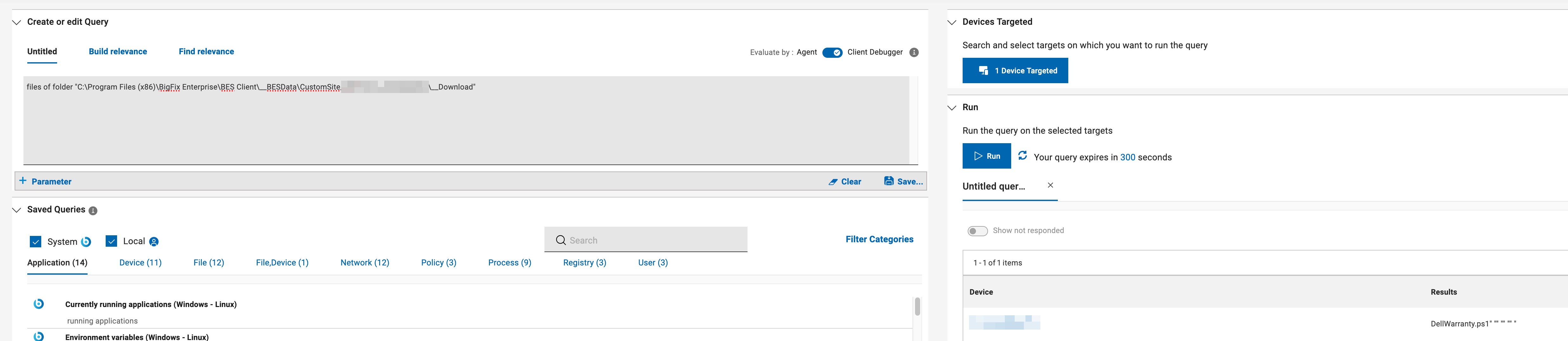
I'll follow up with the onsite technician to try running a command manually.
Running a custom action with a simple powershell command does succeed:
 Relevant - Custom Action (fixlet:148753)
 At 18:13:56 -0500 -
 The CPU usage will be increased because _BESClient_Download_FastHashVerify is enabled
 ActionLogMessage: (action:148753) Action signature verified for Execution
 ActionLogMessage: (action:148753) starting action
 At 18:14:11 -0500 -
 Report posted successfully
 At 18:14:11 -0500 - actionsite (http://rootserver.company.com:52311/cgi-bin/bfgather.exe/actionsite)
 C:\Windows\Sysnative\WindowsPowerShell\v1.0\powershell.exe -WindowStyle Hidden -ExecutionPolicy Bypass -File "C:\Program Files (x86)\BigFix Enterprise\BES Client\__BESData\__bes4.ps1"
 Script ended (exit code = 0) (fixlet 148753)
 At 18:14:11 -0500 -
 ActionLogMessage: (action:148753) ending action
 At 18:14:11 -0500 - mailboxsite (http://rootserver.company.com:52311/cgi-bin/bfgather.exe/mailboxsite1075563994)
 Not Relevant - Custom Action (fixlet:148753)
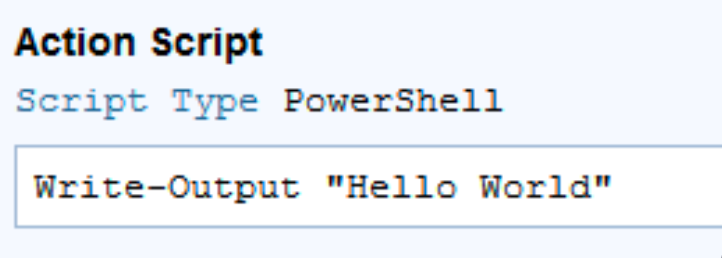
However, running the same command through Action Script failed:
Relevant - Custom Action (fixlet:148767)
 At 18:21:34 -0500 -
 The CPU usage will be increased because _BESClient_Download_FastHashVerify is enabled
 ActionLogMessage: (action:148767) Action signature verified for Execution
 ActionLogMessage: (action:148767) starting action
 At 18:21:35 -0500 - actionsite (http://rootserver.company.com:52311/cgi-bin/bfgather.exe/actionsite)
 Command started - waithidden powershell.exe -executionpolicy bypass -command "Write-Output 'Hello World'" (action:148767)
 At 18:21:54 -0500 -
 Report posted successfully
 At 18:21:54 -0500 - actionsite (http://rootserver.company.com:52311/cgi-bin/bfgather.exe/actionsite)
 Command failed (Thread execution failed (2)) waithidden powershell.exe -executionpolicy bypass -command "Write-Output 'Hello World'" (action:148767)
 At 18:21:54 -0500 -
 ActionLogMessage: (action:148767) ending action
 At 18:21:54 -0500 - mailboxsite (http://rootserver.company.com:52311/cgi-bin/bfgather.exe/mailboxsite1075563994)
 Not Relevant - Custom Action (fixlet:148767)
It looks like, though, if I use the full path, it succeeds:
 Relevant - Custom Action (fixlet:148771)
 At 18:26:06 -0500 -
 The CPU usage will be increased because _BESClient_Download_FastHashVerify is enabled
 ActionLogMessage: (action:148771) Action signature verified for Execution
 ActionLogMessage: (action:148771) starting action
 At 18:26:06 -0500 - actionsite (http://rootserver.company.com:52311/cgi-bin/bfgather.exe/actionsite)
 Command started - waithidden C:\Windows\Sysnative\WindowsPowerShell\v1.0\powershell.exe -executionpolicy bypass -command "Write-Output 'Hello World'" (action:148771)
 At 18:26:08 -0500 - actionsite (http://rootserver.company.com:52311/cgi-bin/bfgather.exe/actionsite)
 Command succeeded (Exit Code=0) waithidden C:\Windows\Sysnative\WindowsPowerShell\v1.0\powershell.exe -executionpolicy bypass -command "Write-Output 'Hello World'" (action:148771)
 At 18:26:08 -0500 -
 ActionLogMessage: (action:148771) ending action
 At 18:26:08 -0500 - mailboxsite (http://rootserver.company.com:52311/cgi-bin/bfgather.exe/mailboxsite1075563994)
 Not Relevant - Custom Action (fixlet:148771)
I thought the PATH variable for PowerShell on this machine would be malformed somehow, but it seems to be correct:
Q: (names of it, it) of values whose (name of it is "Path") of keys "HKEY_LOCAL_MACHINE\SYSTEM\CurrentControlSet\Control\Session Manager\Environment" of native registry as string
A: Path, %SystemRoot%\system32;%SystemRoot%;%SystemRoot%\System32\Wbem;%SYSTEMROOT%\System32\WindowsPowerShell\v1.0\;%SYSTEMROOT%\System32\OpenSSH\;C:\Program Files\dotnet\;C:\Program Files\Leica Microsystems CMS GmbH\LAS X\SHARED\Hardware Model\Bin\RapID_LIBS;C:\Program Files\Leica Microsystems CMS GmbH\LAS X\SHARED\Hardware Model\Bin64\RapID_LIBS
I suppose unless %SystemRoot% isn't resolving correctly, but I imagine there'd be a lot more issues if that was the case.
For fun I tried including action uses wow64 redirection true, but that ended up with the same issue.
Relevant - Custom Action (fixlet:148777)
 At 18:45:17 -0500 -
 The CPU usage will be increased because _BESClient_Download_FastHashVerify is enabled
 ActionLogMessage: (action:148777) Action signature verified for Execution
 ActionLogMessage: (action:148777) starting action
 At 18:45:17 -0500 - actionsite (http://rootserver.company.com:52311/cgi-bin/bfgather.exe/actionsite)
 Wow64 redirection enabled. action uses wow64 redirection true (action:148777)
 Command started - waithidden powershell.exe -executionpolicy bypass -command "Write-Output 'Hello World'" (action:148777)
 Command failed (Thread execution failed (2)) waithidden powershell.exe -executionpolicy bypass -command "Write-Output 'Hello World'" (action:148777)
 At 18:45:17 -0500 -
 ActionLogMessage: (action:148777) ending action
 At 18:45:17 -0500 - mailboxsite (http://rootserver.company.com:52311/cgi-bin/bfgather.exe/mailboxsite1075563994)
 Not Relevant - Custom Action (fixlet:148777)