Seeking advice: Optimizing Linux patch times using the Multiple-Package Baseline feature (150 components)

Hi BigFix Community,

I am hoping to get some advice on optimizing our Linux patch deployment times. Currently, our patching baselines for RHEL and Amazon Linux 2023 are taking around 5 to 7 hours to complete. We typically have about 150 components in a single baseline.

Based on our client logs, the delay is caused by BigFix running a separate dnf transaction for every single patch sequentially (taking about 10 minutes per fixlet).

To reduce this time, we are planning to use the native Multiple-Package Baseline Installation "bookend" method to consolidate everything into a single transaction.

Could the experts here kindly review my proposed plan below and let me know if this configuration is correct?

Step 1: Add the Enable Task (Top) I will add the "Enable the Multiple-Package Baseline Installation feature" task as the very first component in the baseline.

  • Setting: Uncheck "Baseline will be relevant on applicable computers where this component is relevant".

Step 2: Add the Patches (Middle) I will add our ~150 native Linux patch fixlets directly after the Enable task.

  • Setting: Leave their component relevance boxes checked.

Step 3: Add the Execution Task (Bottom) I will add the "Multiple-Package Baseline Installation - Execution" task as the very last component.

  • Setting: Uncheck "Baseline will be relevant on applicable computers where this component is relevant".

Step 4: Action Execution Settings When taking action on the baseline, I will apply these two specific settings in the Execution tab:

  • Disable pre-caching: Uncheck "Start client downloads before constraints are satisfied".

  • Force continuation: Check "Run all member actions of action group regardless of errors".

My questions for the community:

  1. Are the 4 steps and settings above mapped out correctly?

  2. Can this Multiple-Package method successfully handle a large baseline with up to 150 components?

  3. Will this effectively bypass the sequential execution bottleneck and reduce our 7-hour deployment time?

Thank you so much in advance for your time and guidance!
Yes the steps are mapped out correctly.
You should not need to uncheck 'Baseline will be relevant on applicable computers' for the Mult-Package items though; as they are Tasks instead of Fixlets, that selection should already be unchecked by default.

I don't think we have to 'Disable pre-caching' either, in most cases; because the downloads are generated by a Prefetch Plug-In script, those scripts should be able to download the repo metadata and resolve package dependencies during the prefetch phase, before the action 'executes' and begins installation. That can make a huge difference if you create the actions ahead of time - for instance creating an action now with an action-start-time set to Thursday night, all the dependency resolution and package downloads can happen now, and then execute as one large dnf transaction when the action time arrives.

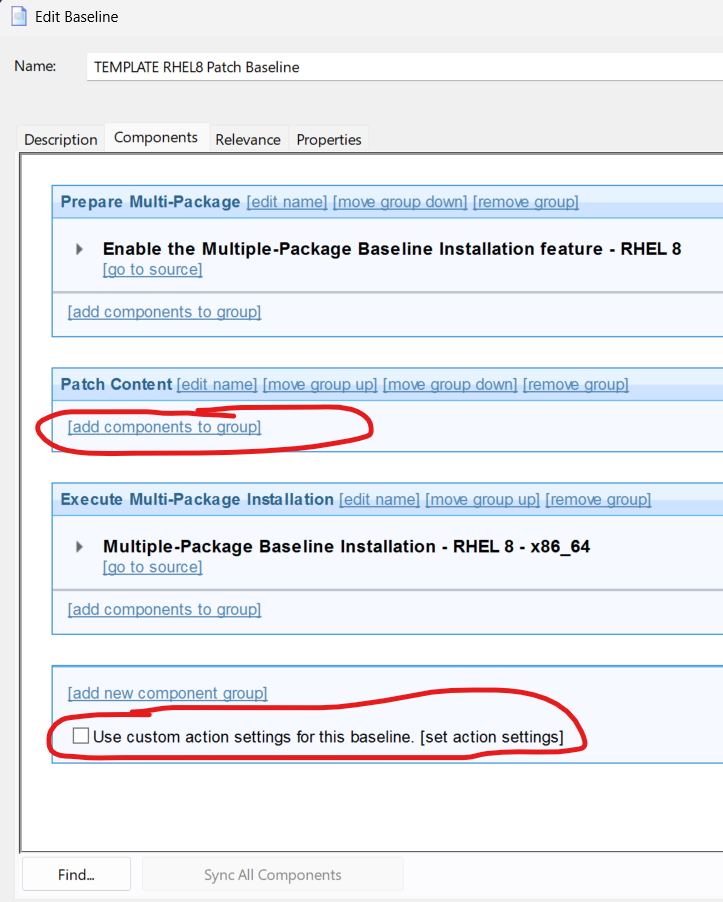
I liked to set up 'template baselines', that I could copy each month. I'd set up a template with three Component Groups, where the first group does the 'prep' task, the middle component group is empty, and the third component group is the 'multi-package install'. That way I copied the baseline template each month, and only replace the second component group that actually has the patches.
(and, when setting up the middle group with 'Add Components to Baseline', we can select other existing baselines, if you have some automation that creates your baselines for you, so it's easy to copy those into the template).
You can also set up custom action presets on the template baseline, for scheduling or post-reboot behavior, because those kind of repetitive clicks are where we're likely to make mistakes.

edit: as an aside, as a customer it made a huge difference for me when multi-package baselines were introduced. I think you're going to like it. The only caveat is that if you're watching closely, all of the component actions will appear to be 'Failed' as it steps through them, until the last Task executes and actually runs the install, then all the component actions should switch to 'Fixed'.