I’m having some difficultly constructing a relevance clause to search for a specific substring that is set in the registry for the windows proxy. The value is REG_BINARY and I need to return anything whose value contains the string “xyz123”
For example I know that the string “myproxyhost” equates to “6d7970726f7879686f7374” as hex, and this will be present as a sub-string some of the servers in the fleet in the REG_BINARY value. Any help is greatly appreciated.
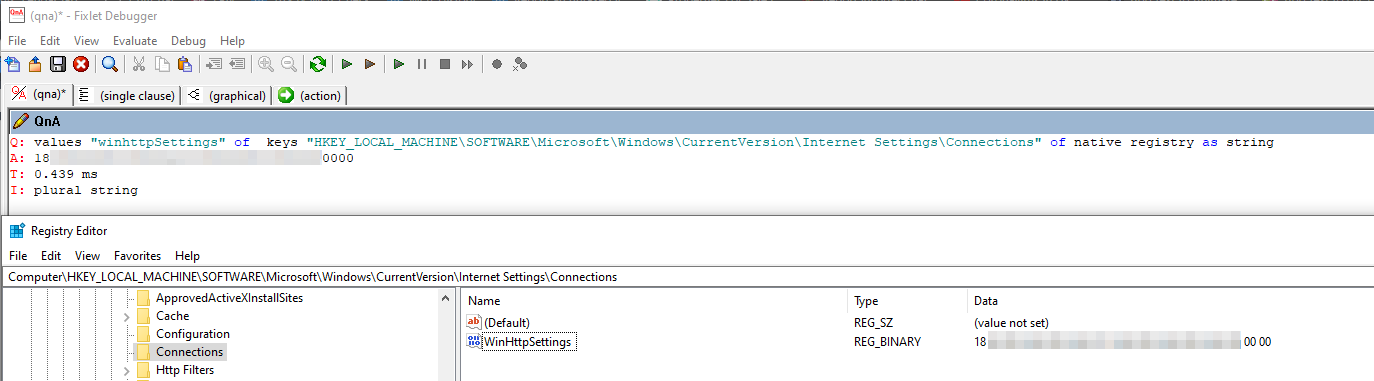
I tried that query in an Analysis and it returned no data. We are actually querying the connection Binary value below - I have blanked out the actual value but it contains “proxy” when converted from hex to text. I’m looking at a relevance that will match machines that have this substring present in the binary value within the registry.
You probablay just need to modify the expressions @brolly33 provided with the correct registry hive for your environment.
values "winhttpSettings" of keys "HKEY_LOCAL_MACHINE\SOFTWARE\Microsoft\Windows\CurrentVersion\Internet Settings\Connections" of native registry as string
So that expression does indeed return a valid value when I add that to my analysis. The issue is finding a valid comparator expression to compare that value with either the full value “1a2f…0000” or a substring “1a2f” etc, that I can put into a relevance clause.
Here are some of the examples, which you can use as per your requirement:
// Retrieve winhttpSettings Value from Registry
Q: values "winhttpSettings" of  keys "HKEY_LOCAL_MACHINE\SOFTWARE\Microsoft\Windows\CurrentVersion\Internet Settings\Connections" of native registry as string
A: 180000000000050000000000000000000000
T: 0.745 ms
// Check if winhttpSettings Contains Specific String
Q: exists values "winhttpSettings" whose (it as string contains "180000000000050000000000000000000000") of  keys "HKEY_LOCAL_MACHINE\SOFTWARE\Microsoft\Windows\CurrentVersion\Internet Settings\Connections" of native registry as string
A: True
T: 0.605 ms
// Check if winhttpSettings Equals Specific String
Q: exists values "winhttpSettings" whose (it as string = "180000000000050000000000000000000000") of  keys "HKEY_LOCAL_MACHINE\SOFTWARE\Microsoft\Windows\CurrentVersion\Internet Settings\Connections" of native registry as string
A: True
T: 0.452 ms
// Check if winhttpSettings Is Not Equal to Specific String
Q: exists values "winhttpSettings" whose (it as string != "180000000000050000000000000000000000") of  keys "HKEY_LOCAL_MACHINE\SOFTWARE\Microsoft\Windows\CurrentVersion\Internet Settings\Connections" of native registry as string
A: False
T: 0.300 ms
// Check if winhttpSettings Does Not Contain Specific String
Q: exists values "winhttpSettings" whose (it as string does not contain "180000000000050000000000000000000000") of  keys "HKEY_LOCAL_MACHINE\SOFTWARE\Microsoft\Windows\CurrentVersion\Internet Settings\Connections" of native registry as string
A: False
T: 0.144 ms
// Check if winhttpSettings Starts with Specific Prefix
Q: exists values "winhttpSettings" whose (it as string starts with "1800") of  keys "HKEY_LOCAL_MACHINE\SOFTWARE\Microsoft\Windows\CurrentVersion\Internet Settings\Connections" of native registry as string
A: True
T: 0.197 ms