There are no enabled repos.
Run "yum repolist all" to see the repos you have.
To enable Red Hat Subscription Management repositories:
subscription-manager repos --enable
To enable custom repositories:
yum-config-manager --enable
32088 : 2026-04-14 11:21:25 : ERROR : yum command not continue, last command exit code is not 0
When check in the bigfix plugin portal configuration: All the certificates are valid.
RHSMPlugin.exe --check-cert-validity
1780 : 2026-04-14 11:37:01 : Level 1911 : RHSM Download Plugin version 1.0.12.0. Gonna get to work now.
1780 : 2026-04-14 11:37:01 : INFO : Using regular HTTP wrapper.
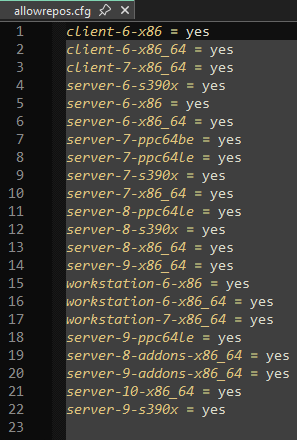
1780 : 2026-04-14 11:37:01 : INFO : Reading allowrepos.cfg.
1780 : 2026-04-14 11:37:01 : INFO : 10 of the certificates in the cert directory are valid.
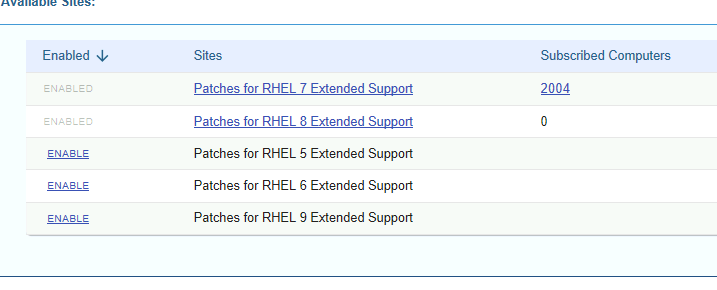
There should be some RHSMPlugin commands to list which repos are accessible by your Red Hat license. RHEL 7 is end-of-life, so I think your entitle would need to cover EUS / ELS entitlements in order to reach RHEL 7 repos, so I'd check for that first.
Then open up an elevated command prompt, in that folder, and use the following command.
.\RHSMPlugin.exe --check-baserepos
You can also do "ALL" repos,
.\RHSMPlugin.exe --check-allrepos
I usually dump this to a log for searching abilities.
.\RHSMPlugin.exe --check-baserepos>>reposlog.log
If you dump to a log, you may have to hit enter when you know for sure it is done, because there is a prompt at the end that asks you if you want to update the repo black list.
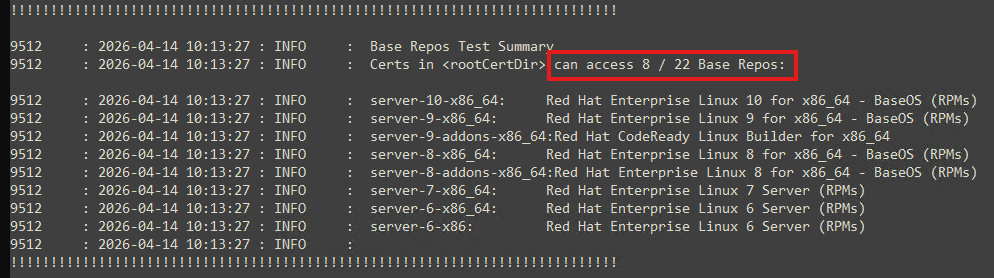
When it finished, the results are listed at the bottom. They look like this...
10452 : 2026-04-14 11:30:54 : INFO : Base Repos Test Summary
10452 : 2026-04-14 11:30:54 : INFO : Certs in can access 15 / 22 Base Repos:
10452 : 2026-04-14 11:30:54 : INFO : server-10-x86_64: Red Hat Enterprise Linux 10 for x86_64 - BaseOS (RPMs)
10452 : 2026-04-14 11:30:54 : INFO : server-9-x86_64: Red Hat Enterprise Linux 9 for x86_64 - BaseOS (RPMs)
10452 : 2026-04-14 11:30:54 : INFO : server-9-addons-x86_64:Red Hat CodeReady Linux Builder for x86_64
10452 : 2026-04-14 11:30:54 : INFO : server-9-ppc64le: Red Hat Enterprise Linux 9 for Power, little endian - BaseOS (RPMs)
10452 : 2026-04-14 11:30:54 : INFO : server-9-s390x: Red Hat Enterprise Linux for IBM z Systems 9 - BaseOS (RPMs)
10452 : 2026-04-14 11:30:54 : INFO : server-8-x86_64: Red Hat Enterprise Linux 8 for x86_64 - BaseOS (RPMs)
10452 : 2026-04-14 11:30:54 : INFO : server-8-addons-x86_64:Red Hat Enterprise Linux 8 for x86_64 - BaseOS (RPMs)
10452 : 2026-04-14 11:30:54 : INFO : server-8-ppc64le: Red Hat Enterprise Linux 8 for Power, little endian - BaseOS (RPMs)
10452 : 2026-04-14 11:30:54 : INFO : server-8-s390x: Red Hat Enterprise Linux for IBM z Systems 8 - BaseOS (RPMs)
10452 : 2026-04-14 11:30:54 : INFO : server-7-ppc64le: Red Hat Enterprise Linux 7 for IBM Power LE (RPMs)
10452 : 2026-04-14 11:30:54 : INFO : server-7-s390x: Red Hat Enterprise Linux 7 for System Z (RPMs)
10452 : 2026-04-14 11:30:54 : INFO : server-7-x86_64: Red Hat Enterprise Linux 7 Server (RPMs)
10452 : 2026-04-14 11:30:54 : INFO : server-6-s390x: Red Hat Enterprise Linux 6 for System Z (RPMs)
10452 : 2026-04-14 11:30:54 : INFO : server-6-x86_64: Red Hat Enterprise Linux 6 Server (RPMs)
10452 : 2026-04-14 11:30:54 : INFO : server-6-x86: Red Hat Enterprise Linux 6 Server (RPMs)
10452 : 2026-04-14 11:30:54 : INFO :
!!!!!!!!!!!!!!!!!!!!!!!!!!!!!!!!!!!!!!!!!!!!!!!!!!!!!!!!!!!!!!!!!!!!!!!!!!!!