Hi Guys, me again.
I’ve created a powershell script that pops up a message. I used the icon from the BigFix client. When I run my script in powershell it works perfectly.
I’ve created following code in the action script:
// Enter your action script here

delete __createfile

delete run_{id of active action}.bat


// Use .bat to set working directory to packages root, for setup command.
createfile until _end_

[void] [System.Reflection.Assembly]::LoadWithPartialName("System.Windows.Forms")
$objNotifyIcon = New-Object System.Windows.Forms.NotifyIcon

$objNotifyIcon.Icon = "C:\Program Files (x86)\BigFix Enterprise\BES Client\__BESData\__UICache\_clientui.ico"
$objNotifyIcon.BalloonTipIcon = "Info"
$objNotifyIcon.BalloonTipText = "x"
$objNotifyIcon.BalloonTipTitle = "x"

$objNotifyIcon.Visible = $True
$objNotifyIcon.ShowBalloonTip(300)


_end_

move __createfile run_{id of active action}.ps1


action uses wow64 redirection {not x64 of operating system}

override wait
hidden=false
completion=job
wait powershell.exe -noprofile -executionpolicy bypass -file run_{id of active action}.ps1
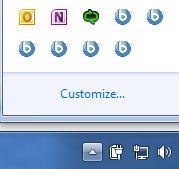
When I run it, i can see an extra icon, but no pop up balloon:
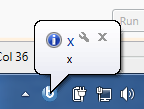
This should be the result (when i run it with powershell):
Does anybody have any idea what i’m doing wrong?
Here is my Log:
At 14:08:24 +0100 - actionsite (http://x:52311/cgi-bin/bfgather.exe/actionsite)
   Command succeeded delete __createfile (action:61106)
   Command succeeded delete No 'C:\Program Files (x86)\BigFix Enterprise\BES Client\__BESData\CustomSite_MOBDEV\run_61106.bat' exists to delete, no failure reported (action:61106)
   Command succeeded createfile until _end_ (action:61106)
   Command succeeded move __createfile run_61106.ps1 (action:61106)
   Wow64 redirection disabled. action uses wow64 redirection {not x64 of operating system} (action:61106)
   Command succeeded override wait (action:61106)
   Command succeeded override hidden=false (action:61106)
   Command succeeded override completion=job (action:61106)
   Command started - wait powershell.exe -noprofile -executionpolicy bypass -file run_61106.ps1 (action:61106)
At 14:09:05 +0100 -
   Report posted successfully
At 14:09:06 +0100 - actionsite (http://x:52311/cgi-bin/bfgather.exe/actionsite)
   Command succeeded (Exit Code=0) wait powershell.exe -noprofile -executionpolicy bypass -file run_61106.ps1 (action:61106)
As always, a great appreciation for all your help!
Greetings