Hello, We are trying to produce PowerBI reports, using the data pulled from BFInsights database.
There are some old computer group memberships and one old computer group that is no more in BFEnterprise database, but still appears in BFInsights database. I have already used BESAdmin tool and executed ETL few times for BFInsights.
The Insights database does maintain historical data, so, depending on your queries, it is certainly possible to see “old data” 
Are you able to share your queries/use cases?
I am using default Power BI to make reports and extracting the data (with some filters from Power BI. I am not modifying the queries developed by BigFix (that come with the files: DeviceInventory.pbix and PatchRemediation.pbix).
I have use BesAdmin Tool to cleanup the old data from BFEnterprise.
Is there a way that during the ETL BFInsights only replicates the current data? - OR - it can delete the data that is removed from BFEnterprise?
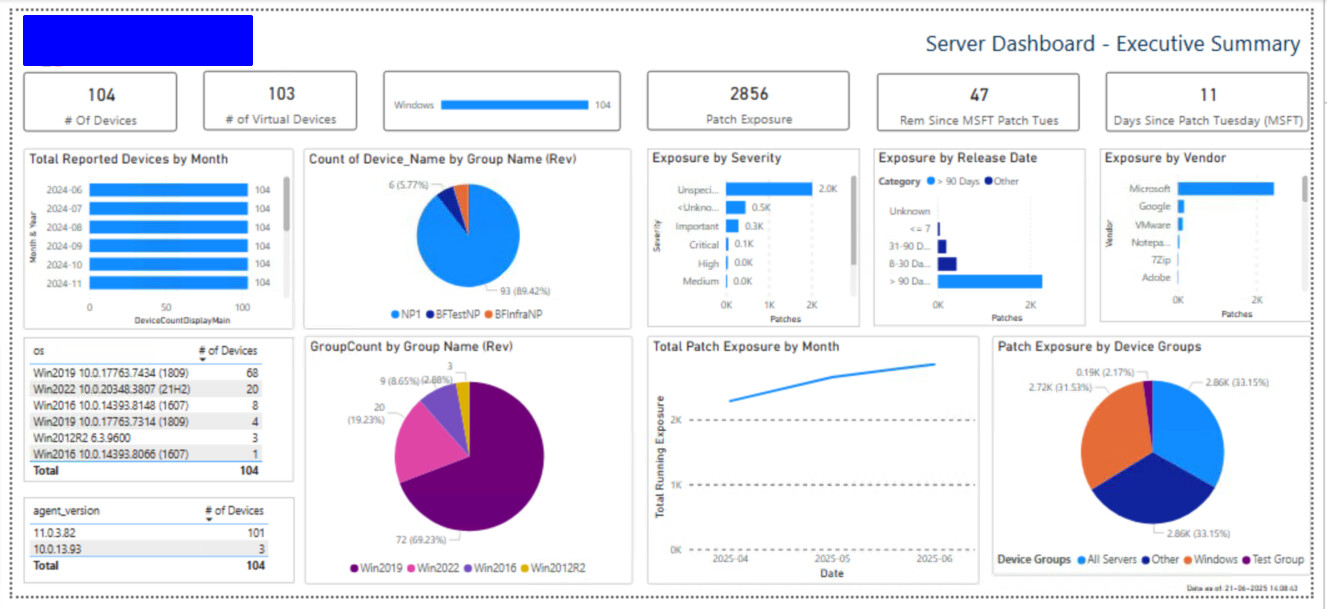
This is the main (executive summary) dashboard, which uses the same queries provided by BigFix in files DeviceInventory.pbix and PatchRemediation.pbix.
Q: can you help with writing a task / fixlet that we can execute as required to cleanup the orphaned data in BFInsights and add it to the Insights External Site or WebUI external site?
@Aram not sure if you were kindly able to see my above response
I’m a bit confused, if we removed all the older data from BFInsights, then it would not be possible to retrieve values for most of that dashboard.
‘Total Reported Devices by Month’ for example relies on having records from prior months.
Can you give an example of one of the queries that is giving you data older than you expect? I think you’ll need to tune your query to filter out any older records you don’t want.
I don’t have much experience with Insights myself, but navigating through the Developer pages at https://developer.bigfix.com/tools/insights_web.html has lead me to the schema for the Datasource_Groups table. I’d check whether this is what you’re using -
https://developer.bigfix.com/insights_schema/#/doc/t6920/insights-ivr-repository---version-10-0-8/tables/dbo-datasource-computer-groups
If so, I’d expect the valid_to field to either be some future date (if the group membership is still valid) or the date of the first ETL in which the computer was removed as a member - so ‘valid_from’ and ‘valid_to’ would list the dates during which the computer was a member of the group.
I don’t know what the actual ‘future date’ value is, but you should be able to read that from your Insights database, and probably filter your query with something like AND valid_to = '9999-12-31' whatever the SQL expression for a date/time comparison would be.