Patch Policy WebUI Behavior for Superseded Fixlets

Hello team,

We noticed this behavior from patch policy wherein patches are not being included in the patch policy action. And when we investigated further, it seems that the patch policy cannot include superseded fixlets in the patch policy actions because no machines are relevant for the fixlet once it is superseded.

In our environment, patch policies for browsers are set to run on non-prod servers first (FEB12-17) while the patch policy for prod servers are only during sunday ( Feb22, Mar01, Mar08). Our patch policies (one for non-prod and one for prod) are set to refresh only once which for this month, Feb11 because we want our non-prod and prod servers to have the same version level.

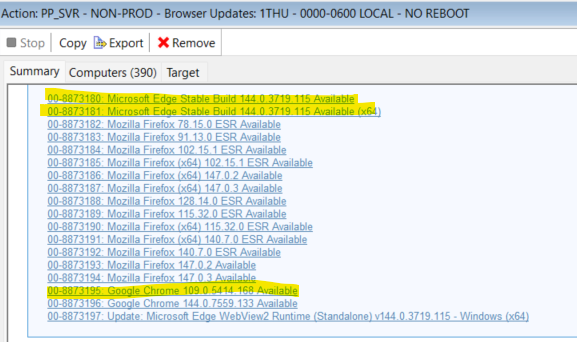
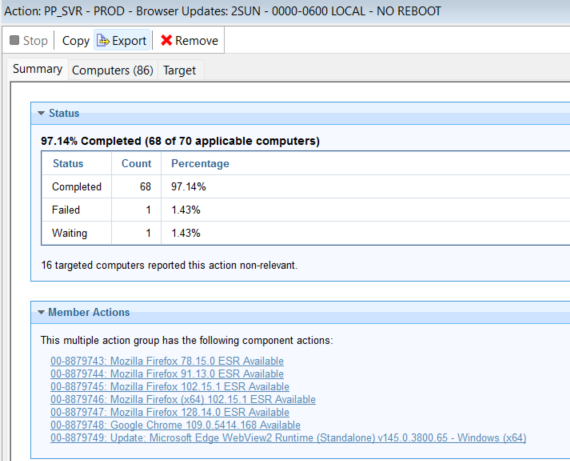
All the patch policy action from FEB12-17 contained the same components from the browser. However, when we were investigating the issue, the first patch policy for prod scheduled last Feb22 did not include the same MS Edge fixlet. We checked the WebUI patch policy external fixlets and the MS edge was there but was not included on the patch policy action. Upon checking, same goes with google chrome latest version.

When we checked the latest release google chrome released a newer version last Feb18 while MS edge released their newer version last Feb17. I was thinking that due to the original filxet being superseded, servers returned as not relevant for the fixlet and since no servers are relevant for it, patch poilicy action did not include it.

Can you confirm if this is the expected behavior for superseded fixlet in the patch policy action? If yes, wouldn’t it make more sense that the fixlet inside the patch policy would still be relevant for the servers because of environments that aim to have their servers be on the same version level? And if this is indeed the expected behavior, I guess the workaround is to have the patch policy schedule create the action WHILE they are still relevant for the fixlet

Thanks for any input.
You can force the evaluation of superseded content, even if it’s not recommended

2 Likes

Agree with DanieleColi.
Note that even if Patch Policy had included the fixlets in the action, once the server is Not Relevant to the fixlet, the server would not run that action anyway. This is why we can do things like one policy including different versions of Windows - each machine only runs the fixlets that are relevant to itself, and ignores everything that is non-relevant.

To run an older fixlet that's no longer relevant, you either need to enable Superseded Evaluation with the client setting, or create custom copies of the Fixlet into a custom site - either before it is superseded, or by removing the supersedence relevance.

I'm not entirely sure whether Patch Policy will include superseded fixlets (even if they are still relevant), so you may need to experiment with that part too.

1 Like

Thank you Daniele and Jason.

Yes, very much familiar with the enabling of relevance to supersede fixlets.

I guess I was just expecting that the patch policy will have a way of keeping the original version of the fixlets (wherein it does not have the supersede setting) so that when it creates the action, the fixlets will still be relevant to the servers.

We have a month long schedule of patching so for applications that releases multiple versions within the patch tuesday releases such as MS edge and Chrome, we wanted the patch policy to deploy the same version of the patch until the next patch tuesday.

Since it seems that the behavior above is the expected behavior, our options for now are:
-create custom copies

-enable the supersedence setting

-schedule the patch policy action to be created at an early time of the month

Do you know if the feature of including baselines in the patch policy has been proposed, or is in the works?

Thanks for your inputs.

Hi @jan.castro,

Setting up a Browser Patch Policy with staggered patching cycles (Phase 1, Phase 2, etc.) is definitely doable, but there is a major caveat you need to keep in mind regarding how Patch Policies handle superseded content.

The Challenge: Out-of-Date Policies

When new patches are released, older ones are modified or replaced, causing your active policy to become "Out of Date."

As noted in the HCL BigFix Documentation, active out-of-date policies continue to run, but they aren't effective. For example, if Chrome gets a new update mid-cycle, your policy falls out of date. It will continue its schedule, but it will do nothing because patches that have been superseded by new content will no longer be deployed until you refresh the policy.

So, how do we successfully deploy a specific Google Chrome version across all your patch cycles without it getting superseded halfway through? Here are two ways to handle it:


Option 1: The Maintenance Window Approach

This method relies on endpoint configurations rather than multiple policy schedules. You aim to deploy the patch before it gets marked as superseded.

  • Refresh the Content: Ensure your policy has the latest patches.
  • Create a Single, Long Schedule: Set the policy to run for a long duration (e.g., 30 days) so it spans across all your phases.
  • Enforce Maintenance Windows: Check the option to ensure the policy only runs during a Maintenance Window.
  • Stagger the Endpoints: Configure the local Maintenance Windows on your target machines based on your preferred patching cycles (Phase 1 gets an earlier window, Phase 2 gets a later one, etc.).

Option 2: The Custom Site Approach (Recommended)

This method "version locks" the content so it is completely immune to external site updates.

  • Create a Custom Site: Dedicate a custom site specifically for the browser versions you want to deploy.
  • Manage the Content: Manually (or via the REST API) delete the previous browser version from this site, and copy the newly desired content from the External Site into it.
  • Target the Custom Site: Create your Patch Policy to look only at this Custom Site rather than the External Site.
  • Create Your Schedules: Set up all the individual schedules for your Patch Cycles directly within the policy.

Why Option 2 is better: I highly prefer Option 2. Because you copied the content into your own custom site, it will not get superseded even when the external BigFix site updates. You effectively "version lock" the patch, ensuring your Phase 3 and Phase 4 machines get the exact same Chrome version as Phase 1, without the policy breaking mid-deployment.

2 Likes

thank you @orbiton for the recommendations