I’m trying to create a report using session relevance to get results of patches installed from Baseline, which I’m partially succeeded if I run the report using computer name however I try to do the same using BigFix Group or set of groups and not succeeding. As parameter I would like to provide baseline name and group name(s)
Relevance
(
name of computer of it,
name of parent group of action of it,
time issued of parent group of action of it,
name of action of it,
detailed status of it
)
of results
whose (
exists parent group of action of it AND
name of parent group of action of it contains "PC1 - 2026-01 WIN10 & WIN11 Patches" AND
detailed status of it as string as lowercase does not contain "not relevant" AND
name of computer of it as lowercase contains "abnc"
//exists computer of it whose (exists bes computer group whose (name of it = "") of it)
//exists computer of it whose (member of bes computer group whose (name of it = ""))
)
of bes actions
Output would be
computerA, baseline_January,1/26/2026,KB12345,The action executed successful
I’ve tried with syntax currently commented out for including groups but not succeeding.
I would also like to add last reboot time of the machine, and when the action got applied on the device.
Thx!
This kind of thing comes up often enough that I have a template that I tend to reuse for it. Starting from this I'll try to adapt to your use case, but posting now because I am expecting to get interrupted and may not be able to finish now, this maybe a starting point
(
  id of item 0 of it
  , id of item 1 of it
  , status of item 2 of it
) of

(
  item 0 of it /* bes computer */
  , item 1 of it /* bes action */
  , results (item 0 of it, item 1 of it) /* bes action results */

)
of
(
  elements of item 1 of it /* filtered bes computers */
  ,elements of item 0 of it /* filtered bes actions */
) of
(
   set of (
     bes actions whose (TRUE) /* filter actions here */
     )

   , set of (
     bes computers whose (True) /* computer filters here */
     )
)
1 Like
I think this should be a pretty good start, just changing the computer group and action names to match what you need
(
  id of item 0 of it
  , name of item 0 of it | "Computername Not Reported"
  , id of item 1 of it
  , name of item 1 of it
  , name of parent group of item 1 of it | "Single Action"
  , status of item 2 of it
) of

(
  item 0 of it /* bes computer */
  , item 1 of it /* bes action */
  , results (item 0 of it, item 1 of it) whose (detailed status of it != "Not Relevant" ) /* bes action results */

)
of
(
  elements of item 1 of it /* filtered bes computers */
  ,elements of item 0 of it /* filtered bes actions */
) of
(
   set of (
     member actions of bes actions whose (multiple flag of it and name of it = "Lab Application Deployment") /* filter actions here */
     )

   , set of (
     members of bes computer groups whose (name of it = "BES Infrastructure") /* computer filters here */
     )
)
2 Likes
Jason,
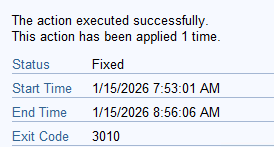
thx thats really helpful and good starting point. I do have follow-up question. Would it be possible also to see start/end time for the individual patch that’s applied? Similar to what you can see when you click “Show Action” in the console (see below example)
Thx again for all help.
Nevermind, I did find a solution for this.I’ve also added button to export and using input box for Group Name and Baseline name (with some help from Gemini don’t want to take all credits)
Full code below if somebody is interested
<div style="background: #f4f4f4; padding: 15px; border-radius: 5px; margin-bottom: 20px;">
    <strong>Baseline Name:</strong>
    <input type="text" id="baselineInput" value="pc1 - 2026-01 win10 & win11 patches" style="width: 250px;">


<strong style="margin-left: 15px;">Computer Group:</strong>
<input type="text" id="groupInput" value="PC1-GRP-W10CoreTesters" style="width: 200px;">

<button onclick="runReport()" style="margin-left: 15px; padding: 5px 15px; cursor: pointer; background: #0078d4; color: white; border: none;">Run Report</button>
<button onclick="exportTableToCSV('PatchReport.csv')" style="padding: 5px 15px; cursor: pointer;">Export CSV</button>


</div>

<table id="sortable">
    <thead>
        <tr><th>ComputerName</th><th>Patch Info</th><th>Start time</th><th>End time</th><th>Patch Status</th><th>Last Reboot Date</th></tr>
    </thead>
    <tbody id="resultsBody">
        </tbody>
</table>

<script>
function runReport() {
    // 1. Get values from inputs
    const baselineName = document.getElementById('baselineInput').value.toLowerCase();
    const groupName = document.getElementById('groupInput').value;
    const tbody = document.getElementById('resultsBody');

    tbody.innerHTML = '<tr><td colspan="4">Loading data...</td></tr>';
    // 2. Construct the dynamic relevance string
    const relevance = `
        concatenation of trs of (
            td of (item 0 of it as string) &
            td of (item 1 of it as string) &
            td of (item 2 of it as string) &
            td of (item 3 of it as string) &
            td of (item 4 of it as string) &
            td of (item 5 of it as string)
        ) of (
            name of item 0 of it | "No Name",
            name of item 1 of it | "No Action Name",
            (year of item 1 of it as string & "-" & month of item 1 of it as two digits as string & "-" & day_of_month of item 1 of it as two digits as string & " " & two digit hour of item 0 of it & ":" & two digit minute of item 0 of it & ":" & two digit second of item 0 of it )
              of (time (universal time zone) of it, date (universal time zone) of it) of start time of item 2 of it as string as string | "noinfo",
            (year of item 1 of it as string & "-" & month of item 1 of it as two digits as string & "-" & day_of_month of item 1 of it as two digits as string & " " & two digit hour of item 0 of it & ":" & two digit minute of item 0 of it & ":" & two digit second of item 0 of it )
              of (time (universal time zone) of it, date (universal time zone) of it) of end time of item 2 of it as string as string | "noinfo",
             status of item 2 of it as string | "No Status",
            (value of results from (bes property "_PG_Device_LastRebooted") of item 0 of it as string) | "Not Found"
        ) of
        (
            item 0 of it,
            item 1 of it,
            results (item 0 of it, item 1 of it)
            whose (detailed status of it as string as lowercase does not contain "not relevant")
        )
        of
        (elements of item 1 of it, elements of item 0 of it)
        of
        (
            set of (member actions of bes actions whose (multiple flag of it and name of it as string as lowercase contains "${baselineName}" as lowercase)),
            set of (members of bes computer groups whose (name of it as string as lowercase = "${groupName}" as lowercase))
        )
    `;
    // 3. Execute via WebReports API
    try {
        const result = EvaluateRelevance(relevance);
        tbody.innerHTML = result;
    } catch (e) {
        tbody.innerHTML = '<tr><td colspan="4" style="color:red;">Error: ' + e.message + '</td></tr>';
    }
}
// Run once on load
window.onload = runReport;
/**
 * Simple Table Sorter
 * Associates with the table id="sortable"
 */
document.querySelectorAll('#sortable th').forEach(headerCell => {
    headerCell.addEventListener('click', () => {
        const tableElement = headerCell.parentElement.parentElement.parentElement;
        const headerIndex = Array.prototype.indexOf.call(headerCell.parentElement.children, headerCell);
        const currentIsAscending = headerCell.classList.contains('th-sort-asc');
        sortTableByColumn(tableElement, headerIndex, !currentIsAscending);
    });
});
function sortTableByColumn(table, column, asc = true) {
    const dirModifier = asc ? 1 : -1;
    const tBody = table.tBodies[0];
    const rows = Array.from(tBody.querySelectorAll('tr'));
    const sortedRows = rows.sort((a, b) => {
        const aColText = a.querySelector(`td:nth-child(${column + 1})`).textContent.trim();
        const bColText = b.querySelector(`td:nth-child(${column + 1})`).textContent.trim();
        return aColText.localeCompare(bColText, undefined, { numeric: true, sensitivity: 'base' }) * dirModifier;
    });
    // Remove existing rows
    while (tBody.firstChild) {
        tBody.removeChild(tBody.firstChild);
    }
    // Re-add sorted rows
    tBody.append(...sortedRows);
    // Remember how the column is currently sorted
    table.querySelectorAll('th').forEach(th => th.classList.remove('th-sort-asc', 'th-sort-desc'));
    table.querySelector(`th:nth-child(${column + 1})`).classList.toggle('th-sort-asc', asc);
    table.querySelector(`th:nth-child(${column + 1})`).classList.toggle('th-sort-desc', !asc);
}
function exportTableToCSV(filename) {
    var csv = [];
    var rows = document.querySelectorAll("table tr");

    for (var i = 0; i < rows.length; i++) {
        var row = [], cols = rows[i].querySelectorAll("td, th");

        for (var j = 0; j < cols.length; j++) {
            // Clean the text to handle commas inside the data
            let data = cols[j].innerText.replace(/"/g, '""');
            row.push('"' + data + '"');
        }
        csv.push(row.join(","));
    }
    // Create a data blob and a temporary link to trigger the download
    var csvFile = new Blob([csv.join("\n")], {type: "text/csv"});
    var downloadLink = document.createElement("a");
    downloadLink.download = filename;
    downloadLink.href = window.URL.createObjectURL(csvFile);
    downloadLink.style.display = "none";
    document.body.appendChild(downloadLink);
    downloadLink.click();
    document.body.removeChild(downloadLink);
}
</script>
2 Likes
Thanks for posting your solution! I updated it to include code tags so it's readable in the forum software.