This is my first endeavor into utilizing the Rest API. I have created my token and the “API Token Test” (code below) returns fine. BUT .. when I try to perform even a simple session relevance query, I receive the error "…there is no reachable BigFix Explorer and/or BigFix Web Reports instance collecting data from this server."
# --- API Token Test.ps1 ---

# --- DEFENSIVE NETWORKING FIXES ---
[System.Net.ServicePointManager]::SecurityProtocol = [System.Net.SecurityProtocolType]::Tls12 -bor [System.Net.SecurityProtocolType]::Tls13
[System.Net.ServicePointManager]::Expect100Continue = $false

Add-Type @"
    using System.Net;
    using System.Net.Security;
    using System.Security.Cryptography.X509Certificates;
    public class SSLHandler {
        public static void Bypass() {
            ServicePointManager.ServerCertificateValidationCallback =
                (sender, cert, chain, sslPolicyErrors) => true;
        }
    }
"@
[SSLHandler]::Bypass()

# --- NEW TOKEN AUTHENTICATION ---
$MyToken = "<token>"

# IMPORTANT: In BigFix 11.0.6, the header uses 'Bearer'
$Headers = @{
    "Authorization" = "Bearer $MyToken"
    "Accept"        = "application/xml"
}

# --- THE COMMAND ---
$BigFixServer = "https://<fqdn>:52311"
$SitesUrl     = "$BigFixServer/api/sites"

try {
    $SitesResponse = Invoke-RestMethod -Uri $SitesUrl -Method Get -Headers $Headers -DisableKeepAlive
    $SitesResponse.BESAPI
}
catch {
    Write-Error "Token Request Failed: $($_.Exception.Message)"
}
The above works fine. The below returns the error.
# Define Variables
$server = "company.com"
$port = "52311"
$token = "YOUR_BEARER_TOKEN_HERE"
$query = "names of bes computers"

# Construct URI and Headers
$uri = "https://$($server):$($port)/api/query"
$headers = @{
    "Authorization" = "Bearer $token"
    "Accept"        = "application/json"
    "Content-Type"  = "application/json"
}

# Construct the exact JSON Body
$body = @{
    "relevance" = $query
} | ConvertTo-Json

# Execute the REST API Call
try {
    $response = Invoke-RestMethod -Uri $uri -Method Post -Headers $headers -Body $body -SkipCertificateCheck
    $response
} catch {
    Write-Error "Failed to evaluate query: $_"
}
I found this post BigFix API / Web Reports broken? - #4 by itsmpro92 that was similar with the last comment being about an SSL certificate change but seeing that this is my first time using Rest API AND that the test script works, I’m not sure if this is the same issue.
My desired end result is a template that I can “plug n’ pray” session relevance into.
Can you try this method and see if it returns anything. This works on my lab but your code failed to (guessing either its the body or the post method vs the get).
Update: Try changing your Content-Type from application/json to application/json+relevance. This allowed your code to run on my lab that has an Explorer instance deployed.
I have not stood up a BigFix Explorer server. We have a relatively small environment (<1500 systems) so I’m not sure its worth the effort – feel free to contradict this!
When I try your exact script using PowerShell 7, I get the original error "…there is no reachable BigFix Explorer and/or BigFix Web Reports instance collecting data from this server."
I get that error too if I stop the 1 explorer instance I have. Not sure if my environment knowing there is an explorer instance but it be inaccessible if that is expected behaviour or whether it should just fall over to WebReports, which is up and running. The first code I posted that uses the GET method did work when Explorer isn’t running.
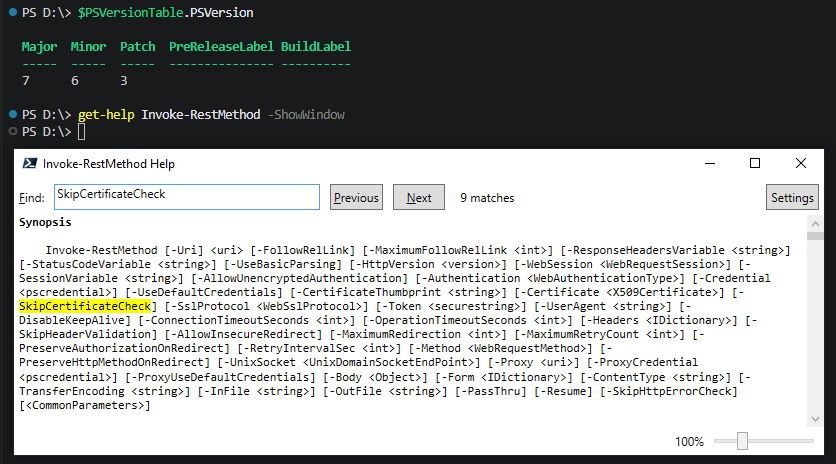
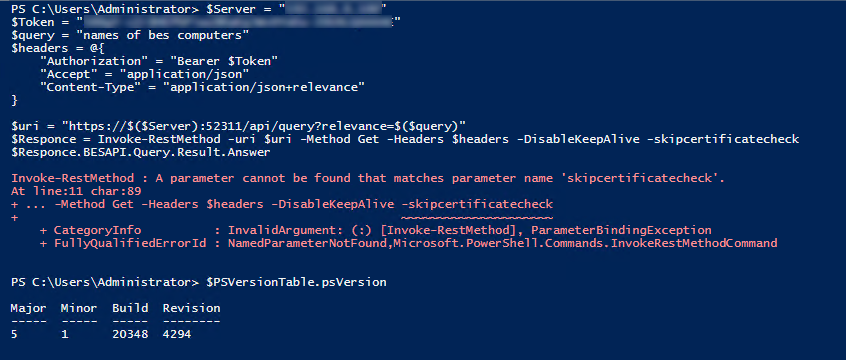
The -SkipCertificateCheck is only available in PowerShell 7 or later and earlier version would require additional methods to bypass an internal or self signed certificate. You can double check by checking the version via $PSVersionTable.PSVersion and by reviewing the available methods via get-help Invoke-RestMethod -ShowWindow
@SLB Yep I caught that (after a moment of frustration) .. and tried on both PowerShell 7 and PowerShell 5 with the correct version specific methods of “skip certificate check”.
v5.2 results:
The underlying connection was closed: An unexpected error occurred on send.
v7 results:
…there is no reachable BigFix Explorer and/or BigFix Web Reports instance collecting data from this server.
Are you using the SSL certificate for the web reports. If i am remembering it correctly i have recently seen this error in one of the customer environment. We converted the certificate in pem format and the issue was resolved.
We have just the single data source: “(local)”. All of our BigFix components live on the same server (BigFix (application), SQL, WebReports, and WebUI).
I installed BES Explorer to a client server, configured the firewall on the BES Explorer server to fully adaptive mode (auto creates rules), stopped the BES Explorer service on the BES Explorer server, added the registry entry to the BES Explorer server, restarted the BES Explorer server, then waited a few mins.
I tried the following:
NOTE: using “BESExplorer.fqn” for the BES Explorer server and “BESServer.fqn” for the BES Server for purposes of sharing.
from the BES Server, the BES Explorer server, and a regular BES Client PC. From the servers I just get “Unauthorized”. The PC asked for credentials but would only accept the Master Operator local account (we use saml for user access) – after authenticated, I got: