With BigFix Platform 11.0.6 an unexpected behavior in Audit Trail Cleaner utility may be causing a problem in displaying computer information in the WebUI.
The problem is tracked in Defect Article KB0131126
To recover from this situation, after having installed 11.0.6 BES Root Server:
Please run the following steps:
stop all the BigFix services on the BigFix Server system
run the query to replace the definition of the stored procedure:
on SQL Server:
 use BFEnterprise
 go
 drop procedure audittrailclean_deletedcontent_content_types
 go
 CREATE PROCEDURE audittrailclean_deletedcontent_content_types (
 @BatchSize INTEGER,
 @rCount  INTEGER OUT
)
 AS
 BEGIN
 SET @rCount = 0;
 END
 go
on DB2:
db2 connect to BFENT

db2 drop procedure dbo.audittrailclean_deletedcontent_content_types

db2 "create procedure dbo.audittrailclean_deletedcontent_content_types ( IN p_BatchSize INTEGER, OUT p_rCount INTEGER ) LANGUAGE SQL BEGIN SET p_rCount = 0; END"
start all the BigFix services on the BigFix Server system
Then, to verify if the stored procedure has already unintentionally deleted data that is still needed, customers have to run the following query:
select count(*) from dbo.QUESTIONRESULTS where WebUISiteID is null
• If the query returns no results, there’s nothing more to do.
• Otherwise, the following recovery procedure must be executed:
stop all the BigFix services on the BigFix Server system
on Windows/SQL Server:
backup BESAdmin.exe
get the hotfix binary for BESAdmin.exe and replace the current one
from a privileged command line, run the command: BESAdmin.exe /repaircontenttypes
once the command is completed, run the following queries:
use BFEnterprise;

update QUESTIONRESULTS set WebuiSiteID = T.SiteID from QUESTIONRESULTS Q join CONTENT_TYPES T on Q.AnalysisID = T.ContentID and Q.SiteID = T.OldSiteID where WebuiSiteID is NULL;

update LONGQUESTIONRESULTS set WebuiSiteID = T.SiteID from LONGQUESTIONRESULTS LQ join CONTENT_TYPES T on LQ.AnalysisID = T.ContentID and LQ.SiteID = T.OldSiteID where WebuiSiteID is NULL;

update FIXLETRESULTS set WebuiSiteID = T.SiteID, Type = T.Type from FIXLETRESULTS F join CONTENT_TYPES T on F.ID = T.ContentID and F.SiteID = T.OldSiteID where WebuiSiteID is NULL;
on Linux/DB2:
backup BESAdmin
get the hotfix binary for BESAdmin and replace the current one
run the command
BESAdmin.sh -repaircontenttypes -sitePvkLocation=<path+license.pvk> [ -sitePvkPassword= <password> ]
once the command is completed, run the following queries:
db2 connect to BFENT

db2 "update dbo.QUESTIONRESULTS set WebuiSiteID = T.SiteID from dbo.QUESTIONRESULTS Q join dbo.CONTENT_TYPES T on Q.AnalysisID = T.ContentID and Q.SiteID = T.OldSiteID where Q.WebuiSiteID is NULL"

db2 "update dbo.LONGQUESTIONRESULTS set WebuiSiteID = T.SiteID from dbo.LONGQUESTIONRESULTS LQ join dbo.CONTENT_TYPES T on LQ.AnalysisID = T.ContentID and LQ.SiteID = T.OldSiteID where LQ.WebuiSiteID is NULL"

db2 "update dbo.FIXLETRESULTS set WebuiSiteID = T.SiteID, Type = T.Type from dbo.FIXLETRESULTS F join dbo.CONTENT_TYPES T on F.ID = T.ContentID and F.SiteID = T.OldSiteID where F.WebuiSiteID is NULL"
start all the BigFix services on the BigFix Server system
verify endpoint properties are displayed correctly in WebUI Device List view
NOTE: Depending on the number of subscribed sites and the custom content created, the BESAdmin repair procedure can take some time: schedule in advance a system maintenance window and do not stop the procedure
In case of issues or questions please contact customer support.
I hope that the hotfix binary for BESAdmin and the changes in the database will be updated in the Installation files of 11.0.6.
For example, when there was an issue with downloading files on the BigFix Client 11.0.5.23 , you uploaded the fixed 11.0.5.24 version as the default one.
This issue is real and the solution does work. It was my ticket that uncovered the issue.
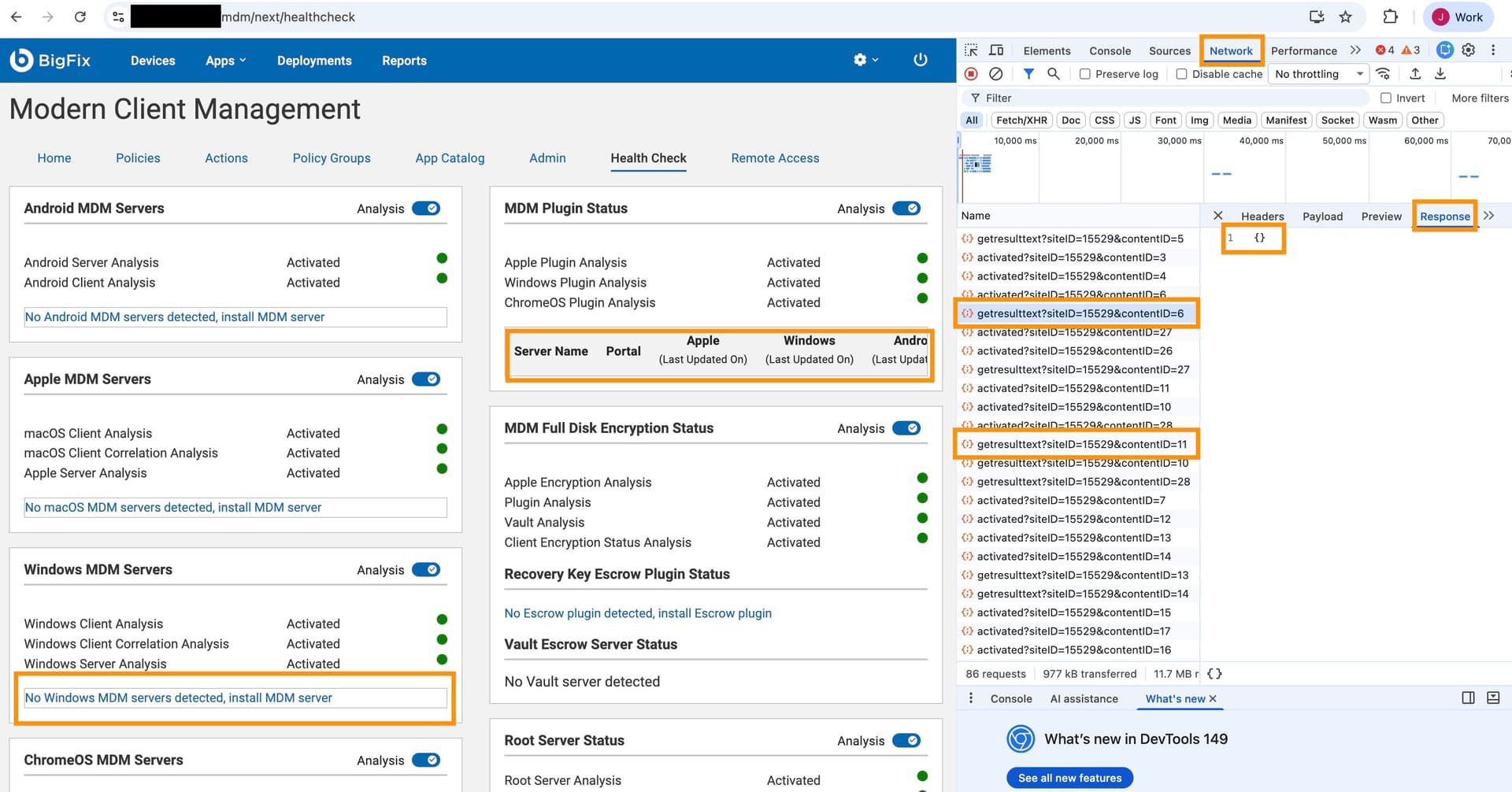
A good example of how you might notice the issue is in the MCM Health Check dashboard in WebUI. If data is missing in the dashboard that is present in analysis results in the console, that is a pretty good clue that you’re having this issue. In our case, information about the MCM server and Plug-in were present in analysis results, but not in the dashboard.
Hello, thanks for your input. At this time, because of the nature and impacts of the problem, and the effectiveness of the provided recovery solution, we are not planning to provide a new build for 11.0.6 root server for this. We will re-evaluate as needed based on customer input. Thank you
In case you’re curious what this issue looks like, see this screenshot of the MCM Health Check dashboard where the MDM Server and Plugin are missing. If we inspect the page and look for the analysis IDs for MCM Server and Plugin analyses (6 & 11), we see null results.
I have just upgraded my environment to 11.0.6. Before running the queries for the workaround, I ran the following verification query and the query returns no results. Do I still have to run the workaround stored procedure?
select count(*) from dbo.QUESTIONRESULTS where WebUISiteID is null
As said above, at this time we are not publishing a new 11.0.6 installer, given the nature and impact of the issue.
For new upgrades to 11.0.6, recommendation is to run step 1. of the above procedure right after the upgrade. Thanks
In the “to confirm data has been properly restored” queries for SQL, there are two instances of > instead of the required >
What should be done if those queries do NOT return 0 results?
I doubt that anyone will see this in time, but we’re currently in a maintenance window to correct this issue and the first and third “confirm” queries returned 3 and 1007 records respectively. Should we run the BESAdmin.exe /repaircontenttypes command again? Run the “update” queries again?
John, probably late but I did run to non-zero result on one of our environments and just proceed with next steps listed - run the admin tool with the flag (ran for me about 10 mins on a small environment, so just fyi, it may be running for a while on bigger); run the sql update statements (and yes, need to replace the > with >) - they ran for about a min but again on a rather small environment; lastly run the selects to confirm there are no issues left and start back the services.
That's the problem… it's the final checks that are generating a non-zero result. Rerunning the initial query also still generates a non-zero result…MUCH lower than the first run (2.3 million vs 3900), but still not 0.
Hello, thanks for the feedback.
After your input, we verified that the "validation" queries might be returning false positives, meaning that a non-zero output not necessarily relates to the persistence of the problem. So, we removed the validation queries and recommended to check on WebUI whether there are missing properties in the Device List. If you have doubts, please open a support case.
Thank you!