Encountered class FileMoveError on C:\Users\\AppData\Local\BigFix\Enterprise Console... while attempting to update the console after an Airgap response import. Fixlets are updated on the server, but local console cache is failing to move temp files. We did basic troubleshooting still the same error.
We rolled back and still the issue is same. Console is not opening up and throwing error: FileMoveError – Windows Error 0x5.
There can be a few causes for that. Generally it means that some file or directory from the console cache is locked - this could be a process that is open in one of the directories that the Console is trying to delete; an open Command Prompt or PowerShell window that is using one of those subdirectories as their current working path; or some antivirus or EDR that is blocking or delaying writes or deletes into one of those folders.
Once you're in that state, the easiest resolution is to delete the entire affected subdirectory. The default paths setup is C:\Users\[WINDOWS_USERNAME]\AppData\Local\BigFix\Enterprise Console\[BIGFIX_SERVERNAME]\[BIGFIX_OPERATOR_NAME]
Find the directory corresponding to your Bigfix Server and your operator account, and delete the whole directory. It will be recreated when you launch the Console again.
If this is happening repeatedly, check to be sure that you have the recommended Antivirus/EDR directory and process exceptions in place.
Thanks the console opened after the Antivirus exception. However, as we were not able to resolve it we rolled back yesterday.
Now we are preparing to upgrade ILMT using the BigFix Fixlet method, but we encountered duplicate computer entries in the BigFix Console for the ILMT/BigFix server. Both entries show the same hostname and IP address, but:
One entry appears as active with an older “Last Report Time,” which corresponds to the VM snapshot rollback point.
The second entry is grayed out and shows a more recent “Last Report Time” from before the VM rollback.
We understand that this duplication occurs when a VM snapshot is restored and the BES Client identity (ClientID and registration files) reverts to an older state. As a result, BigFix now treats the server as two different endpoints with two different internal Client IDs.
Before we proceed with the ILMT upgrade Fixlet, we want to confirm whether the following corrective procedure is appropriate and supported:
Stop the BES Client service on the ILMT/BigFix server.
Delete the BigFix Client identity files, specifically the following files under:
C:\Program Files (x86)\BigFix Enterprise\BES Client\__BESData\__Global
__ClientRegistration
__ComputerID
Start the BES Client service to allow it to generate a new Client ID and re-register with the BigFix server.
Once the new entry appears and reports correctly in the Console, remove the two older duplicate entries from the BigFix database.
After the server is correctly registered as a single active client, rerun the ILMT upgrade Fixlet targeting the newly registered endpoint.
Please confirm whether this is the correct and recommended approach to fix duplicate client entries caused by a snapshot rollback and to ensure the ILMT upgrade Fixlet can run successfully.
Sorry I just found that the below files are not in the path provide, may be it was there in the old bigfix version.
__ClientRegistration
__ComputerID
Could you confirm how we could resolve the duplicate server issue. We need to upgrade the ILMT but when we select take action it shows the grade out server.
Deleting any of those identity files will not fix existing duplicate computer entries and will likely create more of them.
I'm not sure what kind of problems you'd have rolling back snapshots of the root server. Surely not something I'd recommend doing.
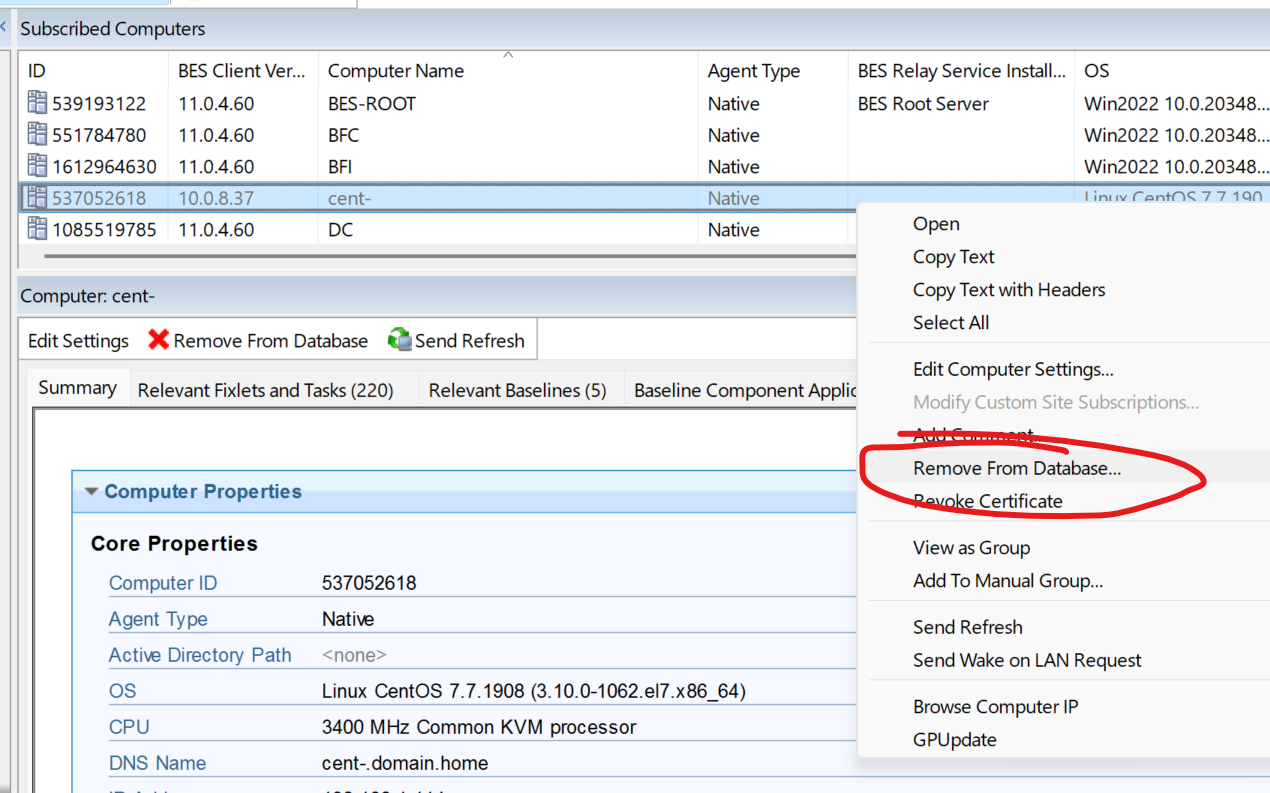
You should delete from the console, the duplicate computer for the instance that is no longer reporting, but it might take some time to be sure which one that is.
All the servers are reporting in the console with the new reporting dates, however our root server is not reporting after 29th and only duplicate 28th root server entry is active. Any suggestion. What if we restore the Bigfix**(BFEnterprise & BESReporting)**
It doesn't sound to me like a restore is necessary, and it would be likely to cause more duplicates.
Sounds like you've gotten past the Console Load issue.
For the duplicate computers, from the Console right-click each computer that is not reporting and select 'Remove from Database'
I could delete the grayed out entry but its a root server and the visible root server has no fixlet associated to it. So if I delete the grayed out root server what would be the consequences?
If you don't want to delete it, that's fine, but if the real client has reset and is now reporting in with a new computer ID, then the old one is not coming back. Either delete it, or ignore it and leave it alone.
Focus on whether the new instance is reporting in properly. Has the "Last Report Time" incremented in the console for the reporting version of the root server's client? Any concerns in the BES Client log, BESRelay.log, or FillDBData and GatherDBData log files?
If these all indicate good reporting, the next step would be to check why the upgrade tickets are not relevant. That could be as simple as the root needing a reboot. We would take the upgrade fixlet relevances and run them individually in the Fixlet Debugger on the root server to see which one results in False
The issue is both the entries are root servers and stopped. Grayed out has fixlet associated. So I need to activate one of these root server first or if I get a new root server reporting I could delete these entries.
Ok then start by troubleshooting with the BES Client logs on the root server itself.
What are you seeing in there?
Do you have a support case open yet, because it sounds like you could really use some live help.
Hi Jason,
We deleted the duplicate entry and it resolved the issue.
There is a separate issue I am facing today. Yesterday I was upgrading the ILMT tool to the latest version, however the action status is still running from last 24 hours and its not completing or failing.
Possibly? I'm not totally sure which thing you're calling the ILMT tool though. Is this the BigFix server, or the Web Interface that's used for reporting? Some questions below to help -
FROM version?
TO version?
Did you install by Fixlet, or manually?
If by Fixlet, what's the last output from the Bigfix Client Log for the action? (not "now", since it's been doing nothing for 24 hours, but back when it was starting the action, what did it log?)
As always, the best help we can give for one-on-one troubleshooting is going to be by opening a Support Ticket, where we can look at your specific configuration and logs, and work with your real-time. It's probably going to be hours before I can look at the Forum again today.