Hi, I have some large files I would like to remove from the
C:\Program Files (x86)\BigFix Enterprise\BES Server\UploadManagerData\BufferDir\sha1
directory, but every time I delete the files, on the next upload they come back. How do I permanently remove files on the
C:\Program Files (x86)\BigFix Enterprise\BES Server\UploadManagerData\BufferDir\sha1
eg. do I need to remove it from the index.txt, or remove it from the agent (if so what directory).
You’ll first need to stop the Archive Manager upload. To do that, identify the action responsible for the upload or the operator who initiated it.
Once the upload is stopped, you can safely proceed with deleting the file. However, if you’re unable to control the upload and still want to ensure the file is removed automatically, you can create a PowerShell/batch script that deletes the file after a defined interval using a scheduled task.
Not sure I follow. My problem is that whenever I delete files from
C:\Program Files (x86)\BigFix Enterprise\BES Server\UploadManagerData\BufferDir\sha1
then I do another upload for some DIFFERENT file, the files I deleted return in the
C:\Program Files (x86)\BigFix Enterprise\BES Server\UploadManagerData\BufferDir\sha1
directory. Why does this happen? If I haven’t requested to upload the deleted files again, why does it do it anyway on the next upload of a completed DIFFERENT file.
The Index.txt file seems to keep ALL of the files that were uploaded
eg.
FileSet-cit_capacity: /var/opt/BESClient/LMT/CIT/1622393934_tlm_hw.tar.gz
FileSet-logcollector: /var/opt/BESClient/LMT/1622393934_logCollectorAgent.tar.gz
FileSet-strace: /tmp/strace.out2
FileSet-messages: /var/log/messages
FileSet-audit: /var/log/audit/audit.log
FileSet-ausearch: /tmp/ausearch.tail
FileSet-cmdoutput: /tmp/wscansw.debug
I deleted
/var/log/messages
/var/log/audit/audit.log
/tmp/ausearch.tail
then I did a separate upload of
/tmp/wscansw.debug
but the other files were uploaded again ???
ie.
/var/log/messages
/var/log/audit/audit.log
/tmp/ausearch.tail
Note: previous upload actions were stopped.
Yes, index file contains metadata about the archive, including information about the files included in the archive.
There are only two possibilities for this behavior:
- The action you stopped was already in the process of uploading. In such cases, the upload might continue briefly before stopping, especially if it was the only action managing the upload.
- If uploads continue even hours after the action was stopped, it clearly indicates that another action is still active and performing the upload.
How to identify such actions:
- In the BigFix Console, use the Custom Filter to search for Fixlets or Tasks that contain the name of the uploaded file or related script content
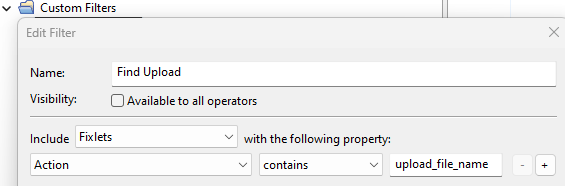
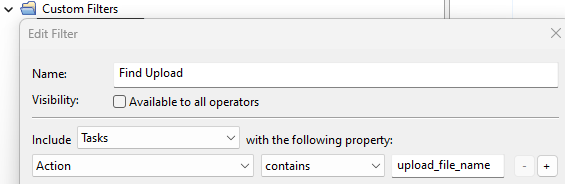
Check both the Fixlet/Task and their related actions to see if any are still in progress.
- There’s also a chance that someone used a custom action with embedded upload logic. To trace this, export all actions and scan the exported files using a text editor for your upload file name.
Also you should probably have a look at Archiving Client files on the BigFix Server and its subtopics, especially
Resource Examples
There’s a very common configuration to do something like “configure the client to upload /var/log/messages every hour forever” that it sounds like might have been configured somewhere in your environment.
Once the client settings are in place, the client will continue repeating the upload, even if there’s no longer an Action using the ‘archive now’ command to do an on-demand upload.
1 Like