Going from Presentation Debugger to CSV report

I’m working off a snippet that was posted in 2015 by @JasonWalker

((name of computer of it, status of it, id of action of it, name of 
action of it) of results of it) of member actions of bes actions whose 
(id of source fixlet of it = 340103)

This snippet is providing the name of the fixlet, computer name, and resulting status of the actions from a baseline. This works perfectly in the presentation debugger. How do I go from presentation debugger to a (scheduled) web report that returns just the csv data (not all pretty with html and not just html with an “export” button). I just need the data in a schedule-able format .. I use another automated method to make the reported data “pretty”.

If you only need the raw data, have you considered using the BigFix REST API instead of WebReports?

1 Like

I can’t pass credentials (security requirement) and we use saml authentication. Would that matter?

What version of BigFix are you using?
The latest version supports API Tokens

11.0.6.137 … so probably understands tokens but this needs to be automated. We don’t want someone to have to click buttons to generate the data pull.

You may find some of the links on the following posting are of of help for your requirements.

Automated Reporting on Completed Actions - Reporting - BigFix Forum

1 Like

Unfortunately, the one link that looked promising ( Custom Web Report | Help with Designing the Page - #2 by vk.khurava ) only contained a video that I cannot access from my secured network.

Thank for trying :slight_smile:

Given the need for automation here, all the more reason to consider leveraging the REST API. You can pass it session relevance queries (essentially what you're evaluating within the Console's Presentation Debugger) via /api/query.

The following post has some sample code showing how to leverage /api/token for authentication: Example REST API usage for /api/token

1 Like

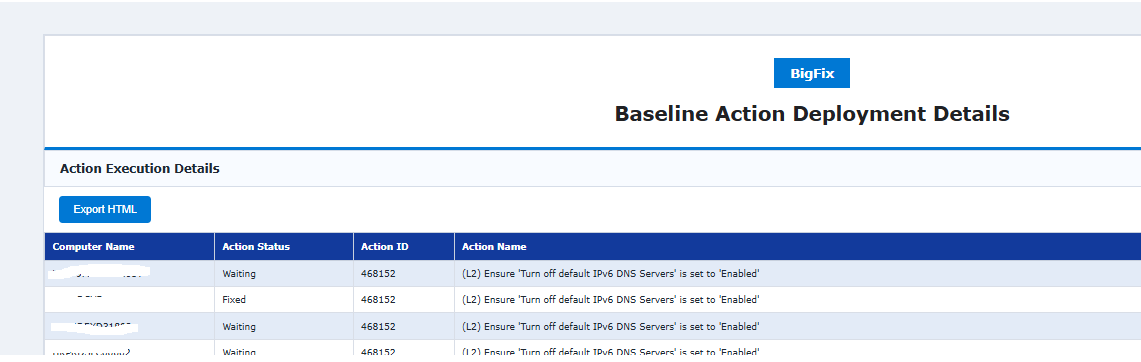
You can use the attached custom report based on your requirement.

It does have export HTML function, you can also schedule it as HTML report.

BaselineActionStatus.pdf (57.1 KB)

Report layout:

For CSV output, you can paste the code below into a Custom Web Report and save it. Once the report has been created, you can schedule it and select CSV as the output format.

<?relevance
"Computer Name,Action Status,Action ID,Action Name%0d%0a" &
concatenation "%0d%0a" of
(
name of computer of it & "," &
status of it as string & "," &
id of action of it as string & "," &
name of action of it
)
of results of member actions of bes actions whose (id of source fixlet of it = 467787)
?>
2 Likes

Thanks for all your replies, it is comforting to know you are all out there!!

I have downloaded the scripts and ideas you have offered. I have to wait for security approval and transfer to the secured environment, so findings won’t be posted for a day or two.

Feel free to post any other thoughts and ideas!!

I was able to get this quickly. I love it, btw, EXACTLY what I was looking for!!!

Follow up question, if you don’t mind, when I try to add the start date and start time of it formatted as “MM/dd/yyyy HH:mm”, it loses its csv separation. What am I missing? (code with my updates below)

(this is a re-type .. I cannot copy/paste from our secured environment)

<?relevance
"Computer Name,Scheduled Start,Status,Fixlet Name,Action Name%0d%0a" &
concatenation "%0d%0a" of
(
name of computer of it & "," &
(((month of it as two digits & "-" & day_of_month of it as two digits & "-" &  year of it as string) of date (local time zone) of it & " " & (two digit hour of it as string & ":" & two digit minute of it as string & ":" & two digit second of it as string) of time (local time zone) of it) of ((start date of it as string & " " & start time_of_day of it as string) as local time) of action of it) & "," &
status of it as string & "," &
name of action of it & "," &
name of parent group of action of it
)
of results of member actions of bes actions whose (name of it as string as lowercase contains "this string")
?>

(don’t worry .. I’ll be reviewing the REST API ideas as soon as I can get the scripts transferred)

Thanks again!

oh wait .. I see it .. it is the space between the date and time .. fixing .. hold!! :slight_smile:

1 Like

So I marked @vk.khurava ‘s response as the solution because it technically answers the exact question I posted.

That being said, now that you have put me on the trail of Rest API, I am diligently trying to get that working! I am currently working with the “API Token Creation.ps1” script posted in GitHub by @kjhoffs (see below for script) I managed to “get around” the clear text entry of a password by using Get-Credential and splitting it into the username/password variables. I’m currently stopped at an Invoke-RestMethod error: “There is currently no token key defined. Before creating a token, you must create a token key with the BigFix Administration Tool.” Upon further research, I found this command “.\BESAdmin.exe /service createtokenkey /sitePvkLocation=<path+license.pvk> /sitePvkPassword=". When I plug in the appropriate path and password, when I run the command, it just opens the BESAdmin GUI at the default Masthead Management tab. I tried simply clicking OK (like I would when I import the airgapResponse file that contains some kind of license update). When I tried the script again, it still complains about there being no token key defined. I found another page that explained about using the BigFix Console/Tools/Manage Tokens, but when I try to “Add New” it also complains about “no token key defined”. Another post said that the /createtokenkey command was suppose to write something to the BigFix database, but does not give the location within the database for me to verify this was done.

Can anyone get me out of this rabbit hole I’ve managed to fall into???

#https://github.com/kjhoffs/BigFix_Public/tree/main/BigFix%20REST%20API%20Token 
# BigFix REST API Token/API Token Creation.ps1
#
#==============================================================================
# BigFix REST API - Unified Targeting Report with Group Resolution & Counts
# ==============================================================================

$BigFixServer = "https://<fqdn>:52311"
$Username     = "<username>"
$Password     = "<password>"

# --- DEFENSIVE NETWORKING FIXES ---
[System.Net.ServicePointManager]::SecurityProtocol = [System.Net.SecurityProtocolType]::Tls13
[System.Net.ServicePointManager]::Expect100Continue = $false

Add-Type @"
    using System.Net;
    using System.Net.Security;
    using System.Security.Cryptography.X509Certificates;
    public class SSLHandler {
        public static void Bypass() {
            ServicePointManager.ServerCertificateValidationCallback = 
                (sender, cert, chain, sslPolicyErrors) => true;
        }
    }
"@
[SSLHandler]::Bypass()

$AuthBytes  = [System.Text.Encoding]::UTF8.GetBytes("${Username}:${Password}")
$AuthHeader = [Convert]::ToBase64String($AuthBytes)
$Headers    = @{ "Authorization" = "Basic $AuthHeader" }

# Use your working Basic Auth Headers from the other script
$TokenName = "MyNewPowerShellToken"
$CreateUrl = "$BigFixServer/api/token?name=$TokenName&duration=0"

try {
    # We POST using Basic Auth to GET the token
    $TokenJSON = Invoke-RestMethod -Uri $CreateUrl -Method Post -Headers $Headers
    Write-Host "--- SAVE THIS TOKEN ---" -ForegroundColor Cyan
    Write-Host $TokenJSON.Token -ForegroundColor Yellow
    # This string usually looks like: cGt2PxRXAX...AAAAE
}
catch {
    Write-Error "If this fails with 401/404, check username and password."
}

I have seen the API token approach mentioned several times, but I have not personally tested or implemented it yet.

For my automation and custom reporting solutions, I use a different approach that I originally picked up from a process shared by HCL during a user group meeting. The original implementation used a Fixlet and created a local file to store the encrypted credentials. I simplified the process by storing the encrypted values in the Windows Registry instead.

If you find it useful, feel free to review and adapt the approach for your own environment. Rest I am leaving the stage for HCL team to suggest on api token part.

One limitation to be aware of is that the credentials can only be decrypted by the same Windows account (NT ID) that was used to encrypt them. If a different account attempts to decrypt the stored values, the operation will fail.

I currently use this method across multiple automation scripts and custom reporting solutions.

Workflow:

Username/Password

Encrypt

Store in Registry

Read from Registry

Decrypt

Use for Authentication

I am attaching both the encryption and decryption scripts for reference.

# Encryption Script (Run Once)
# Replace with your own values before running
$PlainUser = "<BigFix_API_Username>"
$PlainPass = "<BigFix_API_Password>"
$RegPath = "HKLM:\SOFTWARE\CompanyName\ApplicationName"
$UserValueName = "APIBFXMOIDEnc"
$PassValueName = "ApiBFXMIPassEnc"
# Must remain identical in both encryption and decryption scripts
[Byte[]]$Key = 1..16
if (-not (Test-Path $RegPath)) {
    New-Item -Path $RegPath -Force | Out-Null
}
$UserSecure = ConvertTo-SecureString -String $PlainUser -AsPlainText -Force
$PassSecure = ConvertTo-SecureString -String $PlainPass -AsPlainText -Force
$UserEnc = ConvertFrom-SecureString -SecureString $UserSecure -Key $Key
$PassEnc = ConvertFrom-SecureString -SecureString $PassSecure -Key $Key
New-ItemProperty -Path $RegPath -Name $UserValueName -Value $UserEnc -PropertyType String -Force | Out-Null
New-ItemProperty -Path $RegPath -Name $PassValueName -Value $PassEnc -PropertyType String -Force | Out-Null
Write-Host "Encrypted credentials stored successfully."
# Decryption Script
$RegPath = "HKLM:\SOFTWARE\CompanyName\ApplicationName"
$UserValueName = "APIBFXMOIDEnc"
$PassValueName = "ApiBFXMIPassEnc"
# Must be identical to the key used during encryption
[Byte[]]$Key = 1..16
$UserEnc = (Get-ItemProperty -Path $RegPath -Name $UserValueName).$UserValueName
$PassEnc = (Get-ItemProperty -Path $RegPath -Name $PassValueName).$PassValueName
$UserSecure = ConvertTo-SecureString $UserEnc -Key $Key
$PassSecure = ConvertTo-SecureString $PassEnc -Key $Key
$Credential = New-Object System.Management.Automation.PSCredential (
    [System.Net.NetworkCredential]::new("", $UserSecure).Password,
    $PassSecure
)
# Example:
# $Credential.UserName
# $Credential.GetNetworkCredential().Password

The following code worked for me using just the token to connect to the API and pull back a list of sites. It is using PowerShell v7, which is needed to support the use of the -skipcertificatecheck if using self signed certs (as I am in my lab :blush: ).

$BigFixServer = "fqdn.or.ip.address"
$MyToken = "your_token_string"
$url = "https://${BigFixServer}:52311/api/sites"
$headers = @{
    "Authorization" = "Bearer $MyToken"
    "Accept" = "application/xml"
}

$Response = Invoke-RestMethod -uri $url -Method Get -Headers $headers -DisableKeepAlive -skipcertificatecheck
$Response.BESAPI

I will definitely need to review and digest this ….

Thanks Much!

Thanks for the reply, @SLB!

My issue will be with:

$MyToken = "your_token_string"

I am unable to CREATE a token as I cannot seem to create a token key.

From my recollection, the BESAdmin doesn't present any feedback when creating the token key on the server side. I just revoked and re-created on my lab and like you just had the GUI popup afterwards which I clicked on OK to.

I then created the token via the console and from that copy and pasted the code to the Powershell code.

If you created the token on the server but are unable to then create the user token, might be best to raise a PMR with support so they can help. I see in the DB there is a TOKENS table though that’s possibly for the user tokens that are created and not the server token as I only see my test user token in it.

I, too, see a TOKENS table in the DB but it is completely empty.

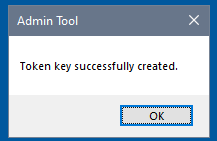
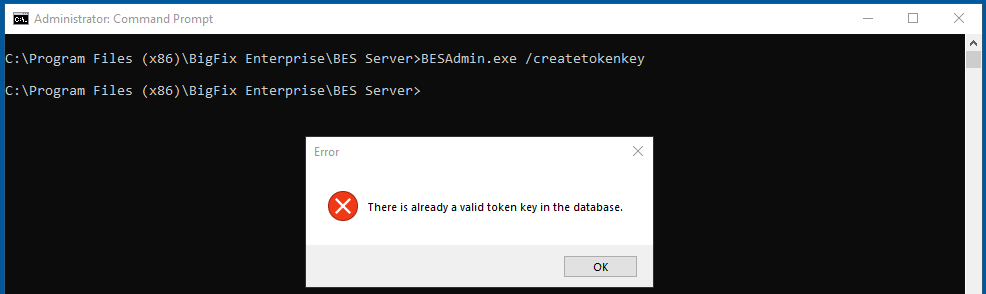
I correct myself, the GUI does provide feedback, I was using the wrong syntax (– instead of /) so only the Admin Tool GUI was being invoked.

Running when a token already exists yeilds

1 Like