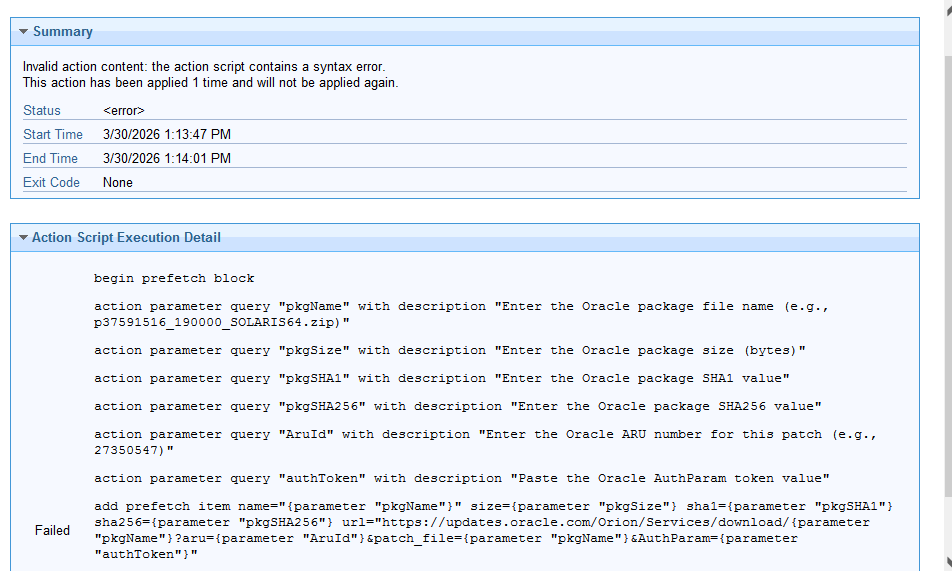
Fixlet action script correction required

I need assistance to download the package from Oracle website directly to bigfix root server. I need assistance to correct my action.

action parameter query "pkgName" with description "Enter the Oracle package file name (e.g., p37591516_190000_SOLARIS64.zip)"
action parameter query "pkgSize" with description "Enter the Oracle package size (bytes)"
action parameter query "pkgSHA1" with description "Enter the Oracle package SHA1 value"
action parameter query "pkgSHA256" with description "Enter the Oracle package SHA256 value"
action parameter query "AruId" with description "Enter the Oracle ARU number for this patch (e.g., 27350547)"
action parameter query "authToken" with description "Paste the Oracle AuthParam token value"

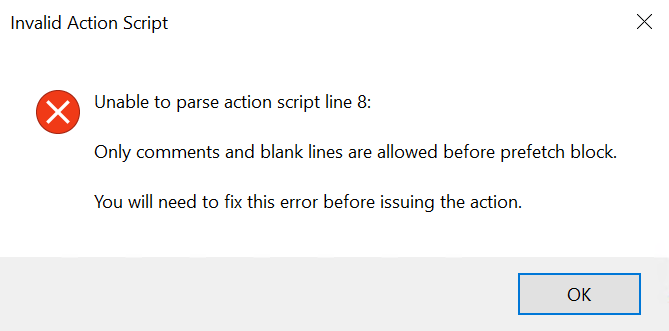
begin prefetch block
add prefetch item name="{parameter "pkgName"}" size={parameter "pkgSize"} sha1={parameter "pkgSHA1"} sha256={parameter "pkgSHA256"} url="https://updates.oracle.com/Orion/Services/download/{parameter "pkgName"}?aru={parameter "AruId"}&patch_file={parameter "pkgName"}&AuthParam={parameter "authToken"}"
end prefetch block

move "__Download/{parameter "pkgName"}" "/tmp/{parameter "pkgName"}"

You can use the below syntax

begin prefetch block
action parameter query "pkgName" with description "Enter the Oracle package file name (e.g., p37591516_190000_SOLARIS64.zip)"
action parameter query "pkgSize" with description "Enter the Oracle package size (bytes)"
action parameter query "pkgSHA1" with description "Enter the Oracle package SHA1 value"
action parameter query "pkgSHA256" with description "Enter the Oracle package SHA256 value"
action parameter query "AruId" with description "Enter the Oracle ARU number for this patch (e.g., 27350547)"
action parameter query "authToken" with description "Paste the Oracle AuthParam token value"
add prefetch item name="{parameter "pkgName"}" size={parameter "pkgSize"} sha1={parameter "pkgSHA1"} sha256={parameter "pkgSHA256"} url="https://updates.oracle.com/Orion/Services/download/{parameter "pkgName"}?aru={parameter "AruId"}&patch_file={parameter "pkgName"}&AuthParam={parameter "authToken"}"
end prefetch block

Hi , While i was testing , i got this error.

begin prefetch block
action parameter query "pkgName" with description "Enter the Oracle package file name (e.g., p37591516_190000_SOLARIS64.zip)"
action parameter query "pkgSize" with description "Enter the Oracle package size (bytes)"
action parameter query "pkgSHA1" with description "Enter the Oracle package SHA1 value"
action parameter query "pkgSHA256" with description "Enter the Oracle package SHA256 value"
add prefetch item name={parameter "pkgName"} size={parameter "pkgSize"} sha1={parameter "pkgSHA1"} sha256={parameter "pkgSHA256"} url="https://github.com/notepad-plus-plus/notepad-plus-plus/releases/download/v8.9.3/npp.8.9.3.Installer.x64.exe"
end prefetch block

ActionLogMessage: (action:29099) Action signature verified for Downloads
ActionLogMessage: (action:29099) Download name is invalid. Name must only be composed of ASCII characters a-z, A-Z, 0-9, -, _, and non-leading

This can be corrected.


begin prefetch block
action parameter query "pkgName" with description "Enter the Oracle package file name (e.g., p37591516_190000_SOLARIS64.zip)"
action parameter query "pkgSize" with description "Enter the Oracle package size (bytes)"
action parameter query "pkgSHA1" with description "Enter the Oracle package SHA1 value"
action parameter query "pkgSHA256" with description "Enter the Oracle package SHA256 value"
add prefetch item name={parameter "pkgName"} size={parameter "pkgSize"} sha1={parameter "pkgSHA1"} sha256={parameter "pkgSHA256"} url="https://github.com/notepad-plus-plus/notepad-plus-plus/releases/download/v8.9.3/npp.8.9.3.Installer.x64.exe"
end prefetch block

Remove the "" around the pkgName and you can pass the name as name of the package without the version and the . The solution will still work.

If possible you can also share the client logs for better understanding

1 Like

Executed the action & got the error as follows.

Download error: The requested URL does not pass this deployment's download whitelist.
Download requested by client:
URL: "https://updates.oracle.com/Orion/Services/download/p38658588_190000_SOLARIS64.zip?aru=28550644&patch_file=p38658588_190000_SOLARIS64.zip"

But website entries “updates.oracle.com” in the “F:\BigFix Enterprise\BES Server\Mirror Server\Config\DownloadWhitelist” file. However seems, it’s not working.

How to fix this issue?

Hi,

You can check this post and get some insights.

Hi Team,

Thank you so much for your continued support. I wanted to share some recent findings regarding the whitelist and code configuration. After enabling the whitelist, I confirmed that the direct code snippet below was working as expected:

add prefetch item name=p38658588_190000_SOLARIS64.zip sha1=0a7485aa9f2c3522e4c3475eae0940a9d7e67791 sha256=270301973b76465d3e676a26dafcbc28dcf38dc5d3df95246e91b05de13bc530 size=2570284246 url=MiddlewareProtocol://get.file/oracle/updates.oracle.com/Orion/Services/download/p38658588_190000_SOLARIS64.zip?aru=28550644&patch_file=p38658588_190000_SOLARIS64.zip

However, when I switched to using parameters in the code, the functionality did not work as intended. Here’s the code I used for the parameter approach:

begin prefetch block

action parameter query "pkgName" with description "Enter the Oracle package file name (e.g., p37591516_190000_SOLARIS64.zip)"

action parameter query "pkgSize" with description "Enter the Oracle package size (bytes)"

action parameter query "pkgSHA1" with description "Enter the Oracle package SHA1 value"

action parameter query "pkgSHA256" with description "Enter the Oracle package SHA256 value"

action parameter query "AruId" with description "Enter the Oracle ARU number for this patch (e.g., 27350547)"

add prefetch item name={parameter "pkgName"} sha1={parameter "pkgSHA1"} sha256={parameter "pkgSHA256"} size={parameter "pkgSize"} url=MiddlewareProtocol://get.file/oracle/updates.oracle.com/Orion/Services/download/{parameter "pkgName"}?aru={parameter "AruId"}&patch_file={parameter "pkgName"}

end prefetch block

Unfortunately, this resulted in the following error: "Unexpected error during download: oracle login failed." Notably, Oracle login worked properly when values were passed directly but failed when parameters were used. The download request details and retry information are included below for your reference.

Download requested by client:

URL: MiddlewareProtocol://get.file/oracle/updates.oracle.com/Orion/Services/download/p38586770_190000_MSWIN-x86-64.zip?aru=28477528&patch_file=p38586770_190000_MSWIN-x86-64.zip

Hash: (sha1)e4435114b647947eca59bee4d9dd1bede6854bc7

Size: 146048040 bytes

Next retry: 2 minutes. Retry now

It seems there may be an issue with passing parameters in this context. If anyone has suggestions on what might be causing the login failure or tips on troubleshooting the parameter usage, I would really appreciate your insight.

Thanks again for your help and looking forward to your feedback.
I'm not entirely sure what you're trying to do - are you using a browser on one machine to logon interactively and figure out the token for an Oracle download, and then trying to update your actionscript to use that token?
Oracle keeps short lifetimes on those tokens, even if you get a working token I think it's only valid for a short time (could be minutes). I'm not sure whether they map tokens to client IP addresses or cookies or browser/host headers... are you sure it's even valid to try using a token from one machine to execute the download on another?

I'm not using token and configured middle ware plugin to download using proxy which was working as expected.. I want to automate the process using manual inputs. Will share you the details by morning. Thanks.