We provide pre and post patch reports each month showing what we accomplished with BigFix for the patch cycle. The extended 3rd party apps external site only keeps the most recent version of the fixlet so when we attempt to report on what was installed we can’t because the fixlet has already been replaced by a newer version. Does HCL have any intention of keeping older versions (superseded fixlets) in the future like it does for all the other external sites?
The quickest workaround is to copy the relevant Fixlets (or Intent Fixlets) into a custom site before they are superseded (you could use REST API to automate it). This preserves the content for historical reporting, as Fixlets in your custom site will not be replaced when newer versions are published in the Extended 3rd Party Applications site.
However officially HCL Support team can confirm.
I doubt this would work actually. Depends the exact session relevance being used on report-side but chances are it uses either first became relevant/relevant of results of bes fixlets OR taken actions of bes fixlets both of which would be lost when you create the fixlet copies because those create new fixlets that will no longer have the history associated with them..
That said, the only idea that I have is to check the latter and extract version numbers off the names of the actions but it only works if you run the individual fixlets - if they are part of a baseline or people rename the name of the action, it may not be achievable…
(names of it, /* version */ (if (name of it contains " v" and name of it contains " - ") then (preceding text of first " - " of following text of last " v" of name of it) else ("Unreadable Version")), time issued of it) of taken actions of bes fixlet whose (name of it = "Update: 7-Zip (EXE) v26.01 - Windows (x64)")
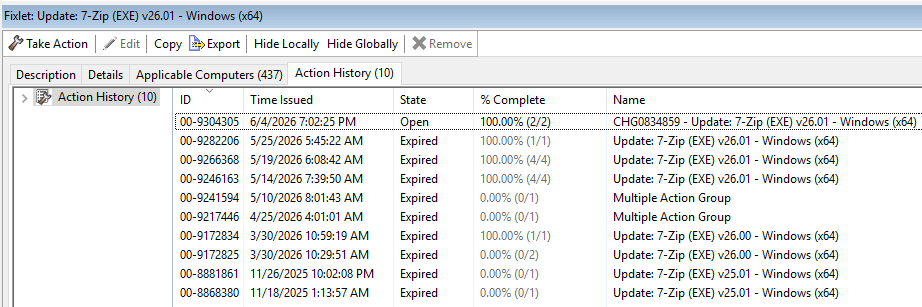
here is how the output looks based on the example above:
Update: 7-Zip (EXE) v25.01 - Windows (x64), 25.01, ( Tue, 18 Nov 2025 01:13:57 -0500 )
Update: 7-Zip (EXE) v25.01 - Windows (x64), 25.01, ( Wed, 26 Nov 2025 22:02:08 -0500 )
Update: 7-Zip (EXE) v26.00 - Windows (x64), 26.00, ( Mon, 30 Mar 2026 10:29:51 -0500 )
Update: 7-Zip (EXE) v26.00 - Windows (x64), 26.00, ( Mon, 30 Mar 2026 10:59:19 -0500 )
Multiple Action Group, Unreadable Version, ( Sat, 25 Apr 2026 04:01:01 -0500 )
Multiple Action Group, Unreadable Version, ( Sun, 10 May 2026 08:01:43 -0500 )
Update: 7-Zip (EXE) v26.01 - Windows (x64), 26.01, ( Thu, 14 May 2026 07:39:50 -0500 )
Update: 7-Zip (EXE) v26.01 - Windows (x64), 26.01, ( Tue, 19 May 2026 06:08:42 -0500 )
Update: 7-Zip (EXE) v26.01 - Windows (x64), 26.01, ( Mon, 25 May 2026 05:45:22 -0500 )
CHG0834859 - Update: 7-Zip (EXE) v26.01 - Windows (x64), 26.01, ( Thu, 04 Jun 2026 19:02:25 -0500 )
If only compliance is concerned, it can usually be derived from the current Fixlet result status, if a Fixlet is relevant/applicable, the endpoint is non-compliant; if it is no longer relevant, it can be considered compliant for that Fixlet.
For historical remediation reporting, you can also use remediated flag with last became relevant within a defined window, for example the last 30 days, should be good enough to create compliance reporting based on that.
We are planning several enhancements to the content of the 3rd party extended sites.
We do not want to maintain all the "superseded" versions of each application, because the risk is that the site become huge and unmanageable.
Instead, we are planning to keep an audit-only fixlets for the app versions that resolve a vulnerability. In case an update of the app has some CVE assigned to it (meaning that it s a security update) when a new version of the app is released, we will keep an audit-only fixlet (meaning that there is no Action script, only relevance) that will track the associated CVE.
We are doing that mainly to leverage the content of the site in IVR, and correlate to the vulnerabilities detected by the scanners, but it will also allow to understand if you have missed any security update of those applications that you have installed on your endpoints.
2 Likes
That’s just it, the report he is describing covering “what was done through BigFIx over the last month” rather than “what is the current status quo and how far away from latest we are”… hence, the reason I think they are most-likely using the historical component of the original fixlets (remediated flag with last became relevant would also get reset if you create a copy of the fixlet in another site)rather than the current relevance…
@ADL, that sounds interesting but I don’t think it will cover the use case described (produce monthly report in what was achieved via BigFIx over the last 30 days) at least the way I read it. Would there be anything in Insights that can cover the requirement? I.e. maybe if you have what computers were relevant to the same fixlet over 30 days, you can do “now - first became relevant < 30 * day” equivalent in SQL query to produce the historical report?
1 Like
Currently what i do is create custom copies of each fixlet, include them in the baseline and run reports against that baseline. If HCL were to provide audit fixlets would they be released the same time as the fixlet? When do you anticipate HCL will start making the audit fixlets available?
Creation of the audit fixlets begins in the month of July 2026.
The audit fixlet will be published as soon as the new version of an Application is published. The fixlet for the latest version of the App will maintain the original fixlet ID, while the Audit-only fixlet will get a new ID.
Thanks
I still don’t see the audit fixlets. Is this something that needs to be enabled somewhere?