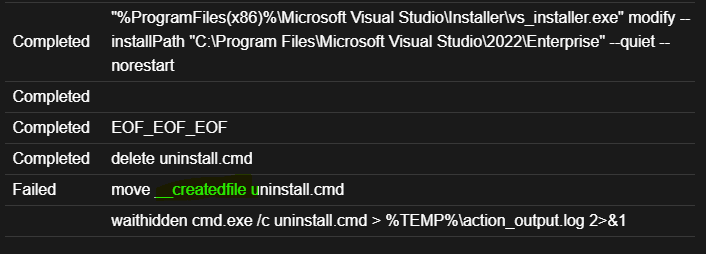
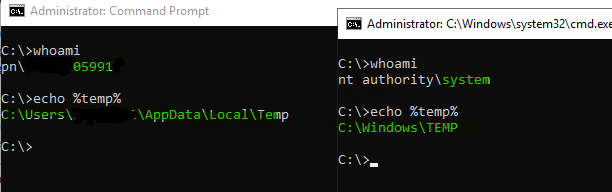
Need help here, this is a simple dos command but it keeps failing. I am trying to run it in Bigfix, can someone help me? it works just fine from a dos command box, but fails in Bigfix. this is what I’m using, it is indeed 1 single line and not 4 separate lines.
Any help would be appreciated.
Thanks!
dos "%ProgramFiles(x86)%\Microsoft Visual Studio\Installer\vs_installer.exe" modify ^
you don't need all those ^ symbols, that's an artifact from running in a batch script - trying to 'escape' the end-of-line character so you can have one command split across multiple lines in the batch file.
You probably shouldn't use 'dos' this way either, just because it's an older method than 'waithidden'.
I'm not sure whether the 'dos' command evaluates shell variables (since the shell doesn't exist at that point). It might, I'm just not sure.
Instead this is probably a better template you could use.
This wraps the command in the CMD shell, which allows us to save both stdout and stderr output messages into a log file which may be useful for troubleshooting later.
I ran it as you suggested and the Bigfix console says it Completed, but with an exit code of 1. the contents of the audit log file that it created reads the following: The system cannot find the path specified.
for sure, it’s definitely 2 lines and vs_installer does exist. I just checked. I’m keeping the faith that I can get this resolved with a push from bigfix as opposed to having to manually visit hundreds of machines. Yikes.
C:\Program Files (x86)\BigFix Enterprise\BES Client__BESData\opsite33>dir "C:\Program Files (x86)\Microsoft Visual Studio\Installer\vs_installer.exe
Volume in drive C is OSDisk
Volume Serial Number is 524C-C02C
Directory of C:\Program Files (x86)\Microsoft Visual Studio\Installer
C:\Program Files (x86)\BigFix Enterprise\BES Client__BESData\opsite33>dir "C:\Program Files\Microsoft Visual Studio\2022\Enterprise"
Volume in drive C is OSDisk
Volume Serial Number is 524C-C02C
Directory of C:\Program Files\Microsoft Visual Studio\2022\Enterprise
01/21/2026 11:05 AM .
11/10/2025 12:48 PM ..
01/21/2026 11:05 AM Common7
11/10/2025 12:54 PM dotnet
01/21/2026 11:05 AM Licenses
11/10/2025 12:58 PM MSBuild
11/10/2025 01:00 PM Team Tools
01/21/2026 07:40 AM Xml
0 File(s) 0 bytes
8 Dir(s) 278,483,210,240 bytes free
Ok well it looks like at some point I lost some arguments in copy/paste. You'll at least need to put the --remove parameters back on. I'm typing on my phone now so I won't be able to fix it but I think you should try again, putting your parameter into the batch file.