I want to deploy a ps1 script to the current users on workstations.
What is the most foolproof and easiest way to achieve this?
TIA!
I want to deploy a ps1 script to the current users on workstations.
What is the most foolproof and easiest way to achieve this?
TIA!
You can use below format
// 1. Clean up any previous runs to prevent append errors
delete __createfile
delete current_user_script.ps1
// 2. Generate the PowerShell script dynamically
createfile until _END_OF_FILE
# YOUR POWERSHELL CODE GOES BELOW THIS LINE
# YOUR POWERSHELL CODE GOES ABOVE THIS LINE
_END_OF_FILE
// 3. Rename the generated file to a .ps1 extension
move __createfile current_user_script.ps1
// 4. Configure the override to run as the current user
override wait
completion=job
hidden=true
runas=currentuser
// 5. Execute the script bypassing the default execution policy
wait powershell.exe -ExecutionPolicy Bypass -NoProfile -WindowStyle Hidden -File "{pathname of client folder of current site}
\current_user_script.ps1"
Thanks!
Will give it a try.
Is there an alternate way to use a ps1 file?
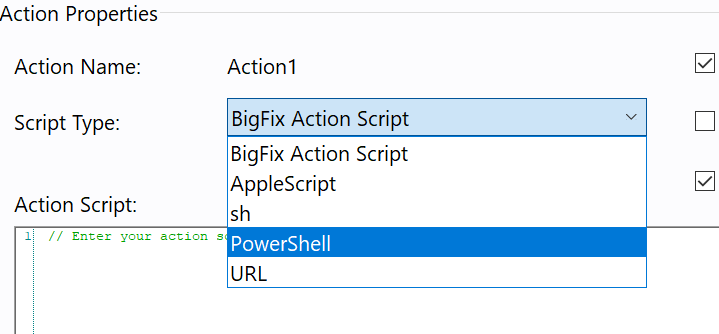
If Client version is 10 or greater than 10 you can directly use native powershell script from script type -
I was just looking at that.
But how would I go about with the run as current user?
Thanks!
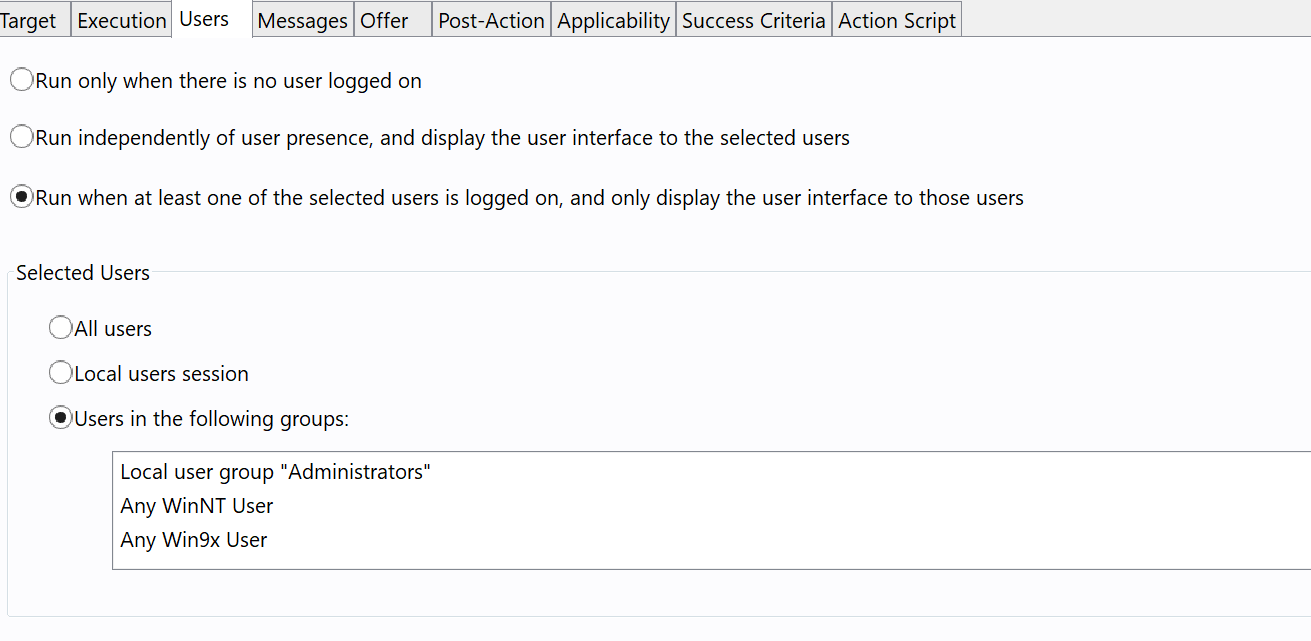
This can be achieved from users tab
I think there will be some constraints here .A User Must Be Logged In: If no user is interactively logged onto the target machine, the action will fail or remain in a "Pending Login" status. The script will only have the permissions of that specific logged-in user. If the user is a standard non-admin account, the PowerShell script cannot perform administrative tasks (like installing system-wide software).
All my standard users are blocked from running powershell meaning I would need to allow powershell for standard users before running…correct?
Yes, permissions should be allowed for users to execute the script
If your PowerShell script requires administrator privileges, it cannot be run as the current user unless that user is already a local administrator or explicitly provides elevation (UAC). In that case, you should deploy it using GPO or another mechanism that runs it with administrative privileges. If the script only performs actions that a standard user can execute, then running it as the current user is fine.
User Tab just manages when the action can be run. But all actions run by default in the context of the client (System on Win, or root on unix like) unless you use the override option.
Users tab
Contains the settings to run the action based on which and if specific users are logged on the computer.