I have a query that presents sorted data that works just fine by itself but I can’t seem to get it to work in a table … (bare with me, this code was hand typed from an air-gapped system)
unique values of (
(value of result from (bes property "Site") of it as string) & "," &
(value of result from (bes property "Domain") of it as string) & "," &
(name of it as string) & "," &
(value of result from (bes property "SecureBootCerts") of it as string)
) of bes computers whose (
(
(value of result from (bes property "Patch Group") of it contains "SVR-G") and
(
(value of result from (bes property "SecureBootCerts") of it contains "NOT STARTED") or (value of result from (bes property "SecureBootCerts") of it contains "IN PROGRESS")
)
) of it
)
but when I try to put it into an html table ……
Concatenation of trs of
(
td of tuple string item 2 of it & td of tuple string item 3 of it & td of tuple string item 0 of it & td of tuple string item 1 of it
) of unique values of (
(value of result from (bes property "Site") of it as string) & "," &
(value of result from (bes property "Domain") of it as string) & "," &
(name of it as string) & "," &
(value of result from (bes property "SecureBootCerts") of it as string)
) of bes computers whose (
(
(value of result from (bes property "Patch Group") of it contains "SVR-G") and
(
(value of result from (bes property "SecureBootCerts") of it contains "NOT STARTED") or (value of result from (bes property "SecureBootCerts") of it contains "IN PROGRESS")
)
) of it
)
it just produces …
Error: Singular expression refers to nonexistent object
Where am I going wrong?
Might be a chance you might be getting multiple values.
This works fine you can take the refrence from here.
<table border="1" cellpadding="5" cellspacing="0">
<tr>
<th>Hostname</th>
<th>IP Address</th>
</tr>
<?relevance
concatenation of trs of (
  td of (name of it) &
  td of (
    if exists ip addresses of it
    then (preceding text of first ", " of (concatenation ", " of (ip addresses of it as string) & ", "))
    else "N/A"
  )
)
of bes computers
?>
</table>
While i was using the below one which was throwing the same error.
<table border="1" cellpadding="5" cellspacing="0">
<tr>
<th>Hostname</th>
<th>IP Address</th>
</tr>
<?relevance
concatenation of trs of (
  td of (name of it) &
  td of (if exists ip address of it then ip address of it as string else "N/A")
)
of bes computers
?>
</table>
1 Like
I appreciate your response, the problem is that I need to have the table sorted by the value of custom property SITE. As far as I can see, this requires the use of the “unique values of” term and the data parts have to be a single string divided by commas. I want each of the data parts to be displayed in their own cell … aka I have to divide the string into parts. If I didn’t care about the sorting, your response is spot on.
there are multiple ways to handle this.
<!DOCTYPE html>
<html lang="en">
<head>
    <meta charset="UTF-8">
    <title>BigFix Inventory Dashboard</title>
    <style>
        :root {
            --hcl-blue: #005EB8;
            --bg-app: #f4f5f7;
            --text-primary: #1e293b;
            --border-light: #e2e8f0;
        }
        body { font-family: 'Inter', sans-serif; margin: 0; background-color: var(--bg-app); }
        .app-layout { display: flex; height: 100vh; }
        .sidebar { width: 240px; background: #fff; border-right: 1px solid var(--border-light); }
        .content-container { flex: 1; overflow-y: auto; display: flex; flex-direction: column; }
        .header { padding: 24px 32px; border-bottom: 1px solid var(--border-light); }
        .card { background: #fff; margin: 24px 32px; padding: 20px; border-radius: 8px; border: 1px solid var(--border-light); }

        table { width: 100%; border-collapse: collapse; font-size: 13px; }
        th {
            text-align: left;
            background: #f8fafc;
            padding: 12px;
            border-bottom: 1px solid var(--border-light);
            color: #64748b;
            cursor: pointer;
            user-select: none;
        }
        th:hover { background: #eff6ff; color: var(--hcl-blue); }
        td { padding: 12px; border-bottom: 1px solid var(--border-light); }

        .sort-icon { margin-left: 8px; font-size: 10px; color: #cbd5e1; }
        th.active-sort .sort-icon { color: var(--hcl-blue); }
    </style>
</head>
<body>
    <div class="app-layout">
        <nav class="sidebar">
            <div style="padding: 24px; font-weight: 700; font-size: 18px; border-bottom: 1px solid #eee;">HCL BigFix</div>
            <div style="padding: 12px 24px; color: var(--hcl-blue); font-weight: 600;">Overview</div>
        </nav>
        <main class="content-container">
            <div class="header">
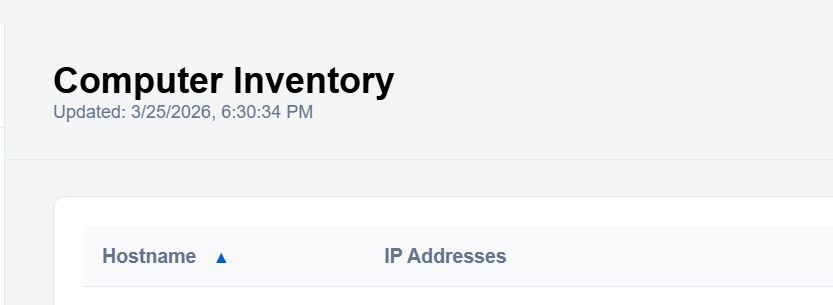
                <div style="font-size: 24px; font-weight: 600;">Computer Inventory</div>
                <div style="font-size: 12px; color: #64748b;" id="timestamp">Updated: --</div>
            </div>
            <div class="card">
                <div id="loading" style="color: var(--hcl-blue);">Loading data from BigFix...</div>
                <table id="results-table" style="display: none;">
                    <thead>
                        <tr>
                            <th id="header-hostname" onclick="handleSort()">
                                Hostname <span id="sort-indicator" class="sort-icon">▲▼</span>
                            </th>
                            <th>IP Addresses</th>
                        </tr>
                    </thead>
                    <tbody id="table-body"></tbody>
                </table>
            </div>
        </main>
    </div>

    <script>
        const unifiedRelevanceExpr = '((name of it | "N/A") & " && " & (concatenation ", " of (ip addresses of it as string) | "N/A")) of bes computers';

        let globalData = [];
        let currentSortOrder = 'asc';

        function loadData() {
            try {
                const evalFn = (typeof EvaluateRelevance !== 'undefined') ? EvaluateRelevance : (window.parent && window.parent.EvaluateRelevance);

                if (!evalFn) {
                    document.getElementById('loading').innerText = "Error: EvaluateRelevance function not found.";
                    return;
                }

                const rawData = evalFn(unifiedRelevanceExpr);

                globalData = rawData.map(line => {
                    const parts = line.split(' && ');
                    return { name: parts[0], ip: parts[1] };
                });

                sortAndRender();

                document.getElementById('loading').style.display = 'none';
                document.getElementById('results-table').style.display = 'table';
                document.getElementById('timestamp').innerText = "Updated: " + new Date().toLocaleString();
            } catch (err) {
                document.getElementById('loading').innerText = "Error: " + err.message;
            }
        }

        function handleSort() {
            currentSortOrder = (currentSortOrder === 'asc') ? 'desc' : 'asc';
            sortAndRender();
        }

        function sortAndRender() {
            globalData.sort((a, b) => {
                let nameA = a.name.toLowerCase();
                let nameB = b.name.toLowerCase();
                if (currentSortOrder === 'asc') {
                    return nameA < nameB ? -1 : (nameA > nameB ? 1 : 0);
                } else {
                    return nameA > nameB ? -1 : (nameA < nameB ? 1 : 0);
                }
            });

            const indicator = document.getElementById('sort-indicator');
            indicator.innerText = currentSortOrder === 'asc' ? ' ▲' : ' ▼';
            document.getElementById('header-hostname').classList.add('active-sort');

            renderTable();
        }

        function renderTable() {
            const tbody = document.getElementById('table-body');
            tbody.innerHTML = globalData.map(row => `
                <tr>
                    <td style="font-weight: 500;">${row.name}</td>
                    <td style="color: #64748b;">${row.ip}</td>
                </tr>
            `).join('');
        }

        window.onload = loadData;
    </script>
</body>
</html>
You can sort the data asec and dec.
1 Like
I finally got this code into my air-gapped environment. It is quite nice! I’m going to mark this issue as resolved and see about putting this code to work!
Thank you!!