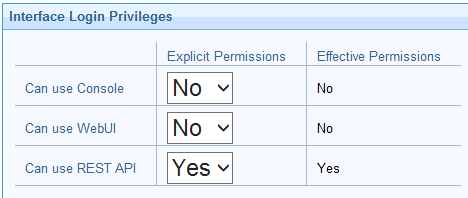
I’ve got request from our monitoring team to see if there is an easy way to check if WebReports/WebUI are up and running and working.
There is an easy API call for BigFix Explorer, I’m looking for something similar, keep in mind we have SAML configured for both, which is causing issue for monitoring team.
BigFix Explorerhttps://:9383/api/status
Output
{"instanceName":"<exploreServer>","status":"Online","rootServerConnection":"Online"}
You can do ping to hostname with specific port and that works,
I’ve tried with https://bigfixrootserver:29450/api/webreports
That works but your API account need Master Operator which I would like to avoid
Any ideas or suggestion are welcome
Can use rest API option works, no need to provide master operator rights
Please suggest if you are getting error
You can use the below api call to check if you are getting the response back.
curl -i -k -X GET -u "monitoring_user:password" "https://<rootserver>:52311/api/query?relevance=now"
Use the local operator and bypass the SAML.
Aram
July 10, 2026, 2:38pm
4
Thinking out loud, there are several potential options and approaches here to monitor at varying levels (running vs. working).
Web Reports:
service running?
login page available?
errors?
https://<bigfixwrserver:port>/webreports?page=ViewErrors
SQL query against dbo.BFENTERPRISE.AGGREGATEDBY table
WebUI:
service running?
login page available?
errors?
parse/monitor logs:
Windows: C:\Program Files (x86)\BigFix Enterprise\BES WebUI\service-wrapper.log
Linux: /var/opt/BESWebUI/service-wrapper.log
2 Likes