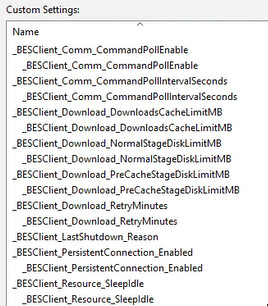
We have issues with operators using invalid client settings, and I’d like to bulk clean up some of them. The most common example is settings that were entered with spaces in front of them:
I’d like to detect if a setting starts with a space, and then delete it, but I’m not sure how to create the loop with Action Script.
I can get the settings with
names whose (it starts with " ") of settings of client
but I’m not sure how to pipe this into
setting delete " bad_client_setting" on "{parameter "action issue date" of action}" for client
I personally avoid using that method to delete a client setting because it only removes the setting’s value, leaving the registry key behind.
Instead, I prefer deleting the entire key to fully clean it up. You can use the following command to remove it completely in one go:
delete __createfile
delete "__Download\DeleteRegSetting.bat"

//create batch job for deletion
createfile until EOF
{concatenation "%0d%0a" of ("reg delete %22" & it & "%22 /f") of (pathnames of keys whose (name of it starts with " ") of keys "HKEY_LOCAL_MACHINE\SOFTWARE\WOW6432Node\BigFix\EnterpriseClient\Settings\Client" of native registry)}
EOF

move __createfile __Download\DeleteRegSetting.bat
waithidden cmd.exe /C __Download\DeleteRegSetting.bat
delete "__Download\DeleteRegSetting.bat"
The batch file method suggested by @vk.khurava will work.
As @vk.khurava mentioned the actionscript setting delete does delete the value of the setting, but leaves the registry key, and time stamp of the deletion behind. This is by design to prevent older settings actions from overwriting newer settings.
Thank you! I’m trying to create something equivalent for our macOS devices, but I’m running into some trouble.
delete __createfile
delete "__Download\DeleteClientSetting.sh"

//create batch job for deletion
createfile until EOF
#!/bin/zsh
sleep 5
/Library/BESAgent/BESAgent.app/Contents/MacOS/BESAgentControlPanel.sh -stop
launchctl stop com.apple.cfprefsd.xpc.daemon
sleep 5
{concatenation "; " of ("/usr/libexec/PlistBuddy -c %22Delete %27Settings:Client:" & it & "%27%22 /Library/Preferences/com.bigfix.BESAgent.plist") of (names whose (it starts with " ") of settings of client)}
launchctl start com.apple.cfprefsd.xpc.daemon
/Library/BESAgent/BESAgent.app/Contents/MacOS/BESAgentControlPanel.sh -start
EOF

copy "__createfile" "__Download/DeleteClientSetting.sh"
wait chmod +x "__Download/DeleteClientSetting.sh"
run {"/bin/zsh -c %22trap '' 15;'" & "__Download/DeleteClientSetting.sh'%22"}
Sometimes it works, and sometimes it doesn’t (settings are either deleted successfully, or settings remain after the client restarts). I’m trying to modify the .plist directly because I couldn’t find a relevant argument for BESAgent, only setSettings,
Is there a -removeSettings, -deleteSettings, or something else I could use?
The only alternative I can think of is building a .json with the settings blanked, and importing that. But in that case, I’m not removing the settings, just removing the value.
Thanks @brolly33 for uncovering the mystery behind why the setting delete function doesn’t remove the registry key itself. I wasn’t clear about that before
Since you’ve already had some success, I’d suggest checking the devices where the issue persists. If it works when run manually, it might be environment-specific. But I’ll try to replicate the scenario on my Mac and let you know if I find anything useful.
Using plutil instead of plistbuddy seems to be much more reliable. With plistbuddy I was seeing the fixlet fail once, then succeed, then fail again, all on the same device. I have not been able to reproduce any failures with plutil. Thank you!
This is what I ended up with for the Macs:
delete __createfile
delete "__Download\DeleteClientSetting.sh"

//create batch job for deletion
createfile until EOF
#!/bin/zsh
sleep 5
/Library/BESAgent/BESAgent.app/Contents/MacOS/BESAgentControlPanel.sh -stop
launchctl stop com.apple.cfprefsd.xpc.daemon
sleep 5
{concatenation "; " of ("plutil -remove %27Settings.Client." & it & "%27 /Library/Preferences/com.bigfix.BESAgent.plist") of (names whose (it starts with " ") of settings of client)}
launchctl start com.apple.cfprefsd.xpc.daemon
/Library/BESAgent/BESAgent.app/Contents/MacOS/BESAgentControlPanel.sh -start
EOF

copy "__createfile" "__Download/DeleteClientSetting.sh"
wait chmod +x "__Download/DeleteClientSetting.sh"
run {"/bin/zsh -c %22trap '' 15;'" & "__Download/DeleteClientSetting.sh'%22"}