Broker session. Failed to connect.

Hello everybody! Who knows Remote Control topic very well? Who can help with Broker sessions?

I have a demo environment. Server, Relay, Remote Control Server, Broker Server, Win10 PC, AD with DNS. I have installed Broker, created new DNS A record for broker (private IP), created new certificate, added a new broker server, installed a target with broker server name and certificate, configured broker properties and reload a service.

Also, I have used instructions from Brad.

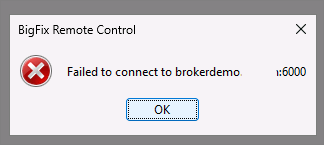
But, I can’t initiate a broker session. Failed to connect.
Broker settings:

# Public address and port for this broker

PublicBrokerURL = https://brokerdemo.xxx\:6000

# Server configuration

ServerURL = https\://bfrelay.demo.local/trc

# Defaults for connections

DefaultPortToListen = 6000

DefaultTLSCertificateFile = brokerdemo._key.p12

DefaultTLSCertificatePassphrase=

# Inbound connections

prefix.ConnectionType = Inbound

prefix.PortToListen = see DefaultPortToListen

prefix.TLSCertificateFile = see DefaultTLSCertificateFile

prefix.TLSCertificatePassphrase=

prefix.AllowEndpoints = yes

prefix.AllowBrokers = no

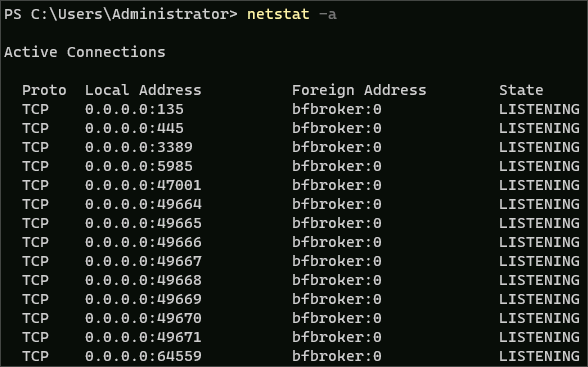
Netstat doesn’t show port 6000:
Log info after service has been restarted:

But there is a different port then 6000

Who can help to determine the problem?

I recommend, please open case with HCL support.

Hi evgeniy,

You didn’t provide a value for these properties:

prefix.PortToListen = see DefaultPortToListen

prefix.TLSCertificateFile = see DefaultTLSCertificateFile

prefix.TLSCertificatePassphrase=

That’s why the Broker is not listening to the right port. Since you provided the default values for port and certificate you can comment these three entries. Once the certificate is loaded correctly you will se the listening port on 6000 owned by the trc_icb process.

Yes, you are right, but partially.
Thank you for advice.

I don't know why but it is not working with "see Defaults *" parameters.
I have changed it to real data like in Defaults strings:

prefix.PortToListen = 6000
prefix.TLSCertificateFile = cert_file
prefix.TLSCertificatePassphrase = cert_file_pass

This port is in LISTENING state now.

But right now, I guess, problem with certificate. Several times I tried to use Brad instruction, but nothing changed yet.
Right now I don't have access to the environment.
I will show the errors on Monday.

Why is no one talking about this?!
There is not enough information about each BigFix module.
There is no correct and understandable documentation, no examples.
Yes, we have an old YouTube channel, but there are no updates, no new versions, no examples of use, only partial information about installation.
Every time you have to guess, figure it out, and take a shot in the dark.

Really helpful information I had found - only articles of Brad.
But as we see, they are missing some info too.

I tried to deploy and configure Remote Control about three weeks in summary.

About Remote Control -

Network Topology - https://help.hcl-software.com/bigfix/landing/Technical+Documents/Landing_page_shared/BigFix_Network_Topology_Diagrams.pdf

Broker Setup Examples - Broker setup examples

Can you share your Topology?

Using Broker is for a very specific usage

If Broker - specific usage, then, what is the best practice to control remote stations through the Internet?

My scheme now looks like that:

RC Server -> RC Broker -> Remote PC

It’s all in lan, there is no Internet for now, and i use “A” record in an internal DNS Server (broker domain name but with internal ip).
So, as I understood, I should create a session RC Server to the Broker, and the second one session from Remote PC to the Broker.

If it works in lan, it will work through the Internet. It will be just connectivity issue, external dns record and routing. May be firewall and nat, but it will be the next story.

@evgeny Ive sent you a PM

So, guys! with support team we have resolved the issue.

If you like to deploy the Broker I would recommend you to read Brad instructions. It is really good enough but it's missing information about certificates.

Additionally you have to to do those steps:

  1. You have to use DNS name when you will create a certificate. Not only CN name, but DNS name too. It is important.

  2. You have to create private key and certificate. For example:
    openssl req -x509 -nodes -newkey rsa:2048 -keyout c:\temp\broker.key -out c:\temp\broker.crt -days 3650 -sha256 -subj "/CN=broker.demo" -addext "subjectAltName=DNS:broker.demo"

  3. You have to add the broker server domain name and port on the Remote Control Server UI as in the Brad's instruction.

  4. You have to add the certificate from broker.crt file to the Trusted Authority.

  5. Restart services on the web ui -> Admin -> Restart Application

  6. Then you have to add into the broker.crt file from broker.key file. You have to merge or combine them. After that broker.crt file will contain the following information (shortly):
    -----BEGIN CERTIFICATE-----
    -----END CERTIFICATE-----
    -----BEGIN PRIVATE KEY-----
    -----END PRIVATE KEY-----

  7. Restart service "BigFix Remote Control - Internet Connection Broker" on the Broker Server.

Only after those steps everything start working.

!!! Also, If you wants to use ikeyman tool from IBM it has a bug. My domain name for remote sessions contains a numeric. For example: broker2.demo. If you will try to add DNS name in the ikeyman tool you see an error. You can't create a certificate with number in the domain name. Be attention.

1 Like

Who knows how self-sign certificates should works it is not big deal i hope.
But for me personally it was difficult to understand.
Also, I think, there is no information on the BigFix Admin guides. No examples, the info they described not implied for me.