BigFix Rest API session relevance query

Hi,

I am trying to create a session relevance query for getting few results of computer properties from the rest Api. Any one help me to short this out.

Relevance:
https://<BigFix_Server>:52311/api/query?relevance=(
name of item 0 of it | “missing name”
& “||” & (concatenation “;” of values of results (item 0 of it, elements of item 1 of it))
& “||” & (concatenation “;” of values of results (item 0 of it, elements of item 2 of it))
& “||” & (concatenation “;” of values of results (item 0 of it, elements of item 3 of it))
& “||” & (concatenation “;” of values of results (item 0 of it, elements of item 4 of it))
& “||” & (concatenation “;” of values of results (item 0 of it, elements of item 5 of it))
& “||” & (concatenation “;” of values of results (item 0 of it, elements of item 6 of it))
& “||” & (concatenation “;” of values of results (item 0 of it, elements of item 7 of it))
& “||” & (concatenation “;” of values of results (item 0 of it, elements of item 8 of it))
& “||” & (concatenation “;” of values of results (item 0 of it, elements of item 9 of it))
& “||” & (concatenation “;” of values of results (item 0 of it, elements of item 10 of it))
) of (
elements of item 0 of it
,item 1 of it
,item 2 of it
,item 3 of it
,item 4 of it
,item 5 of it
,item 6 of it
,item 7 of it
,item 8 of it
,item 9 of it
,item 10 of it
) of (
set of BES computers
, set of bes properties whose (name of it as lowercase = (“Computer ID”) as lowercase)
, set of bes properties whose (name of it as lowercase = (“IP Address”) as lowercase)
, set of bes properties whose (name of it as lowercase = (“Computer Name”) as lowercase)
, set of bes properties whose (name of it as lowercase = (“Computer Manufacturer - Windows”) as lowercase)
, set of bes properties whose (name of it as lowercase = (“Computer Model - Windows”) as lowercase)
, set of bes properties whose (name of it as lowercase = (“CPU”) as lowercase)
, set of bes properties whose (name of it as lowercase = (“CPU Name”) as lowercase)
, set of bes properties whose (name of it as lowercase = (“MAC Address”) as lowercase)
, set of bes properties whose (name of it as lowercase = (“Make”) as lowercase)
, set of bes properties whose (name of it as lowercase = (“Identifying Number - Windows”) as lowercase)
)

Error:
A string constant had no ending quotation mark.

Another Query:
https://<BigFix_Server>:52311/api/query?relevance=(
name of item 0 of it | “missing name”
, (concatenation “;” of values of results (item 0 of it, elements of item 1 of it))
, (concatenation “;” of values of results (item 0 of it, elements of item 2 of it))
, (concatenation “;” of values of results (item 0 of it, elements of item 3 of it))
, (concatenation “;” of values of results (item 0 of it, elements of item 4 of it))
, (concatenation “;” of values of results (item 0 of it, elements of item 5 of it))
, (concatenation “;” of values of results (item 0 of it, elements of item 6 of it))
, (concatenation “;” of values of results (item 0 of it, elements of item 7 of it))
, (concatenation “;” of values of results (item 0 of it, elements of item 8 of it))
, (concatenation “;” of values of results (item 0 of it, elements of item 9 of it))
, (concatenation “;” of values of results (item 0 of it, elements of item 10 of it))
) of (
elements of item 0 of it
,item 1 of it
,item 2 of it
,item 3 of it
,item 4 of it
,item 5 of it
,item 6 of it
,item 7 of it
,item 8 of it
,item 9 of it
,item 10 of it
) of (
set of BES computers
, set of bes properties whose (name of it as lowercase = (“Computer ID”) as lowercase)
, set of bes properties whose (name of it as lowercase = (“IP Address”) as lowercase)
, set of bes properties whose (name of it as lowercase = (“Computer Name”) as lowercase)
, set of bes properties whose (name of it as lowercase = (“Computer Manufacturer - Windows”) as lowercase)
, set of bes properties whose (name of it as lowercase = (“Computer Model - Windows”) as lowercase)
, set of bes properties whose (name of it as lowercase = (“CPU”) as lowercase)
, set of bes properties whose (name of it as lowercase = (“CPU Name”) as lowercase)
, set of bes properties whose (name of it as lowercase = (“MAC Address”) as lowercase)
, set of bes properties whose (name of it as lowercase = (“Make”) as lowercase)
, set of bes properties whose (name of it as lowercase = (“Identifying Number - Windows”) as lowercase)
)

Error:
This expression could not be parsed.

Try % encoding the “;” i.e. replace each “;” with “%29”.

With “;” in the URL I get the same error but it works with “%29

3 Likes

Thanks for the update, it’s working now.

Have you tried this console dashboard / web report? It seems to pull similar data:

1 Like

Hi @jgstew @SLB

I’m to trying to run custom Analyses query, the query is not working. The Analyses have huge amount of data listed below
Microsoft Edge | Microsoft Corporation | 141.0.3537.99
Microsoft Search in Bing | Microsoft Corporation | 2.0.2
Microsoft Teams Meeting Add-in for Microsoft Office | Microsoft | 1.25.24601
Microsoft Visual C++ 2005 Redistributable | Microsoft Corporation | 8.0.56336
Microsoft Visual C++ 2008 Redistributable - x64 9.0.30729.6161 | Microsoft Corporation | 9.0.30729.6161
Microsoft Visual C++ 2008 Redistributable - x86 9.0.30729.17 | Microsoft Corporation | 9.0.30729
Microsoft Visual C++ 2008 Redistributable - x86 9.0.30729.6161 | Microsoft Corporation | 9.0.30729.6161
Microsoft Visual C++ 2010 x64 Redistributable - 10.0.40219 | Microsoft Corporation | 10.0.40219
Microsoft Visual C++ 2010 x86 Redistributable - 10.0.40219 | Microsoft Corporation | 10.0.40219

it contains data of application nmae, publisher and the version.
Can i get the query for single devices, if no values found it should show as NA.

Thank you for the prompt attention.

@SATHISH Please share more details & your relevance queries, what is not working, is this related to session relevance query or client relevance?

Below is the Api query

https://:52311/api/query?relevance=(values of it, names of computers of it) of results of bes properties whose (name of it = "Applications Installed - Workstations")

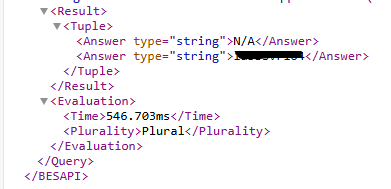
You can use the query below and simply provide the desired computer name. I doubt there will be any device with no data, but I’ve added logic to handle that scenario, if no values are found, it will display as N/A.

((if exists values of it then values of it as string else "N/A"), name of computer of it as string) of results whose (exist computer whose (name of it as string = "YOUR_Device") of it) of bes property whose (name of it as string as lowercase = "Your_Analysis" as lowercase)

can I get the full api query?

Simply replace your existing relevance with it, but ensure you apply URL encoding before executing it in the browser.

**https://YOUR_BFX_SERVER:52311/api/query?relevance=(NEW_SESSION_Relevance_Query)
**
For URL encoding you can use following website:
URL Decoder/Encoder

Post URL encoding API query will look like below:
https://YOUR_BFX_SERVER:52311/api/query?relevance=(((if%20exists%20values%20of%20it%20then%20values%20of%20it%20as%20string%20else%20%22N%2FA%22)%2C%20name%20of%20computer%20of%20it%20as%20string)%20of%20results%20whose%20(exist%20computer%20whose%20(name%20of%20it%20as%20string%20%3D%20%22YOUR_Device%22)%20of%20it)%20of%20bes%20property%20whose%20(name%20of%20it%20as%20string%20as%20lowercase%20%3D%20%22Your_Analysis%22%20as%20lowercase))

The query works on my end, but not on yours, possibly something is missing or needs debugging.
I tested it on a device with no applicable results, and it returned the expected output.

I recommend breaking the query into smaller parts and testing them individually using Web Reports QNA or the Presentation Debugger. This will help identify where the issue lies.

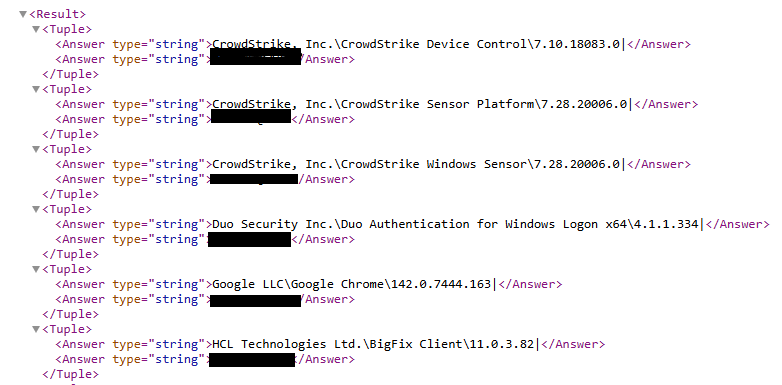
And device with results:

Can I get the Analyses query as well?

@vk.khurava
Can I get the relevance?

I didn’t quite follow, which query are you asking for? I already shared a working one in my previous post.

@vk.khurava
I need an Analysis relevance

if (name of operating system does not contain "Win") then "N/A" else (if it = "" then "Unknown" else it) of unique values of ((if (exists value "DisplayName" of it AND exists value "DisplayVersion" of it AND exists value "Publisher" of it) then (value "Publisher" of it as string) else ("Unknown")) & (if (exists value "DisplayName" of it) then ("" & value "DisplayName" of it as string) else ("Unknown")) & (if (exists value "DisplayVersion" of it) then ("" & value "DisplayVersion" of it as string) & "|" else ("\Unknown|"))) of keys whose (/exists value "UninstallString" of it AND/ ((not exists value "SystemComponent" of it) OR (exists value "SystemComponent" of it AND name of it starts with "{" AND name of it contains "}" )) AND (it as lowercase does not contain "Hotfix" as lowercase AND it as lowercase does not contain "Security Update for" as lowercase AND it as lowercase does not contain "Update for" as lowercase AND it as lowercase does not contain "Security Update for Windows" as lowercase AND it as lowercase does not contain "Update for Windows" as lowercase AND it as lowercase does not contain "Security Update for Microsoft" as lowercase AND (length of it > 0) AND (number of substrings " " of it < length of it)) of (value "DisplayName" of it as string)) of keys "HKLM\SOFTWARE\Microsoft\Windows\CurrentVersion\Uninstall" of (if x64 of operating system then (x32 registry; x64 registry) else registry)