BigFix Reports - Custom Reporting

I was reviewing the new BigFix Reports and noticed that none of the custom reports are functioning as expected. I also attempted to create a new custom report using the same logic as before, but it didn’t work either. It seems the report isn’t processing any custom logic, as there’s no indication that any action is being taken or that a preview is being generated.

Interestingly, the same custom reports and relevance code are working perfectly fine in the existing (old) Web Reports interface.

Am I missing something here, or is this functionality not yet available in the new BigFix Reports?

1 Like

Hi
It seems it is not ready yet. Fully functional new Reports is yet to come, you can read this in the article that announces the “New Reports”.

Yes, the fully functional BigFix report may take longer than expected; however, according to the announcement below, custom reports should already be operational.

Continuing the discussion from BigFix Reports - first release available!:

Hello, the full new Reporting experience is going to take some more time.
Nonetheless, in terms of custom reports, what was delivered in the BigFix Reports interface in the past months is meant to be equivalent to the capability available in the old WebReports.
Can you please provide more insight into the issues you are facing?
Have you considered opening a support case?

Thank you

Hi @adinia, Since you mentioned this, I revisited the issue and conducted a more thorough comparison. I’ve identified a few problems:

Scenario 1:

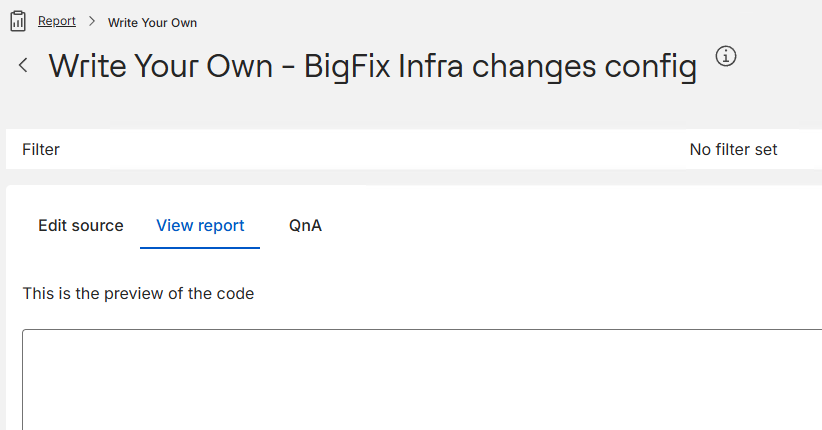
A custom report based on HTML + Session Relevance was successfully imported into the new BigFix Reports. However, the preview fails to load in the new interface.

Note: I compared the code from both platforms using WinMerge to rule out any discrepancies. The code is identical in both cases.

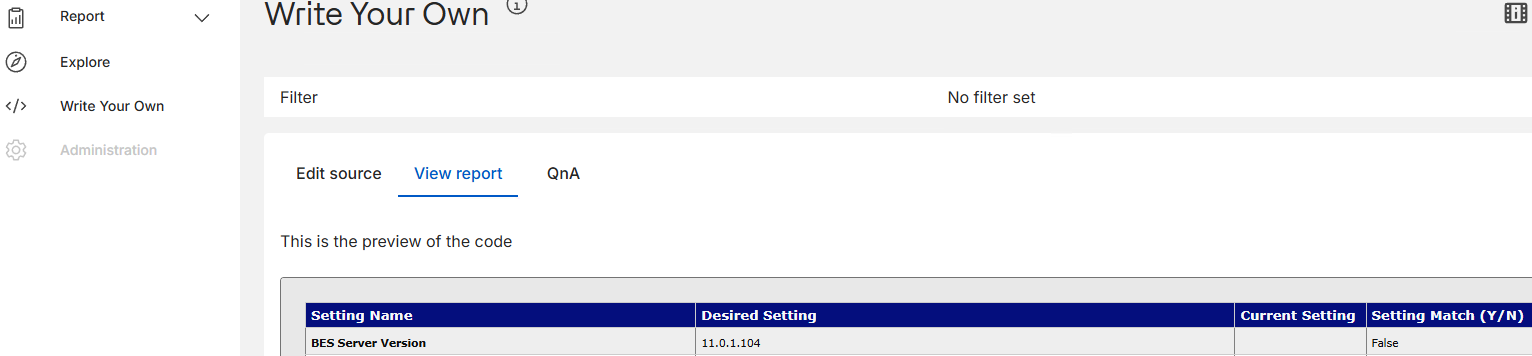
//Report Preview from old Webreport:

//Report Preview from new BigFix Reports:

Scenario 2:

Taking the same code from the non-functioning custom report in the new BigFix Reports and pasting it into the “Write Your Own” section loads the preview successfully.

Important Note: After pasting the code under “Write Your Own,” you must refresh the page for the preview to work. Without refreshing, it won’t load properly.

Note: Our production infrastructure is currently on v11.0.1, and we plan to upgrade to v11.0.3 next month. Only after that will we be able to provide further feedback or consider raising a case. For now, we are validating this in the test infrastructure running v11.0.4.

1 Like

Hey, so im interested in whats happening here, What browser that you are using ? What browser suite and version would be helpful ?

Have you tried another browser ? It would be helpful to know / isolate the browser from the equation.

Assuming we can isolate the browser from the equation, What is the contents of your report ? Is it an html based report using the <?Relevance ?> Tag or are there external scripts loaded in there ?

The fact that the tab switch is not forcing the application to render is certainly not the expected behavior… But what makes this more interesting is refreshing… refreshing the page should in theory reset the state of the app (meaning the contents within your edit source tab should not \ would not persist across the refreshes), there for the view report would not have any content to attempt to render. So If i understand correctly, you are indicating that this is working… Perhaps i am not understanding the scenario you are rolling through. In any case , if you can provide a bit more detail, we will work to get this figured out with you. All the best!

Google Chrome - Version 138.0.7204.168 (Official Build) (64-bit)

Yes, I observed the same behavior in Microsoft Edge (Version 138.0.3351.109, 64-bit).

There’s nothing new about it, it’s the same old custom report that used to work, and still works perfectly fine in the old Web Reports.

here is the sample:

<style>
a { text-decoration: none; } 

a:link { color: #200772; font-weight: normal; text-decoration: none; } 

a:hover { color: #FF8000; font-weight: normal; text-decoration: none; } 

table { margin: 0; border-collapse: collapse; color: #0d0c0c; font: 10pt verdana, geneva, lucida, 'lucida grande', arial, helvetica, sans-serif; }

th { font: 10pt verdana, geneva, lucida, 'lucida grande', arial, helvetica, sans-serif; color: #f7f9fa; font-weight: normal; background-color: #040e7d; border: 1px solid #cccccc; margin: 0; padding: 4px 10px 4px 5px; text-align: left; } 

td { color: #0d0c0c; font: 8pt verdana, geneva, lucida, 'lucida grande', arial, helvetica, sans-serif; border-bottom: 1px solid #cccccc; margin: 0; /* padding: 6px 20px 1px 0; */ padding: 8px 20px 5px 5px; }

td.userinput { color: #0d0c0c; font: 10pt verdana, geneva, lucida, 'lucida grande', arial, helvetica, sans-serif; font-weight: bold; border-bottom: 0px; margin: 0; padding: 6px 20px 1px 0; } 

td.errormsg { color: red; font: 10pt verdana, geneva, lucida, 'lucida grande', arial, helvetica, sans-serif; font-weight: bold; border-bottom: 0px; margin: 0; padding: 6px 20px 1px 0; } 

td.msg { color: #747170; font: 10pt verdana, geneva, lucida, 'lucida grande', arial, helvetica, sans-serif; font-weight: bold; border-bottom: 0px; margin: 0; padding: 6px 20px 1px 0; } 

/*#t01*/ tr:nth-child(even) {background-color: #eee;}

/*#t01*/ tr:nth-child(odd) {background-color: #fff;}
</style>
<HTML>
<BODY style="background-color:#e8e8e8;">
      <TABLE border="1">
<tr>
<th><b>Setting Name</b></th><th><b>Desired Setting</b></th><th><b>Current Setting</b></th><th><b>Setting Match (Y/N)</b></th>
<tr>

<td><b>BES Server Version</b> <td>11.0.1.104</td><td><?Relevance values of results from (bes property "BES Server Version") of bes computers whose (name of it as string as lowercase  contains "MYSERVER" as lowercase) ?></td><td><?Relevance exists bes computers whose (name of it as string as lowercase = "MYSERVER" as lowercase AND (value of results from (bes property "BES Server Version") of it starts with "11.0.1")) ?></td>
<tr>

</TABLE>
</BODY>
</HTML>

Yes, that change made it work in Microsoft Edge as well.

Hiii,

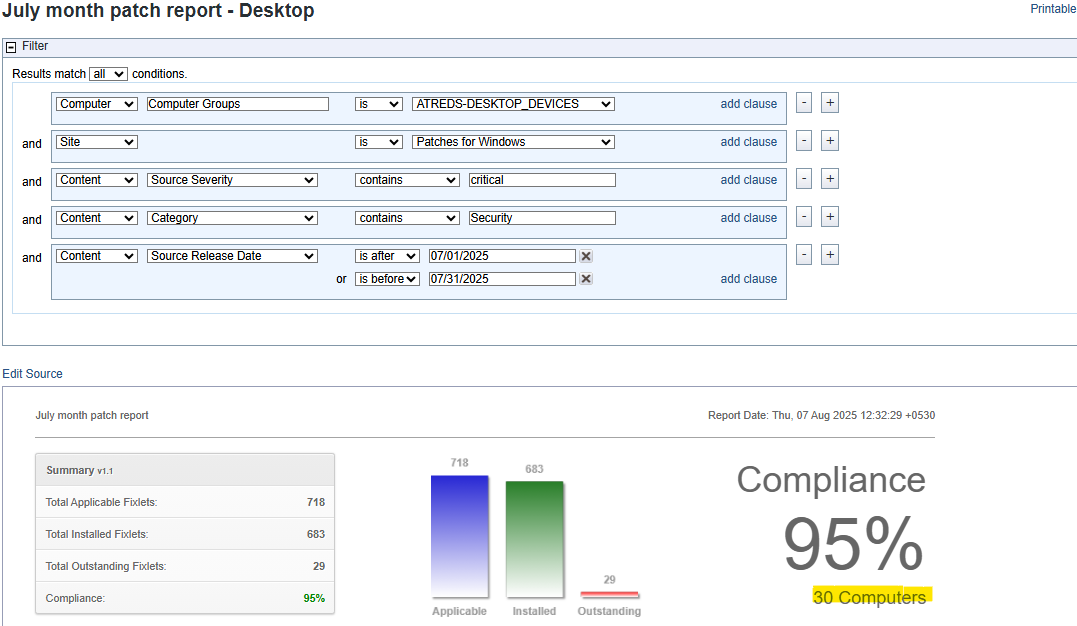
We have getting mismatch count in BigFix report. We have 31 Desktops in our environment but when we fetch report it showing only 30 desktops in report. PFB both snaps for reference. Could you please help out to solve this mismatch count issue.

Hello @windows2025 (no harm in using your real name, just saying! :smile:), and welcome!

It looks like your question was posted in the wrong thread. Ideally, you should have started a new topic for better visibility, as this post isn’t related to your query.

That said, regarding your question, a few important checks are missing:

  1. Are all 31 devices visible in BigFix Web Reports?
  2. Does your ATREDS** computer group correctly show all 31 devices in the BigFix Console?
  3. Are all 31 devices subscribed to the “Patches for Windows” site?
  4. Are all 31 devices running Windows OS?
  5. For the device(s) not showing relevant content, if you open the device in the Console and check its relevant fixlets, do you see any matching patches based on your filters (e.g. Source Severity = Critical, Category = Security, and Source Release Date)?

If you go through these points one by one, you should be able to identify the root cause.

1 Like

Hi Vk.Khurava,

Could you please help me out how to start new topic

Once you login, you will find highlighted option to start:

Coming back to the main topic, we were not able to reproduce the report preview issue using both Chrome and Edge (BigFix 11.0.4).
I recommend opening a support case to BigFix Platform, we will be glad to help.

Thank you.

No worries! As of now its in testing only, next month when we will upgrade our prod infra will re-evaluate it.