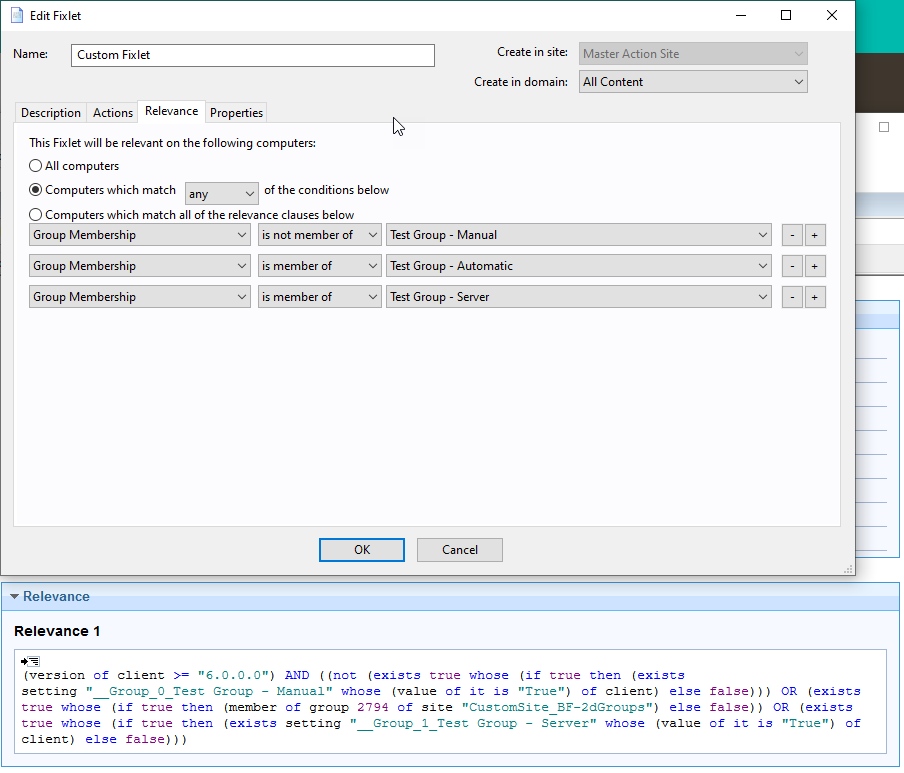
As @vk.khurava has advised, yes you can do this though how will depend on whether you are using a manual group, an automatic group or a server group.
For an automatic group, the group ID and site name are use in the relevance, eg
member of group 2794 of site "CustomSite_BF-2dGroups"
For a manual group, your relevance would need to reference the client setting that is created by the console when the group is created, which would be something like __Group_0_{group name}.
exists setting "__Group_0_Test Group - Manual" whose (value of it is "True") of client
For a server group, you'd again need to reference the assigned group name, similar to the manual group but it would be along the lines of __Group_1_{group name}
exists setting "__Group_1_Test Group - Server" whose (value of it is "True") of client
If unsure, a trick I use is to create an empty fixlet then use the "Computers which match {any|all} the of the conditions below" then add the group membership filter(s). This creates the fixlet with the relevance needed for the group detection that you can then copy into the fixlet you need this in.
Made it relevant to all servers not in the list. Now I have an easy life just adding servers to the group iand it automatically will nor run this fixlet on them.