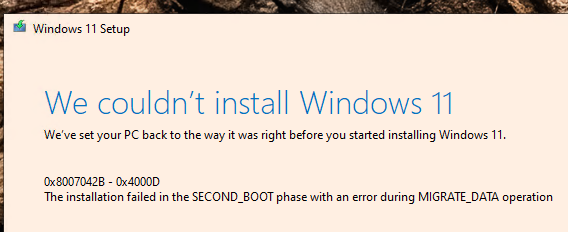
Here’s one of the failed ones. I dont have one that I deep dive troubleshoot, but for that other machine I cleaned out the inf’s in question, similar to how they show here:
2025-08-22 14:49:53, Error CONX Appraiser: ERROR,SdbpGetMatchingInfoBlocksInternal,2313,TAGREF array insufficient
2025-08-22 14:49:55, Error CONX Appraiser: ERROR,SdbpGetMatchingInfoBlocksInternal,2313,TAGREF array insufficient
2025-08-22 14:49:58, Error CONX Appraiser: ERROR,SdbpGetMatchingInfoBlocksInternal,2313,TAGREF array insufficient
2025-08-22 14:52:08, Error [0x0808ff] MIG COutOfProcPluginFactory::CreateInstance: m_currentHostSurrogate->LoadDllServer(C:$WINDOWS.~BT\Sources\ReplacementManifests\Microsoft-Windows-RasServer-MigPlugin\RasMigPlugin.dll, {D26AA4A5-92AD-48DB-8D59-95EF0DCE6939}, 1) failed, hr=[0x8007007f].
2025-08-22 14:52:08, Error [0x080387] MIG Failure while calling IDiscovery->Discover for Plugin={ServerPath=“Microsoft-Windows-RasServer-MigPlugin\RasMigPlugin.dll”, CLSID={D26AA4A5-92AD-48DB-8D59-95EF0DCE6939}, ThreadingModel=Apartment, ExceptionHandling=Default}. Error: 0x8007007F
2025-08-22 14:53:13, Error [0x080831] MIG CSIAgent: Invalid xml format: FormatException: “script” attribute is mandatory. class Mig::CMXEMerge *__cdecl Mig::CMXEMigrationXml::LoadMerge(class UnBCL::XmlNode *,int,class Mig::CMXEMigrationXml *,class Mig::CMXEXmlComponent *)
2025-08-22 14:58:50, Error [0x0808fe] MIG Plugin {ff9c714f-b864-4f43-ae39-ec07d7385abe}: BthMigLib: BthMig(V:2 T:1): This device is not a personal device, will check to see if authenticated
2025-08-22 15:00:43, Error SP Failed to remove INF oem50.inf, Err = 0x3[gle=0x00000003]
2025-08-22 15:02:04, Error SP Failed to remove INF oem411.inf, Err = 0x3[gle=0x00000003]
2025-08-22 15:04:12, Error SP Failed to remove INF oem391.inf, Err = 0x3[gle=0x00000003]
2025-08-22 15:04:12, Error SP Failed to remove INF oem382.inf, Err = 0x3[gle=0x00000003]
2025-08-22 15:05:18, Error SP Failed to remove INF oem359.inf, Err = 0x3[gle=0x00000003]
2025-08-22 15:05:24, Error SP Failed to remove INF oem369.inf, Err = 0x3[gle=0x00000003]
2025-08-22 15:05:27, Error SP Failed to remove INF oem496.inf, Err = 0x3[gle=0x00000003]
2025-08-22 15:05:30, Error SP Failed to remove INF oem389.inf, Err = 0x3[gle=0x00000003]
2025-08-22 15:12:36, Error [0x0808ff] MIG COutOfProcPluginFactory::CreateInstance: m_currentHostSurrogate->LoadDllServer(C:$WINDOWS.~BT\Sources\ReplacementManifests\Microsoft-Windows-RasServer-MigPlugin\RasMigPlugin.dll, {D26AA4A5-92AD-48DB-8D59-95EF0DCE6939}, 1) failed, hr=[0x8007007f].
2025-08-22 15:12:36, Error [0x080387] MIG Failure while calling IDiscovery->Discover for Plugin={ServerPath=“Microsoft-Windows-RasServer-MigPlugin\RasMigPlugin.dll”, CLSID={D26AA4A5-92AD-48DB-8D59-95EF0DCE6939}, ThreadingModel=Apartment, ExceptionHandling=Default}. Error: 0x8007007F
2025-08-22 15:12:53, Error SP CUpdateBootCode::DoExecute: The TPM reseal failed, the error code is 0x80310030 and output flag is 0x0