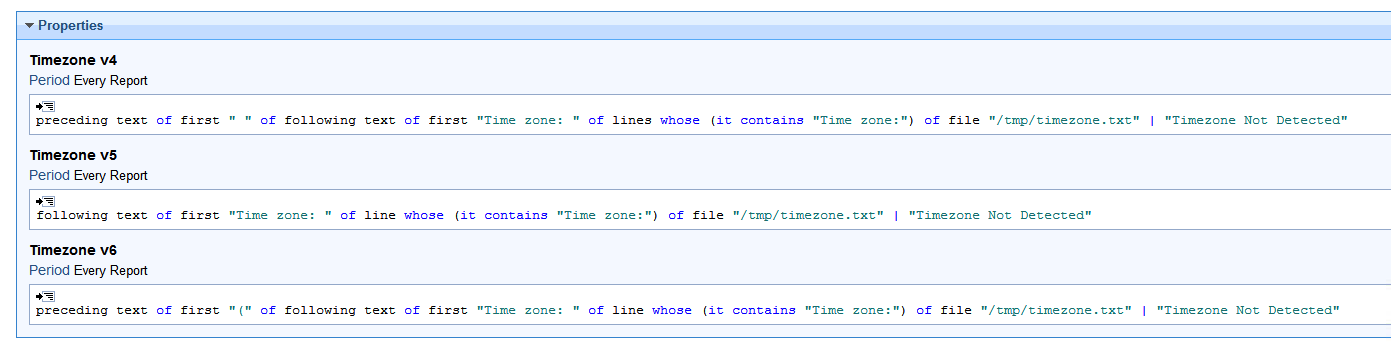
I need help writing a BigFix Analysis to report the local timezone of all our Linux servers (various flavours really).
I have tried these so far
(if exists file "/etc/localtime" then following text of first "zoneinfo/" of pathname of source folder of link "/etc/localtime" else "Unknown" )
Results just come back as 'undefined'
if exists file "/etc/timezone" then preceding text of first "%0a" of ((it & "%0a") of content of file "/etc/timezone") else if exists symlink "/etc/localtime" then if pathname of target of symlink "/etc/localtime" contains "/usr/share/zoneinfo/" then following text of first "/usr/share/zoneinfo/" of pathname of target of symlink "/etc/localtime" else pathname of target of symlink "/etc/localtime" else "Unknown"
This just comes back with ‘Non Reported’
Once I have the working analysis, I then need a fixlet to set the a specific timezone.
Can you give a listing of the file pathnames and snippet of the content you're trying to parse? I don't have a good sample handy at the moment.
From your first queries it looks like you're trying to parse something based on the file name or link, in other spots it looks like you're working with the contents of a file?
Hi - Let me prefix by saying I am not a ‘linux’ person but my colleague has been assisting me. This is how its checked manually
#Check the timezone (BEFORE)
hostname_here:~$ sudo timedatectl status Local time: Thu 2025-09-18 02:07:51 UTC Universal time: Thu 2025-09-18 02:07:51 UTC RTC time: Thu 2025-09-18 02:07:51 Time zone: Etc/UTC (UTC, +0000) System clock synchronized: yes NTP service: active RTC in local TZ: no
hostname_here:~$ sudo timedatectl status Local time: Thu 2025-09-18 12:08:00 AEST Universal time: Thu 2025-09-18 02:08:00 UTC RTC time: Thu 2025-09-18 02:08:00 Time zone: Australia/Sydney (AEST, +1000) System clock synchronized: yes NTP service: active RTC in local TZ: no
I’m trying to package the checking into a BigFix Analyis and the ‘Setting/Changing’ of the timezone into a Fixlet.
q: lines whose (it contains "Time zone:") of file "C:\temp\timezone.txt" A: Time zone: Australia/Sydney (AEST, +1000) T: 0.535 ms
We can refine it further to fetch just the time zone
q: following text of first "Time zone: " of (lines whose (it contains "Time zone:") of file "C:\temp\timezone.txt") A: Australia/Sydney (AEST, +1000) T: 1.642 ms
you can also use the below relevance for error handling to make sure that your analysis don’t fail if the file does not exists, or it does not contain your desired line.
q: following text of first "Time zone: " of (lines whose (it contains "Time zone:") of file "C:\temp\notexists.txt") | "File or Line Not Present" A: File or Line Not Present T: 3.073 ms
I didn’t have a Linux lab on me so I made the file in windows and tested this relevance to fetch the time zone. you can simply change the file path and rest will work as intended
You wont get the text out of a command directly like this. if you want to do that, I Suggest the following:
Create an action script with the following flow:
Redirect the content of config file( the file which contains the timezone information) into another text file ( pre_script.txt)
Run the command to change the timezone
then repeat step 1 and redirect it into another text file(post_script)
in step 3, you dont need to redirect the output into another file, you can directly read the content from the original config file. it’s totally optional
Now coming to your approach in the Screenshot.
you need to redirect the output of the said command into a text file and then create analysis to read the file. you can wrap your bash command like this:
timedatectl status > /tmp/timezone.txt 2>&1
here /tmp/timezone.txt is the text file location, you can change it accordingly. Run this command using a fixlet on the servers you want and then use the analysis to fetch the results like I mentioned above
Sorry for the delay, but I did get around to checking an Ubuntu 24.04 system for this. It also uses systemd, which appears to be how your system is setup as well.
In this setup, the file /etc/localtime is a symlink to a named timezone file. The following command can show the target:
We can evaluate this in native relevance as well using the value of <symlink> inspector:
Q: value of symlink "/etc/localtime"
A: /usr/share/zoneinfo/America/Chicago
Thus I think you can check these without having to run the 'probe' task ahead of time. For the Analysis/Property that retrieves the current value you could use
following texts of firsts "zoneinfo/" of values of symlinks "/etc/localtime"
For the Fixlet relevance you can check that the current value does not match your desired value "Australia/Sydney":
exists values whose (it as string does not end with "/Australia/Sydney") of symlinks "/etc/localtime"