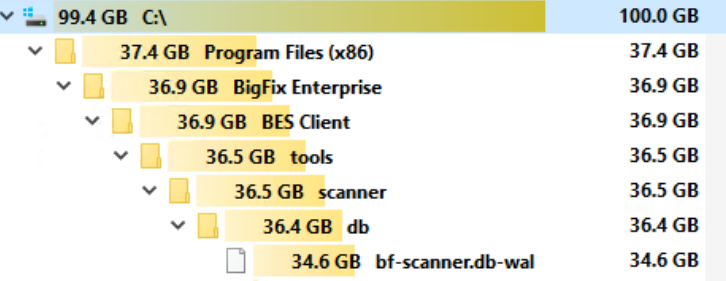
We have run into issues with the BFI scanner consuming a large portion of disk due to a bf-scanner.db-wal file.
Just wanted to make BFI customers aware of this in case you started to see disk consumption.
We have run into issues with the BFI scanner consuming a large portion of disk due to a bf-scanner.db-wal file.
Just wanted to make BFI customers aware of this in case you started to see disk consumption.
What version of BigFix scanner is installed? Is there a support case opened for this?
11.0.6.
Case was opened but due to the impact on a prod server, we had to nuke the client and reinstall it hence losing any of the data.
@jbruns2017, we haven’t gone “live” with the Filesystem Scanning, which I presume is what is causing this, where the scanner caches all discoveries (executables/packages/software installations) to local db. If so, what I would be checking is what is unique in how this machine is used? For example, are there any particularly large filesystems with a ton of software to be processed - is it possible this machines hosts docker containers and they are loading a ton of software titles that may or may not exist long-term but are still being discovered; are there any users’/project data where they use to backup all sorts of tools/software even though it is not active installs; is it possible the client identity gets reset on the machine and scanner just rediscovers the software as new each time without cleaning up the old discoveries; and so on.
If you find anything like that then consider excluding certain folders/filesystems just like you would if you see normal scan functionality is misbehaving (scan running for hours/days with high cpu/memory usage). In other words, I would expect the behaviour of the scanner to be different when it encounters those edge cases but the actual root cause is probably the same (too big of filesystems to scan with too many of discoveries to handle normally).
As suggested above though, do go through support - they can at least identify what is causing it and how to move forward.
That’s probably BFI version. Scanner version will be something like 11.0.40.0. I checked few of my lab instances and they all show smaller .*.db-wal file (4MB). What is the case number so that I can see if it’s with the Scanner L3 team
11.0.41.1
What concerns me about L3 developers is they don’t ever consider that a tool like this could go out of control and take down a box no matter what the reasons are.
There should be stop gaps in the code like am I taking more than 4GB or am I taking more than x% of available space and if that is true, stop and issue an error message.
I get what your saying but at the same time we as the administrators have responsibility too. There is no way a developer can think of every single scenario around those modern edge cases like docker hosts; like “cattle" machines; etc and especially, have them all accounted for on day one - filesystem caching was listed as “beta” feature up-until 1-2 versions ago, so this is technically it’s first or second production-ready version. There is a chance you can always hit something that is unaccounted for. I will give you an example - our company has historically been pushing for improvements on package detections cause old-styled reg scans are creating a ton of misdiscoveries when software is removed but reg keys are left behind and OS is able to clearly identify those but scanner is not which to me is a bug; separately we have been pushing for filesystem scanning and we even have use case to not only use this for software scanning but as security tool (let’s say you identify compromised .exe file and you search the sha256 hash of that file across all devices to see any other instances irrespective of how they may have called the file or where it was placed and that doesn’t involve any kind of scans to run and results to be collected but instead a quick SQLite query against cached files).
As you can imagine between the two use-cases having the filesystem scanning is something we have been waiting/pushing for years now and is extremely high on our agenda! That said, we still don’t have it running in production because there is still to be produced documentation around scale testing; volume of discoveries to resource (cpu, memory, disk space, etc) requirements; is it possible to configure scanner to store the SQLite db to dedicated/separate filesystem instead of system drive: etc - all of which to me indicate this is not production-ready for our environment which has a ton of edge-cases, so take your own risk with it… As a result, we only enabled it on several machines of different types just so we can compare discoveries so far; next step would be to enable it against machines that have ton of discoveries and see what it produces and what kind of resources it takes; cover machines with fast software turnover like docker host; etc and all of these against non-production. Cover all the edge cases one type at a time, and only then consider putting it live across the board against production systems. Potentially put ourselves some custom-made monitoring - create an analysis with properties to keep track of files/folder sizes and email those daily for review. This file didn’t get to 34 gb of size on day one, did it? Could have it been spotted before it caused an actual outage? Those are the sort of things I would be doing in our own environment.
Unfortunately, I do not have admin access to the box, I only can go off of what ppl send me when they anomolies.
To get the box back from the brink, we had to uninstall and reinstall the bes client, rendering all data collected moot.
If it returns, then we can regroup.
We should also see a property added to one of these analysis that shows us space consumption,
hint hint
if you raise an idea about it, I’d certainly “vote” for it for what it is worth, cause I definitely agree, and same goes for resource management controls.
Just to be clear the issue is with the SQLite write ahead log (see reference below). This is for concurrency support and we expect this file to be quite small (under low/no concurrency). This is not something we are explicitly writing, and I can assure you we focus heavily on resilience and run time impact. I expect this is a bug vs blindly writing GBs. Either way it needs to be resolved. Thanks for bringing it to our attention.
Unfortunately, we had to uninstall the client and reinstall it, so all data is lost.