I don’t know anything about lee wee's custom webreport named as Action start end time
You still aren’t telling me exactly what you want, what you want it to look like, providing any example results you’d like to see. I really can’t help you without more information.
- How many entries / rows / lines do you expect to be in this CSV file?
- is it number of actions, which should be in the thousands
- Or number of action results, which could easily be in the millions?
- Or is it number of action results by a single computer, which could be just a few to a few hundred?
- Or is it number of action results by a single action, which could be just a few or up to as many computers as you have total?
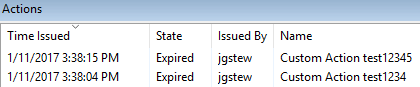
Do you want a report that looks something like this?
Once I know what you want to be in the report, then it is a matter of writing session relevance to display that info, which can then be used in the REST API or in Web Reports or in a Console Dashboard, or in many other places. The basic session relevance is the same no matter how or where you access the data or what format you want the data in.
This would also be useful to know to get a better idea of what is possible:
- How many computers do you have total?
- How many actions do you have total?
#Try this:
( concatenations ", " of (id of it as string | ""; name of it | ""; name of issuer of it | ""; state of it as string | "") of it) of top level bes actions
How close is this to what you want?
You can test this in a custom webreport by putting it withing <?Relevance ?> or you can do it in the presentation debugger in the bigfix console, or in webreports qna or in the session relevance tester or with the REST API (though I wouldn’t recommend starting with the REST API since it can be harder to debug)