In my managed infra with around 17k endpoints, patching windows are really short and performance is high priority. Sometimes I’ve seen the UDP being absent/intermittent. To Counter this, I’m planning to set command polling to 20 minutes.
My question is, does command polling interrupt/slows down large downloads?(Standard OOB patching for RHEL, Windows. Custom patching via SWD for AIX, Solaris etc)
20 mins for us was agressive. We had to set 30 mins to get the correct action status. Simple results posting such as reboot often was showing failed because of command polling.
It might not address your stated concerns directly, but a simple way of managing command polling settings is to use a policy action that sets the polling interval to the average loop time plus 10 minutes. If the average client loop is less than 10 minutes then set the client loop to 20 minutes. This way the settings are implemented in a custom fashion on a per client basis vs. just a made up number you apply globally. It should re-evaluate daily as the loop times do ebb and flow.
This task can be used to implement the settings the way I described above. I’m not so sure its the solution to your issue but certainly won’t hurt to try it out.
As a slight aside, related to the original challenge raised where UDP notifications are absent/intermittent, I would suggest that Persistent Connections is a better solution than Command Polling (or better yet, the combination of the two where persistent connections would be the primary mechanism for bi-directional communication and less frequent command polling a backup/secondary control).
Prior to 11.0.7, there were some scalability limitations with persistent connections that may have made it more difficult to use. With 11.0.7, that scalability limitation no longer exists.
Totally agree with Aram's assessment about Persistent Connections versus Command Polling.
But for the general issue of a short patching window, I believe the best-practice is to send the patching actions much earlier, with a schedule to start execution at the scheduled time. That allows plenty of time for the agent to see that the action exists, download the required binaries, and then wait for the scheduled time to arrive before executing.
A more advanced implementation is to leverage Maintenance Windows. This allows you to schedule a single action or baseline, targeting all of your computers, with a Constraint that the action executes only when the Maintenance Window time arrives. And that can be a different time on every machine. The clients all see the patch action, download the patches ahead of time, and then wait for their own specific maintenance window schedule to execute them.
I'd be happy to dig into further details of how to put that together, or for a start read up in the "Manage Maintence Windows" Wizard/Dashboard
We do schedule the baselines before the patching window. I also use the “download before action time” option…but if I remember correctly, it is not useful in baselines using multi package baseline feature?
Apart from baseline, we execute loads of pre and post tasks which require the agent to be responsive, hence the UDP/workaround becomes a necessity!
Question: Are you aware whether the OOB fixlet (List enabled modules to file on client - RHEL 9 -x86_64), which is a part of the baseline we are using download the content before the action start time?(if the download before start time option is enabled while scheduling the baseline)
Noted..Will try this. Just a curiosity, what might happen if the command polling is set lesser than the client evaluation time? Will that cause the agent to stuck in a loop of gathering and trying to post results?
Wow. I guess I missed that change. I may have to add that to our todo list, though we don’t have all that many problems with UDP, it could close some of those gaps potentially.
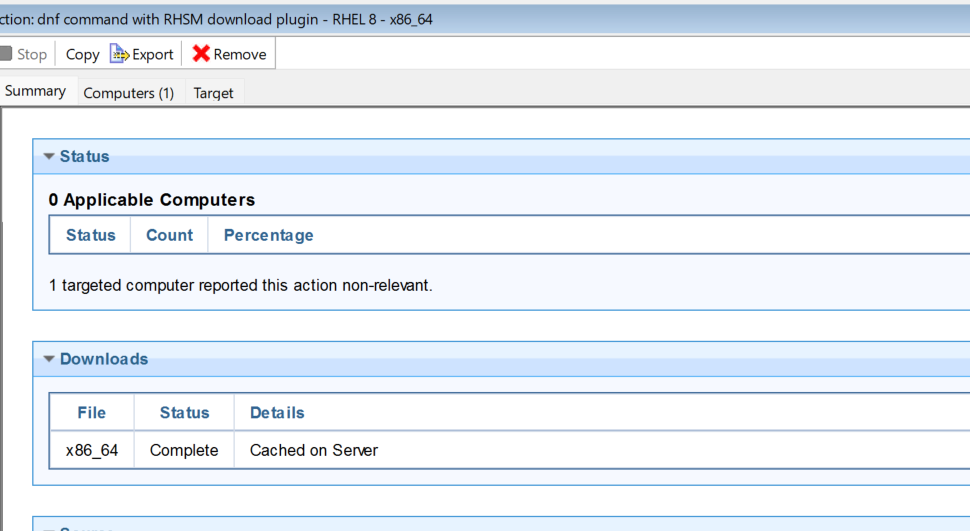
Hm, I think that multi-package baselines should handle downloading packages before the action time - that's the reason for using the prefetch plugin block, and all of the 'execute prefetch-plugin' scripts that do the EDR (endpoint dependency resolution) and package downloads. You could check that by viewing the Action Status, Summary tab in the console - as clients execute the plugins, and request the package downloads, you'll see the 'Downloads' list update, from first the 'x86_64' file (which is the repository metadata), to eventually include the rpm or deb packages for the client.
I could see the 'List enabled modules to file on client' being a problem though. I can check with the Patch team on this, but I believe this is what we use to detect which Modules are enabled (there's not a direct API / Relevance way to do that today). Creating or updating that Modules list, might make more fixlets (and thus their actions) relevant, than what were relevant before it ran... you should not run this as part of your patching baseline only during maintenance windows, this one should generally be run every day, outside of your patching window, so that the client will know ahead of time which modules need to be updated when your baseline runs, and can precache those modules ahead of time.
I think that 'List enabled modules" should be run on a daily schedule, outside of your maintenance windows...it doesn't install updates, it is a probe to see which things are installed now.